If you want to downgrade a Mac, create a bootable installer for Mac, or install an older system, you may wonder where to download the latest or older Mac OS versions.
In this macOS download hub, we'll cover several ways to get a Mac OS free download full version 64-bit. (If you need to install macOS on Windows, get the macOS installer for Windows.)
Before you download
Before downloading the macOS installer, ensure you've read the following tips:
- Back up your Mac before installing, downgrading, or creating a bootable installer.
- Check whether your Mac is compatible with the macOS version you want.
- Prefer Apple sources: Mac App Store or Apple CDN links.
- Treat beta installers as test software, not the default choice for a primary Mac.
- If you create a bootable USB installer, back up the USB drive first because it may be erased.
File type guide
| File type | What it is | How to use it | Best for |
|---|---|---|---|
| InstallAssistant.pkg | Apple full installer package | Open it to place Install macOS [Name].app in Applications | Recent full installers |
| .dmg | Disk image, often for older macOS | Open DMG -> open PKG -> install app to Applications | Older macOS installers |
| .app | The installer application | Keep it in Applications or use it for createinstallmedia | Installing or making bootable USB |
| .iso | Disc image, often VM-oriented | Use only when your VM/Windows workflow specifically requires it | Virtual machines / Windows-side workflows |
macOS installers download for Mac & PC
If you're looking to download the latest version of macOS 27 Golden Gate, macOS Tahoe, macOS Sequoia, macOS Sonoma, macOS Ventura, macOS Monterey, macOS Big Sur, macOS Catalina, macOS Mojave, macOS High Sierra, and earlier installers, use iBoysoft DiskGeeker with the following steps:
(This macOS installer downloader also allows you to create bootable USB installers for macOS.)
① To download macOS installers on Mac:
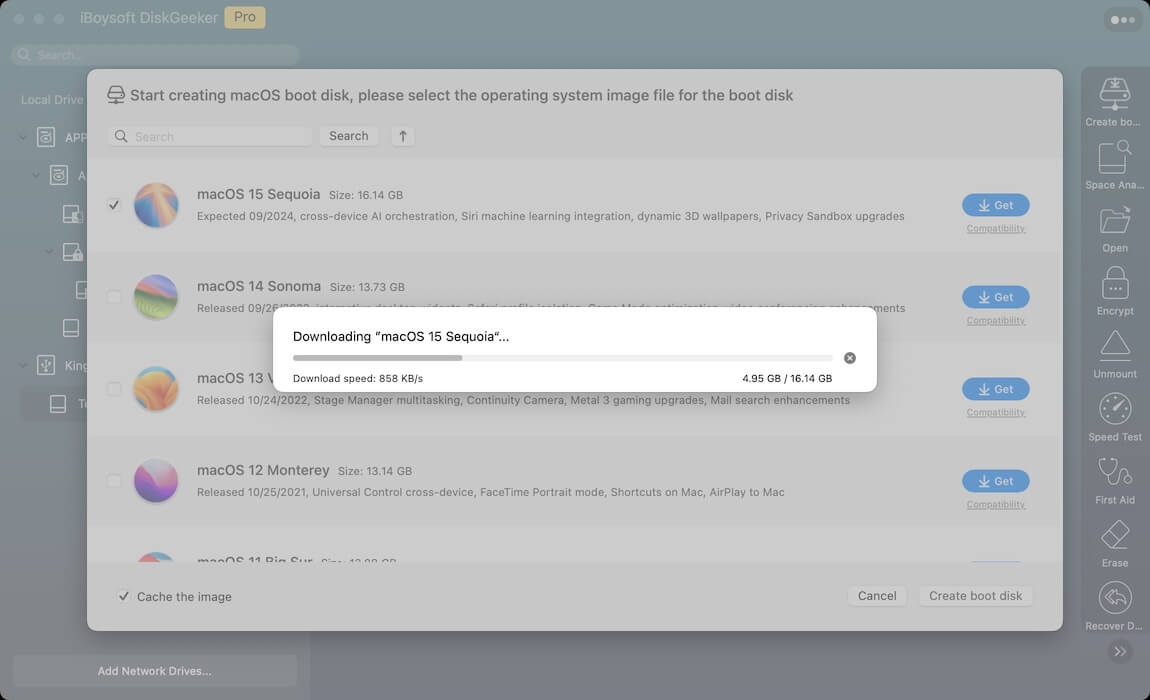
Step 1: Free download, install, and launch iBoysoft DiskGeeker for Mac.
#macOS 27 Golden Gate ~ Mac OS X 10.6 Snow Leopard
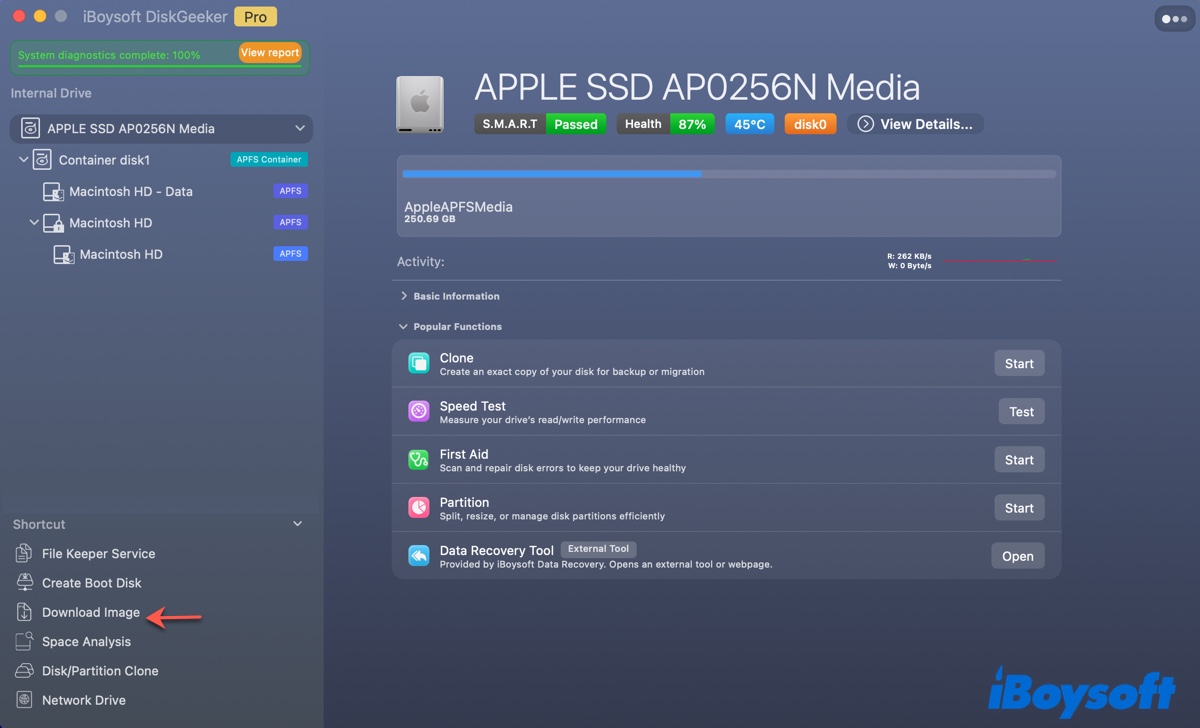
Step 2: Click Download Image.
Step 3: Choose the macOS installer you want to download and click Get.
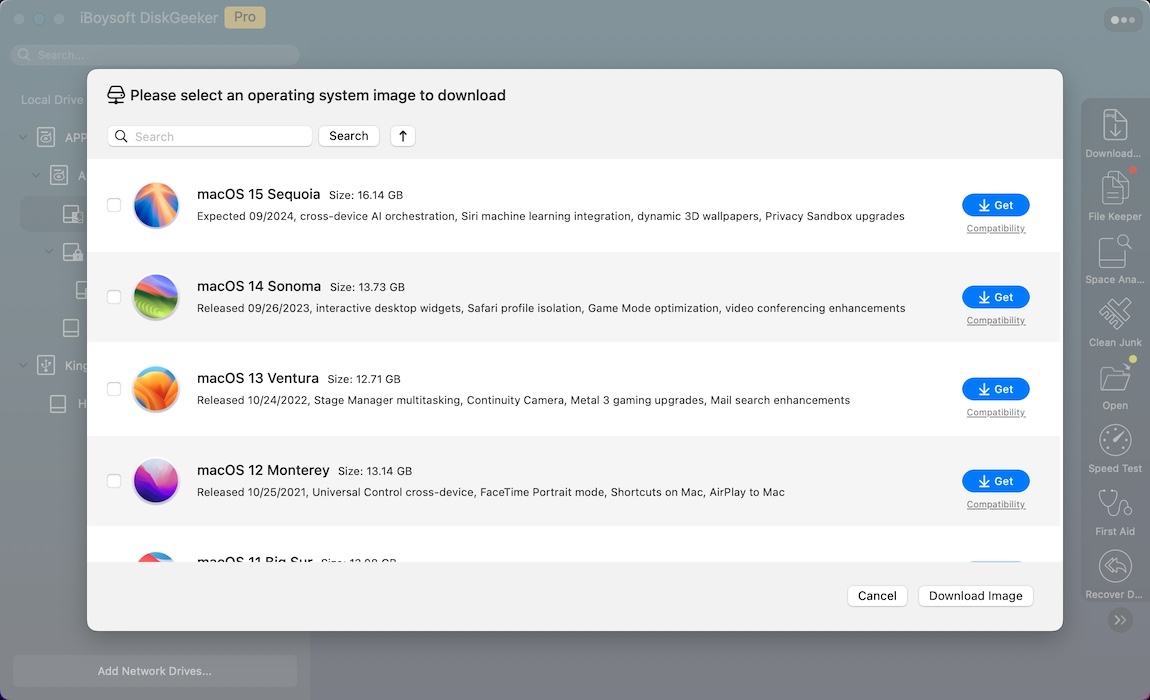
﹡ Note that the macOS installer is in the .dmg format. If you want to access the app installer, double-click to mount the macOS DMG file, then copy and paste the installer to the Applications folder.
Step 4: Choose the ISO or DMG format and the download method.
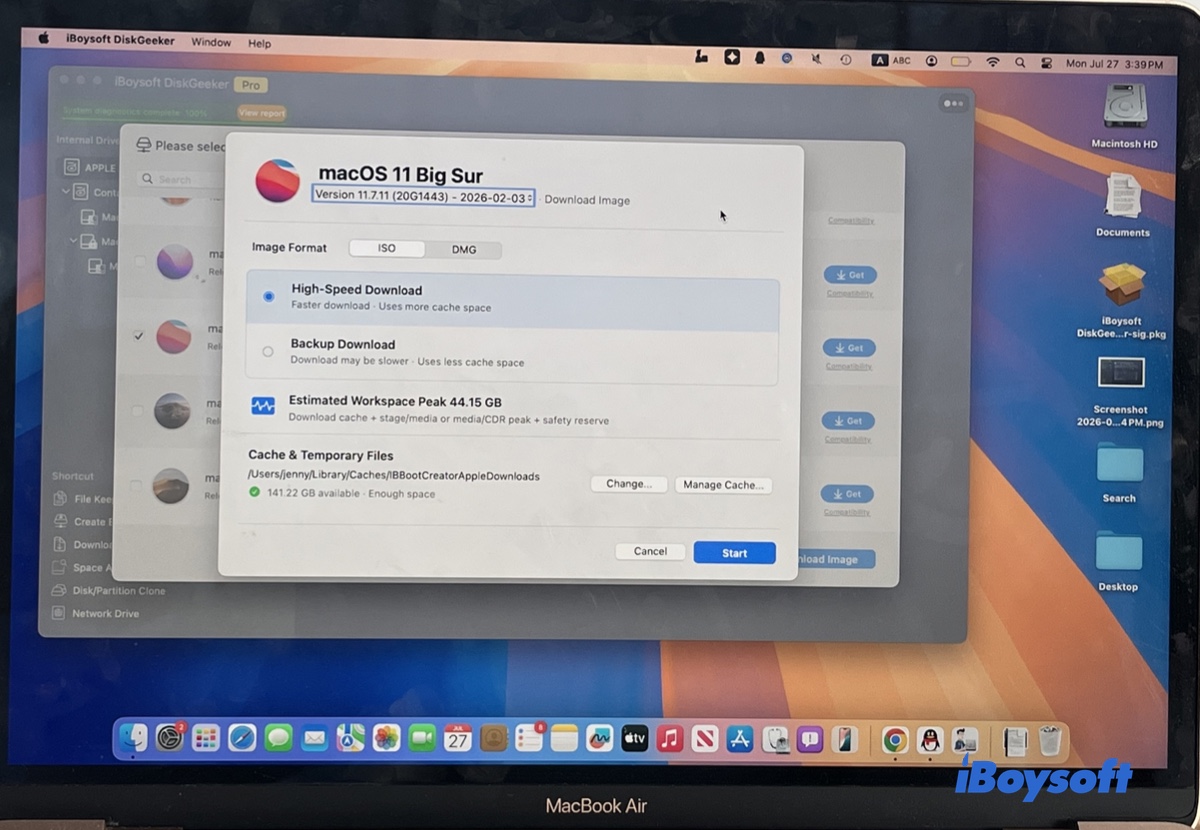
Step 5: Select a location to save the installer.
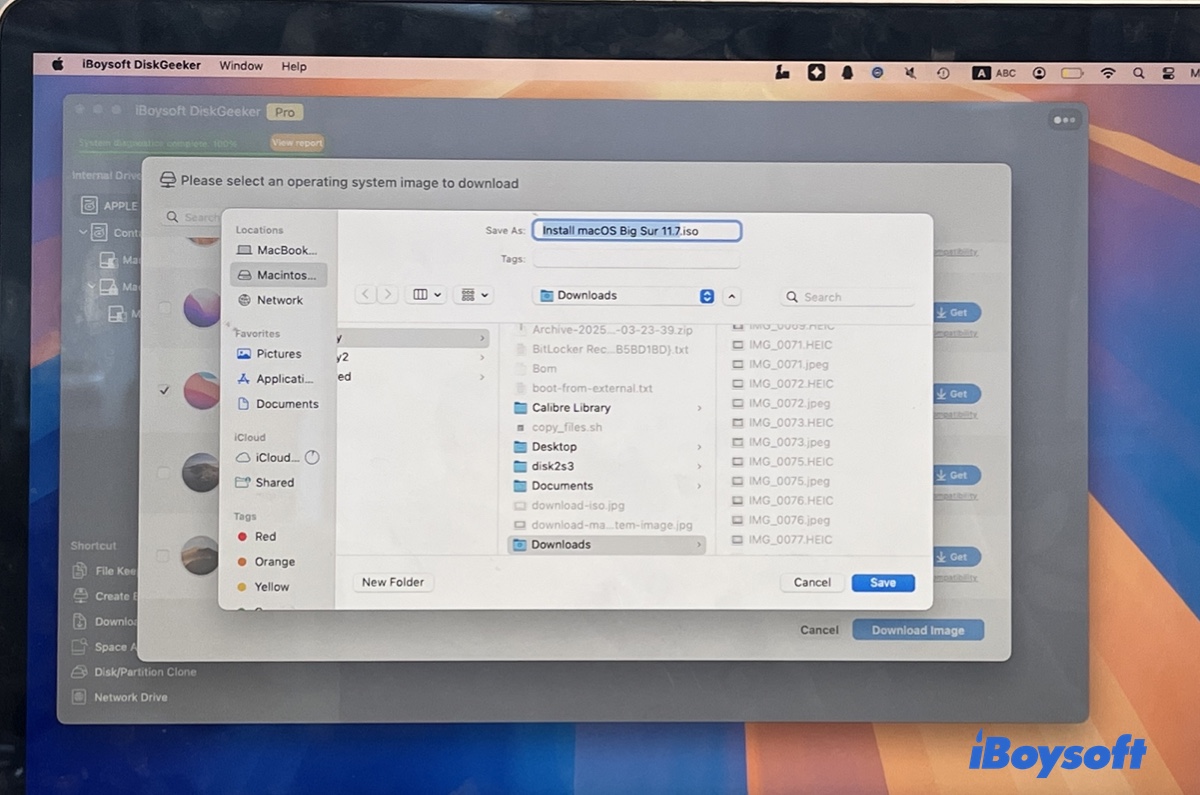
If you wish to create a bootable USB for macOS on a Mac, plug in an external drive that's backed up and take the steps below instead:
- Open iBoysoft DiskGeeker.
- Select the external drive and click Create boot disk.
- Choose a macOS version and click Create boot disk.
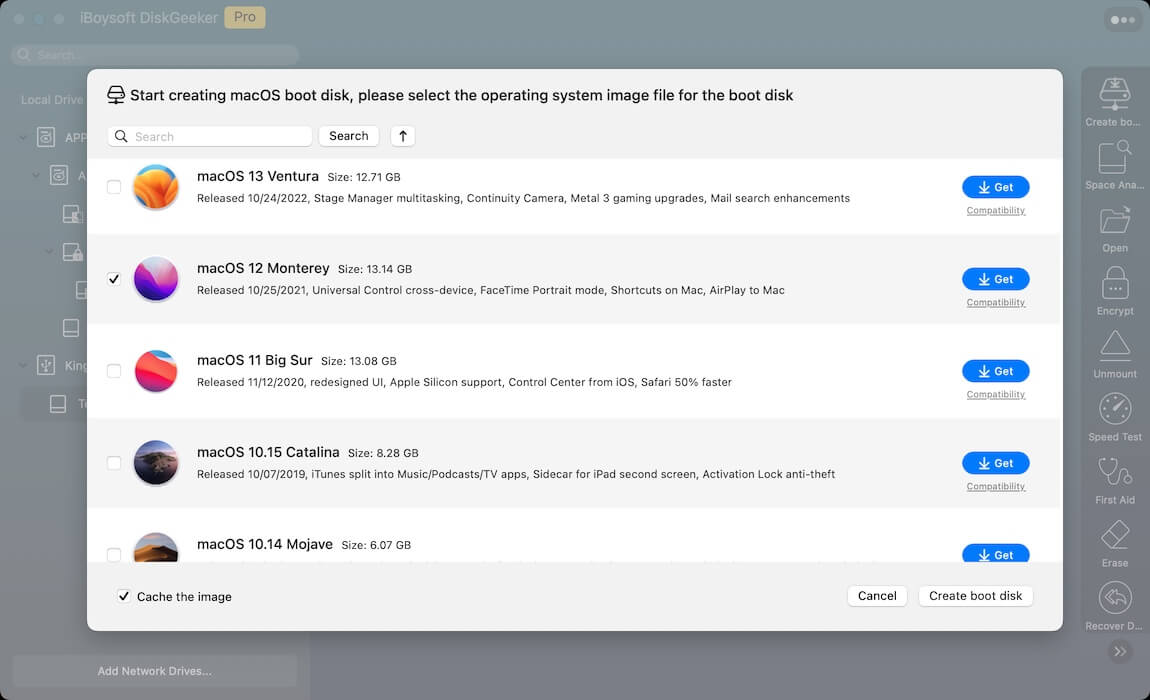
② To download macOS installers on Windows PC:
Step 1: Free download, install, and open iBoysoft DiskGeeker for Windows.
Step 2: Navigate to Download and create boot disk > Download macOS system image.
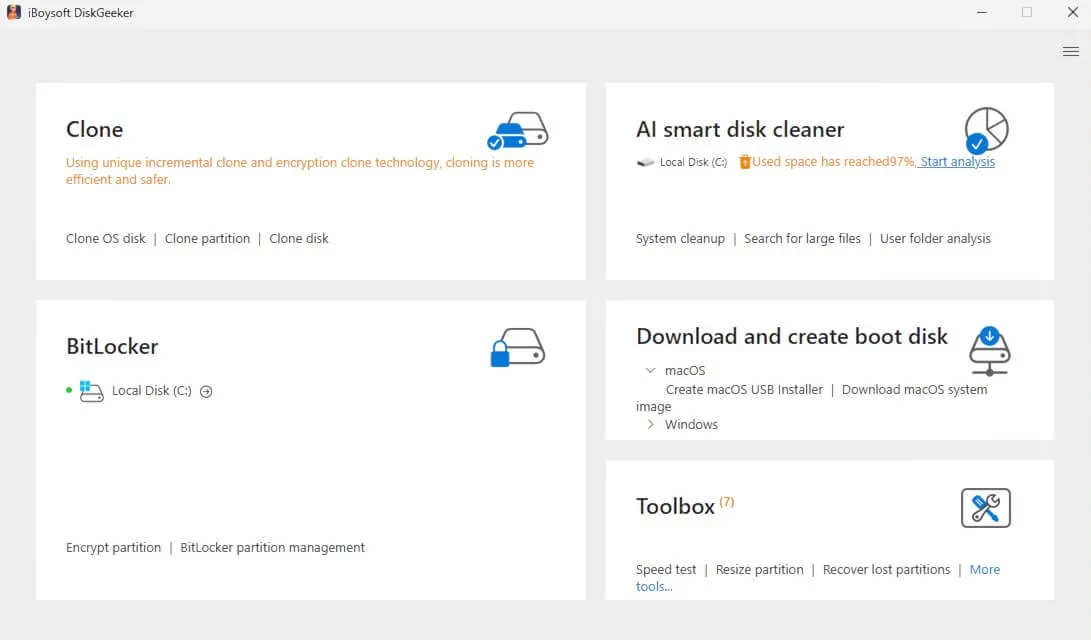
Step 3: Choose the macOS version you need and click Get.
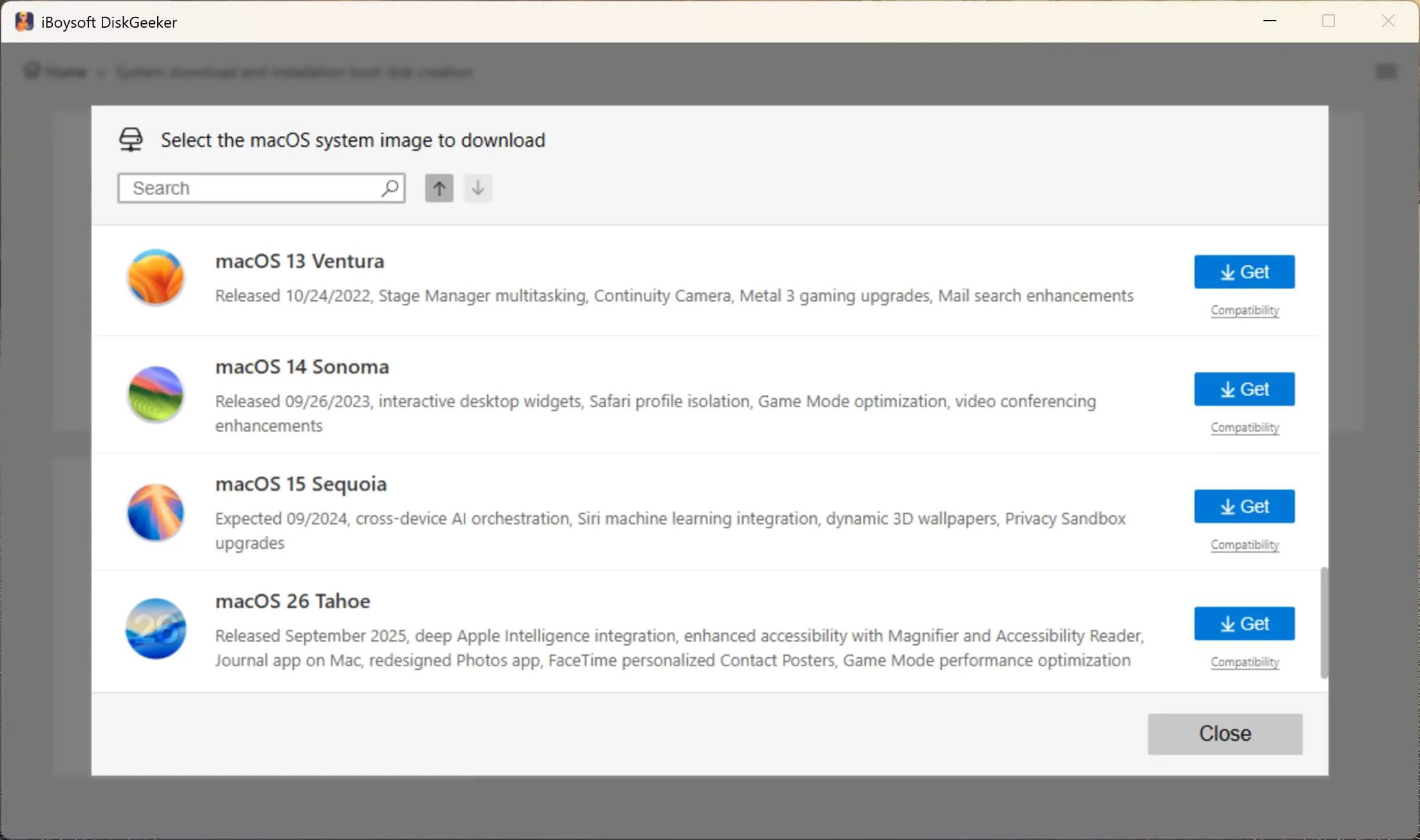
Step 4: Choose to download the ISO or DMG file.
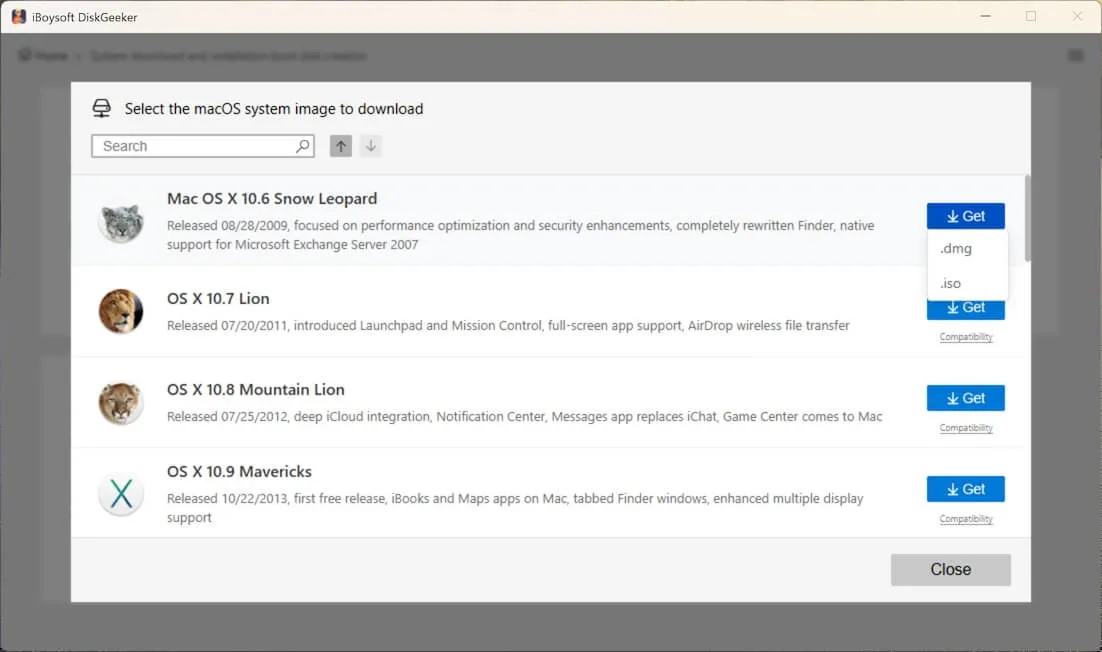
Step 5: Select a location to save the macOS installer on Windows.
If you want to create a macOS bootable USB installer on Windows, click Create macOS USB Installer in Step 2 instead.
Keep reading to access Mac OS versions download links directly!
Note: The Mac OS versions download links for the latest macOS Golden Gate beta, macOS Tahoe, macOS Sequoia, macOS Sonoma, macOS Ventura, macOS Monterey, and macOS Big Sur are pkg files with the same name: InstallAssistant.pkg. They are downloaded directly from Apple's own software update servers. To utilize the full "Install macOS.app" inside the pkg file, open it and follow the instructions to install the installer to your Applications folder.
If you need the macOS ISO or DMG file, refer to Mac OS DMG Download | Mac OS ISO Download
Note: Use Apple links first whenever they are available. Third-party archives such as Archive.org,
Mega, MediaFire, or Google Drive may be useful for historical installers, but they can be modified, unavailable, incomplete, or unsuitable for a production Mac. Verify the file source and use a test Mac or non-critical environment before installing.
Mac OS latest version download - macOS 27 Golden Gate
Released on September 14, 2026, macOS Golden Gate (27) is a landmark release, serving as the first macOS version to drop Intel support and run exclusively on Apple silicon.
Powered by Apple Intelligence, it introduces a conversational Siri AI with a dedicated app, alongside Visual Intelligence for instant screen analysis via Shift-Command-Space. Additional highlights include refined Liquid Glass visuals with transparency controls, smart price-tracking in Safari, natural-language Shortcuts generation, and faster AirDrop and file-indexing performance.
| macOS Golden Gate Public Version Full Installers (.pkg) | Build | Availability | Date |
| Download macOS Golden Gate 27.0 installer | 26A428 | Yes | 2026/9/14 |
macOS installer download directly (26 Tahoe ~ 10.12 Sierra)
Since the release of macOS Sierra in 2016, Apple has renamed its Mac operating system from OS X to macOS. This section will help you download all macOS versions directly, including macOS 26 Tahoe to macOS 10.12 Sierra installers. Note that we'll only list the currently available installers.
macOS Tahoe free download full version
Released on September 15, 2025, macOS Tahoe 26 introduced Apple's Liquid Glass design language, bringing a translucent, light-refracting aesthetic to sidebars, toolbars, and a fully transparent menu bar alongside deeper personalization options like tinted icons and customizable, color-coded folders.
Beyond its visual overhaul, the update debuts a native Phone app with Call Screening and Hold Assist, an expanded Spotlight capable of performing direct system actions, built-in Live Translation, Live Activities in the menu bar, and a dedicated Games app—all while marking the final macOS release with support for Intel-based Macs.
| macOS Tahoe Public Version Full Installers (.pkg) | Build | Availability | Date |
| Download macOS Tahoe 26.7 installer | 25G229 | Yes | 2026/9/14 |
| Download macOS Tahoe 26.6.2 installer | 25G83 | Yes | 2026/8/17 |
| Download macOS Tahoe 26.6.1 installer | 25G76 | Yes | 2026/8/6 |
| Download macOS Tahoe 26.6 installer | 25G72 | Yes | 2026/7/27 |
| Download macOS Tahoe 26.5.2 installer | 25F84 | Yes | 2026/6/29 |
| Download macOS Tahoe 26.5.1 installer | 25F80 | Yes | 2026/6/1 |
| Download macOS Tahoe 26.5 installer | 25F71 | Yes | 2026/5/11 |
| Download macOS Tahoe 26.4.1 installer | 25E253 | Yes | 2026/4/9 |
| Download macOS Tahoe 26.4 installer | 25E246 | Yes | 2026/3/24 |
| Download macOS Tahoe 26.3 installer | 25D125 | Yes | 2026/2/11 |
| Download macOS Tahoe 26.2 installer | 25C56 | Yes | 2025/12/12 |
| Download macOS Tahoe 26.1 installer | 25B78 | Yes | 2025/11/3 |
| Download macOS Tahoe 26.0.1 installer | 25A362 | Yes | 2025/9/29 |
| Download macOS Tahoe 26.0.0 installer | 25A354 | Yes | 2025/9/15 |
To download all updates for macOS Tahoe, move to the macOS Tahoe Full Installer Database!
Before installing macOS Tahoe, make sure you check the common macOS Tahoe issues or bugs.
macOS Sequoia free download full version
macOS 15 Sequoia was released on September 16, 2024. It introduced Apple Intelligence for AI-powered features like smarter Siri and Writing Tools, plus iPhone Mirroring for seamless device integration.
Interested in macOS Sequoia DMG or ISO files? Get them and more macOS Sequoia releases in this article: macOS Sequoia Download: DMG, ISO, Full Installer
Share the links to help others download all macOS versions!
macOS Sonoma free download full version
Released September 26, 2023, macOS 14 Sonoma added interactive widgets to the desktop and introduced Game Mode and enhanced video conferencing tools.
| macOS Sonoma Full Installers (.pkg) | Build | Availability | Date |
| Download macOS Sonoma 14.8.7 installer | 23J520 | Yes | 2026/5/11 |
| Download macOS Sonoma 14.8.5 installer | 23J423 | Yes | 2026/3/24 |
| Download macOS Sonoma 14.8.4 installer | 23J319 | Yes | 2026/2/11 |
| Download macOS Sonoma 14.8.3 installer | 23J220 | Yes | 2025/12/12 |
| Download macOS Sonoma 14.8.2 installer | 23J126 | Yes | 2025/11/3 |
| Download macOS Sonoma 14.8.1 installer | 23J30 | Yes | 2025/9/29 |
| Download macOS Sonoma 14.8 installer | 23J21 | Yes | 2025/9/15 |
| Download macOS Sonoma 14.7.8 installer | 23H730 | Yes | 2025/8/20 |
| Download macOS Sonoma 14.7.7 installer | 23H723 | Yes | 2025/7/29 |
| Download macOS Sonoma 14.7.6 installer | 23H626 | Yes | 2025/5/12 |
| Download macOS Sonoma 14.7.5 installer | 23H527 | Yes | 2025/3/31 |
| Download macOS Sonoma 14.7.4 installer | 23H420 | Yes | 2025/2/10 |
| Download macOS Sonoma 14.7.3 installer | 23H417 | Yes | 2025/1/27 |
| Download macOS Sonoma 14.7.2 installer | 23H311 | Yes | 2024/12/11 |
macOS Ventura free download full version
Released October 24, 2022, macOS 13 Ventura added Stage Manager for window organization and Passkeys for secure logins without passwords.
| macOS Ventura Full Installers (.pkg) | Build | Availability | Date |
| Download macOS Ventura 13.7.8 installer | 22H730 | Yes | 2025/8/20 |
| Download macOS Ventura 13.7.7 installer | 22H722 | Yes | 2025/7/29 |
| Download macOS Ventura 13.7.6 installer | 23H625 | Yes | 2025/5/12 |
| Download macOS Ventura 13.7.5 installer | 22H527 | Yes | 2025/3/31 |
| Download macOS Ventura 13.7.4 installer | 22H420 | Yes | 2025/2/10 |
| Download macOS Ventura 13.7.3 installer | 22H417 | Yes | 2025/1/27 |
| Download macOS Ventura 13.7.2 installer | 22H313 | Yes | 2024/12/11 |
macOS Monterey free download full version
Released October 25, 2021, macOS 12 Monterey introduced Universal Control for cross-device workflows and brought Focus modes to the Mac.
Apple has stopped supporting macOS Monterey and earlier. Although its final version is 12.7.6, Apple has pulled the installer for this version and left 12.7.4 as the newest version available.
| macOS Monterey Full Installers (.pkg) | Build | Availability | Date |
| Download macOS Monterey 12.7.4 installer | 21H1123 | Yes | 2024/3/7 |
macOS Big Sur free download full version
Released November 12, 2020, macOS 11 Big Sur featured a major UI overhaul, Control Center, and native support for Apple's M1 chips.
| macOS Big Sur Full Installers (.pkg) | Build | Availability | Date |
| Download macOS Big Sur 11.7.10 installer | 20G1427 | Yes | 2023/8/11 |
Note: For macOS Catalina, macOS Mojave, macOS High Sierra, and macOS Sierra, we'll provide the direct download links to the respective DMG files. To use the app installer, double-click the DMG file, then open the pkg file and follow the instructions to add the installer to your Applications folder.
macOS Catalina free download full version
Released October 7, 2019, macOS 10.15 Catalina replaced iTunes with standalone media apps and added Sidecar for iPad second-screen support.
Here are the links to download the macOS Catalina installer:
macOS Catalina 10.15.7 installer download (MediaFire)
macOS Catalina 10.15.7 installer download (Mega)
macOS Catalina installer download (Google Drive) (Password: Geekrar.com)
To create a macOS Catalina DMG file yourself, read: How to Download or Create macOS Catalina 10.15.7 DMG File?
macOS Mojave free download full version
Released September 24, 2018, macOS 10.14 Mojave brought Dark Mode, dynamic wallpapers, and iOS-inspired apps like News and Stocks.
Here's how to download the macOS Mojave installer:
macOS Mojave installer download (archive.org)
macOS Mojave installer download link 2 (archive.org)
macOS Mojave installer download link 3 (Mega)
≫≫≫ Also read: Download/Create macOS Mojave 10.14.6 DMG File Without App Store
macOS High Sierra free download full version
Released September 25, 2017, macOS 10.13 High Sierra introduced the APFS file system and Metal 2, prioritizing under-the-hood upgrades.
You can download macOS High Sierra full installers from the links below:
macOS High Sierra 10.13.6 full installer download (Google Drive)
Download Install macOS High Sierra.zip (archive.org)
macOS High Sierra DMG Download
macOS High Sierra ISO Download
macOS Sierra free download full version
Released September 20, 2016, macOS 10.12 Sierra rebranded the OS and added Siri, Apple Pay on the web, and Universal Clipboard.
macOS Sierra installer download (Apple's server)
macOS Sierra installer download 2 (archive.org)
macOS Sierra ISO & DMG Download
Share to help others download macOS installers!
OS X installer download directly (10.11 El Capitan ~ 10.8 Mountain Lion)
With the release of OS X Mountain Lion (10.8) in 2012, Apple dropped "Mac" from the name, simplifying it to OS X. This section will list the installers for all OS X versions.
Note: To download from Apple's server, copy the link and open it in Safari.
Download OS X El Capitan installer
Released September 30, 2015, OS X 10.11 El Capitan focused on speed and Metal graphics, while adding Split View for multitasking.
OS X El Capitan full installer download (Apple's server)
OS X 10.11 El Capitan installer download (archive.org)
Download OS X Yosemite installer
Released October 16, 2014, OS X 10.10 Yosemite featured a flat iOS 7-style redesign and introduced Handoff for seamless device switching. Here's how to download OS X Yosemite installer:
OS X 10.10 Yosemite installer download (Apple's server)
Download Install OS X Yosemite.app (archive.org)
Download OS X Mavericks installer
Released October 22, 2013, OS X 10.9 Mavericks introduced Finder Tabs, App Nap for efficiency, and was the first free macOS update.
OS X Mavericks installer download (Apple's server)
OS X Mavericks 10.9.5 installer download (archive.org)
Check other download links: Free Download OS X Mavericks 10.9 ISO, DMG, Full Installer
Download OS X Mountain Lion installer
Released July 25, 2012, OS X 10.8 Mountain Lion integrated iCloud deeply, added Notification Center, and replaced iChat with Messages.
OS X 10.8 Mountain Lion installer download (Apple's server)
Install OS X Mountain Lion.app (arachive.org)
Get more information about Mountain Lion DMG & ISO file: Free Download Mac OS X 10.8 Mountain Lion Full Installer, DMG & ISO
Share these links to download OS X installers with your friends!
Mac OS X installer download directly (10.7 Lion ~ 10.0 Cheetah)
Debuting in 2001 as Mac OS X, Apple's modern operating system highlighted its Unix foundation through the Roman numeral X, while distinguishing itself from classic Mac OS with its Aqua interface and Darwin core. If you need to download any Mac OS X installer, check the links below.
Download Mac OS X Lion installer
Released July 20, 2011, Mac OS X 10.7 Lion brought iOS-inspired features like Launchpad, Mission Control, and system-wide auto-save.
Mac OS X 10.7 Lion installer download (Apple's server)
Install Mac OS X Lion.app.zip download (archive.org)
For Lion DMG/ISO/App installers: Mac OS X 10.7 Lion Installer
Download Mac OS X Snow Leopard installer
Released August 28, 2009, Mac OS X 10.6 Snow Leopard focused on optimization, delivering 64-bit support and Grand Central Dispatch for multicore performance.
Mac OS X 10.6.8 Snow Leopard installer download
Download Mac OS X Leopard installer
Released October 26, 2007, Mac OS X 10.5 Leopard introduced Time Machine backups, Spaces for virtual desktops, and a redesigned translucent menu bar.
Mac OS X 10.5 Leopard installer download
Download Mac OS X Tiger installer
Released April 29, 2005, Mac OS X 10.4 Tiger debuted Spotlight search, Dashboard widgets, and later became the first version to support Intel Macs.
Mac OS X 10.4 Tiger installer download
Download Mac OS X Panther installer
Released October 24, 2003, Mac OS X 10.3 Panther added Exposé for window management, FileVault encryption, and fast user switching.
Mac OS X 10.3 Panther installer download
Download Mac OS X Jaguar installer
Released August 23, 2002, Mac OS X 10.2 Jaguar introduced Quartz Extreme for GPU acceleration, alongside new apps like Address Book and iChat.
Mac OS X 10.2 Jaguar installer download
Download Mac OS X Puma installer
Released September 25, 2001, Mac OS X 10.1 Puma offered performance improvements, DVD playback support, and enhanced networking as a free update to Cheetah.
Mac OS X 10.1 Puma installer download
Download Mac OS X Cheetah installer
Released March 24, 2001, Mac OS X 10.0 Cheetah debuted the Aqua UI, Dock, and a Unix-based Darwin foundation as Apple's first modern operating system.
Download macOS installer from Mac App Store (15 Sequoia ~ 10.12 Sierra)
Alternatively, you can download macOS installers from the Mac App Store if your Mac is compatible with the OS version you want to download.
Click the link below to download the desired macOS version from the Mac App Store. After the download is complete, it will be in the Applications folder.
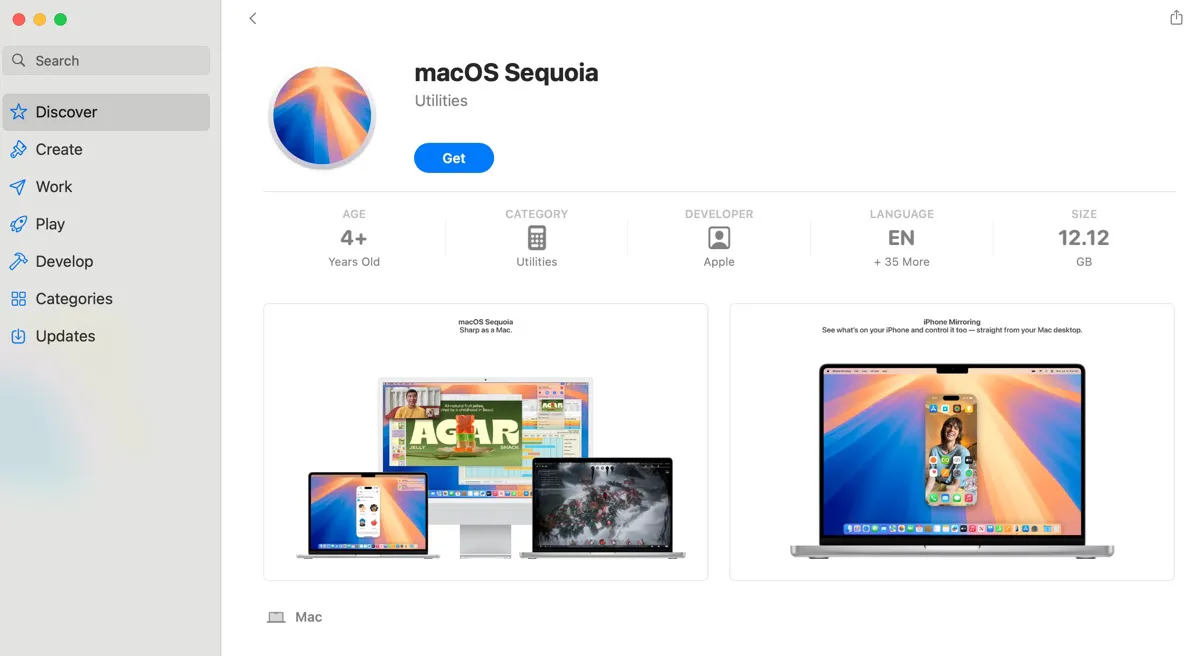
macOS 26 Tahoe download (Link not available yet, but you can search for "macOS Tahoe" to download it from the App Store.)
Download macOS full installer from Terminal
If you can't download the macOS installer, try Terminal. It's the command-line interface of macOS and allows you to check, download, and install any compatible macOS version.
- Open Terminal.
- Check all macOS versions compatible with your Mac.softwareupdate --list-full-installers
- Write down the version you need to download.
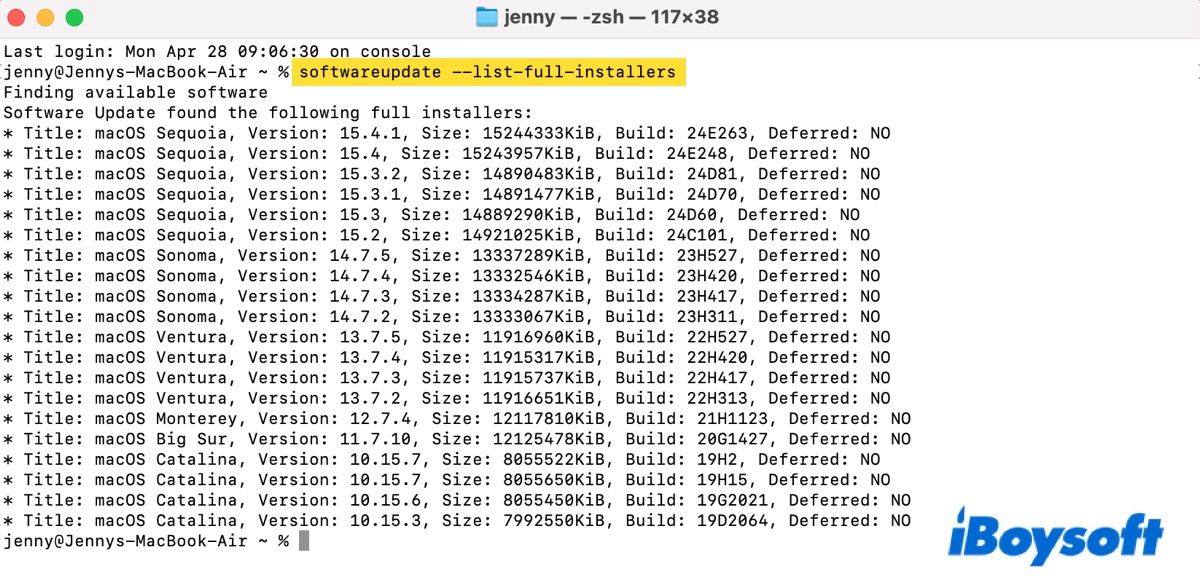
- Download the macOS installer with the command below:softwareupdate --fetch-full-installer --full-installer-version number For example, to download macOS Tahoe, softwareupdate --fetch-full-installer --full-installer-version 26.0.0
Keep reading to learn more details: How to Download Full macOS Installer from Terminal?
Why a macOS installer download may fail?
A macOS installer download may fail if the Mac is not compatible with that version, the App Store link is unavailable in your region, Apple no longer offers that exact build, the installer is damaged, the Mac lacks storage space, or Terminal returns "update not found."
Try Safari for Apple web links, check compatibility first, delete damaged installers, and use Software Update or Recovery when you only need to update or reinstall the current Mac.
Tips: If you want to update or install macOS, learn what you need to do before and during the macOS installation: Mac Operating System Download and Install Guide
If you need the Windows installer, download it from the following resources:
Windows 11 ISO Download | Windows 10 Update ISO Download | Windows 10 Pro, Enterprise, Home, Education ISO | Windows 7 Home Premium ISO
Find this post useful? Spread the word!
FAQs
- QWhat is the safest way to download a macOS installer?
-
A
You should first consider Apple sources, such as Mac App Store, Apple CDN web links, or Terminal. If you want to create a bootable USB or download an older macOS version or the DMG or ISO file, iBoysoft DiskGeeker is the safest choice.
- QIs macOS Golden Gate a stable installer?
-
A
macOS Golden Gate is currently beta phase. You should use stable macOS for primary devices unless for testing purposes.
- QWhy can't I download an older macOS installer from the App Store?
-
A
It's usually due to compatibility, region, unavailable version, or Apple hiding it.
- QWhat does InstallAssistant.pkg do?
-
A
It installs the full Install macOS.app into Applications.
- QCan I create a bootable macOS installer from this download?
-
A
Yes, if you have a full installer app and a USB drive. Be reminded that the USB will be erased.
- QAre third-party macOS installer links safe?
-
A
Third-party macOS installer links may be modified and unsafe. So, it's recommended to treat it as fallback only. If you want to use it, verify sources and avoid running it on a production Mac.
- QCan Apple silicon Macs install old OS X versions?
-
A
Generally no. Old OS X versions were built for older Intel/PowerPC eras.