Ring videos are different from files stored on a computer. When a Ring video is deleted, it's usually permanently erased rather than being moved to the trash can.
Therefore, in most cases, deleted Ring videos are not recoverable, except if they're in one of the following scenarios:
- If it was shared with others, it's possible to recover it through the shared link.
- If it was downloaded on a storage device (a computer or a phone) or stored on a microSD card, a data recovery tool will likely retrieve it.
- If it was deleted from cloud storage within 72 hours, contact support to request its recovery.
This guide will help you determine whether data recovery is still possible and how to recover the deleted Ring video.
How Ring video deletion actually works (Before you try anything)
Ring videos are typically stored in the cloud by default, not locally on the device. When you have a Ring Protect subscription, videos are saved in Ring's cloud storage for up to 60 days (depending on your plan and settings). Without a subscription, no video storage occurs beyond live viewing.
When a video is deleted, it is removed from Ring's cloud servers. Ring's cloud-based storage does not have a "trash bin" or recovery option for deleted videos unless you request recovery within the 72-hour window. This is the time the video may stay in the backend systems before it's permanently erased. After this period, Ring has no ability to restore it.
Data recovery tools are usually ineffective for recovering deleted Ring videos because the video isn't stored locally on your device in a way that would make it accessible to recovery software.
When deleted Ring videos are truly unrecoverable?
Deleted Ring videos become permanently unrecoverable much sooner than most users expect. This is because Ring uses cloud-based, server-side storage, not local files you can undelete later.
Below are the exact situations where recovery is no longer possible.
- The Ring video has been deleted for more than 72 hours.
- The Ring video has never been downloaded.
- Ring Edge is not enabled.
- The Ring video has never been shared.
- The Ring account was unbound or deactivated.
If your situation matches all of the above, the video is permanently gone.
The only 4 scenarios where recovery is still possible
Scenario 1: You downloaded the Ring video before deleting it
If you downloaded a Ring video before deleting it, you are not recovering a Ring cloud video. You are dealing with a local MP4 file that was saved to your phone, computer, or another local storage location.
In this case, recovery depends entirely on whether the local MP4 file has been overwritten and is unrelated to Ring's cloud storage or video deletion process.
Scenario 2: The video was deleted less than 72 hours ago
If a Ring video was deleted within the last 72 hours, there is a limited chance it may still exist in Ring's backend systems. This window exists because Ring uses delayed server-side cleanup, not because the video is intentionally kept for user recovery.
Besides, it can only be attempted by Ring's official support team. Users cannot recover the video themselves.
There is no promise or guarantee that a deleted video can be restored, even if the request is made immediately. The video is queued for system cleanup and can be purged at any time.
⚠️ This is not a guaranteed recovery period and is not a user-facing feature.
Scenario 3: The video was shared before deletion
When you share a Ring video with others through Facebook, message, email, or Nextdoor, Ring generates a separate access token for that video. In other words, sharing creates an access copy, not a new stored copy. If the video was shared before it was deleted, the shared link may continue to work temporarily.
As long as the video has not been unshared, access may still be possible until cleanup completes. Go find the shared link and then download or screen record the video immediately.
Remember that this does not restore the video to the original account and does not prevent permanent deletion.
Scenario 4: You use Ring Edge (Local microSD storage)
When you use Ring Edge, your videos are stored locally on a microSD card inside the Ring Alarm Pro. These recordings are separate from Ring's cloud storage, even if you also have a subscription that includes cloud recording.
With Ring Edge enabled, video recovery becomes a local SD card issue, not a cloud issue. A deleted video is usually recoverable if it's not overwritten by new data.
What does NOT work (Common Myths)?
Tips: Many guides suggest "quick fixes" that do not work for Ring video recovery.
Trying them wastes time and can create false expectations.
Here are some common myths you should be aware of:
❌ Data recovery software can scan Ring's cloud
Data recovery software only works when it can scan local storage devices, such as SD cards, USB flash drives, etc. It can't access Ring's cloud infrastructure, scan Ring's servers, or restore videos deleted at the server level.
❌ Reinstalling the Ring app or logging back in
The Ring app is only a viewer, not a storage location. Reinstalling the app or logging back into your account doesn't restore deleted videos, resync expired recordings, or trigger any recovery process.
❌ Phone cache recovery
Ring videos are not stored in your phone's cache as playable files. Clearing or recovering phone cache won't recreate deleted Ring videos or restore expired cloud recordings.
How to recover downloaded Ring videos from a computer or SD card?
⚠️ This does NOT recover videos from Ring's servers.
If the video file existed locally, you can recover the deleted Ring video with iBoysoft Data Recovery.
This software supports video formats (.mp4) used by Ring videos and other common devices, such as digital cameras, drones, security cameras, etc.
Besides, it works with both macOS and Windows. Whether you have a Windows PC or a Mac, you can download the tool and recover deleted videos from Ring cameras or doorbells.
Take the steps to recover deleted videos from the Ring doorbell or camera.
How to recover deleted Ring videos on a PC and Mac:
Step 1: Download and install iBoysoft Data Recovery.
Ensure the storage device that saved the downloaded Ring videos is connected to your computer.
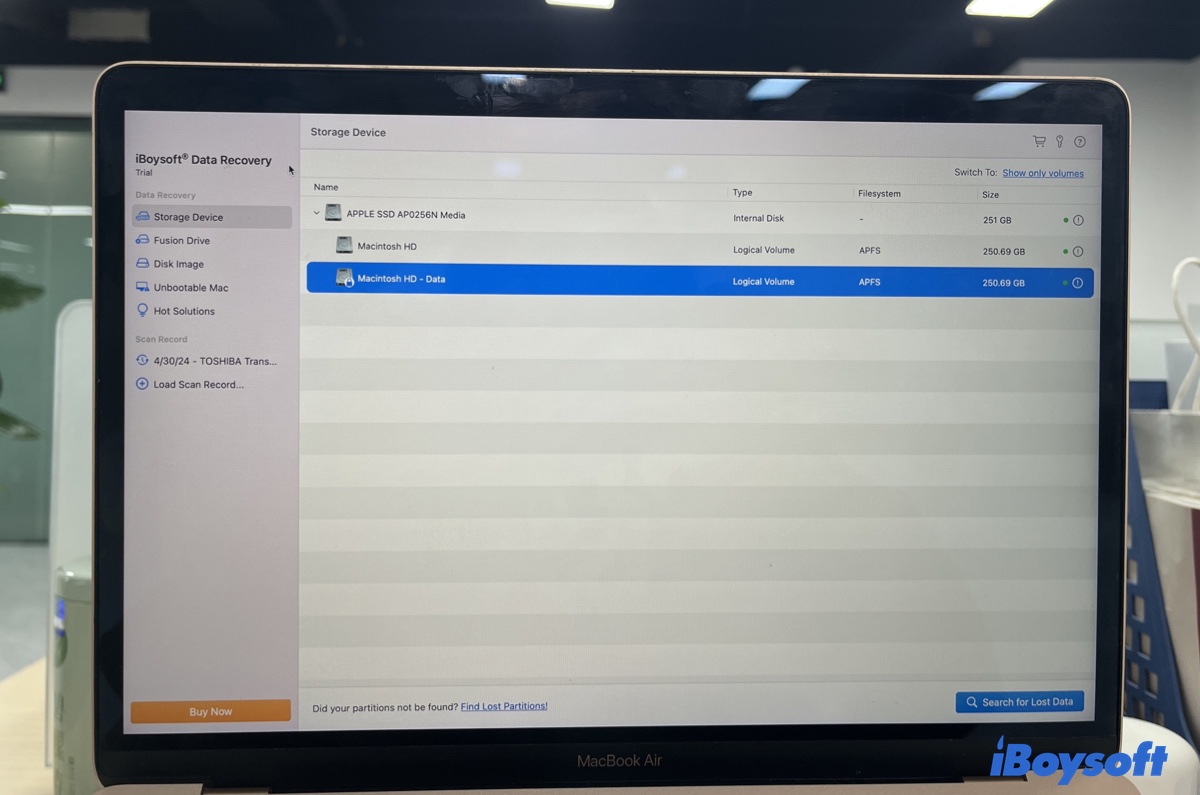
Step 2: Launch the Ring video recovery tool, select the drive, and start scanning it.
Step 3: Preview found files.
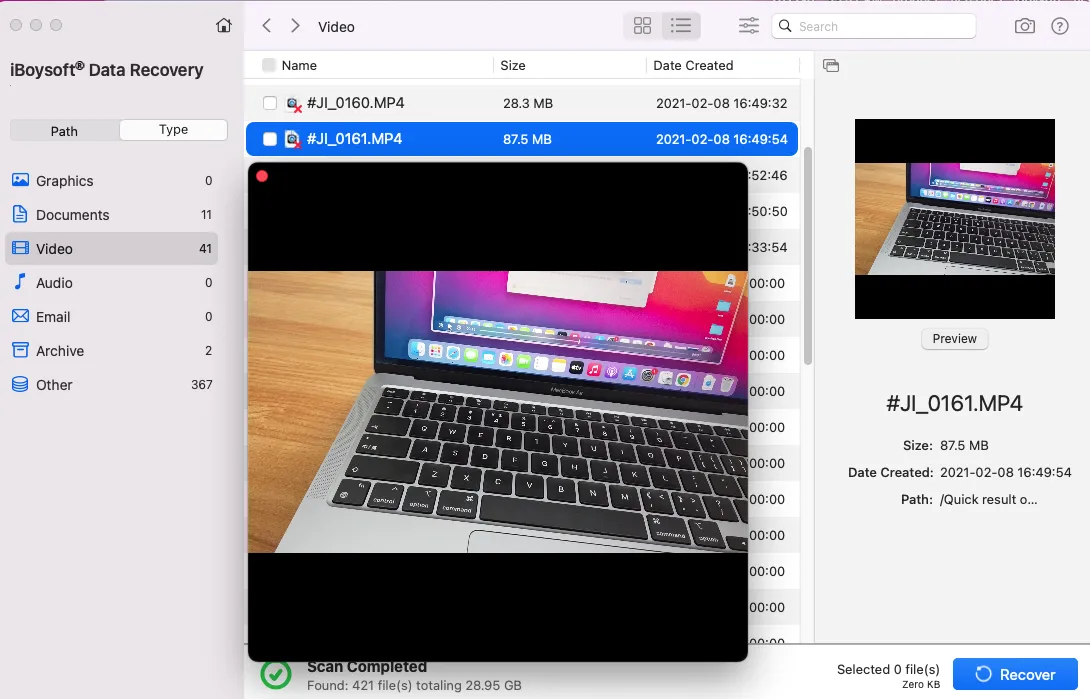
Step 4: Select the Ring videos you want to recover and save them to a location other than the drive from which they were recovered.
Should you contact Ring support?
Depending on how long youhave had the Ring video deleted, you can decide whether contacting support is worth your time.
Within 72 hours of deletion → ✅ Yes, contact Ring Support immediately
More than 72 hours after deletion → ❌ No, save your time
If you're still within the 72-hour window, contact Ring's tech support and ask if they can recover the deleted videos from their servers. You can either chat or speak with them.

- Go to the support page and click "Chat with Us" to connect to a tech support representative.
- Open the "Call Us" page, and choose your region to find the corresponding number of the available Ring line.
Why Ring videos get deleted (And how to avoid it)
Retention period ends: When the retention period ends, Ring videos expire automatically. They'll disappear from your account and be deleted permanently, even if you never touch the delete button.
By default, the retention period is 30 days for 4K devices and 60 days for 1080p and 2K devices. You can customize the setting for shorter or longer periods, up to 180 days, depending on your location and subscription plan.
Manual deletion: Users may accidentally delete videos from the Ring app or webpage.
microSD card overwrites old data: If you use Ring Edge (local storage on a microSD card), it has limited storage space. When it fills up, older videos are automatically overwritten.
To avoid losing important Ring videos, you can:
- Download important videos immediately.
- Use Ring Edge for redundancy (Only for Ring Alarm Pro.)
- Perform regular backups.
FAQs
- QCan police recover deleted Ring videos?
-
A
Usually no, police can't recover deleted videos on Ring if they are permanently erased. They may be able to obtain a Ring video only if all of the following are true:
1. The video has not been permanently deleted yet.
2. The video was saved to a storage device.
3. A valid legal request (warrant, subpoena, or emergency request) is submitted.
4. If the video is on the cloud and hasn't been deleted for 72 hours.
- QHow long can police recover deleted Ring videos?
-
A
Police can only recover deleted Ring videos within a short window.
If the video is only stored on the cloud, they have up to 72 hours from the moment the file was deleted.
If the video is stored locally, they can recover the deleted videos on Ring before they are overwritten by scanning the storage device with data recovery software.
- QHow to retrieve deleted Ring videos on iPhone?
-
A
You usually can't retrieve deleted Ring videos directly on an iPhone. However, if the Ring video was downloaded to your iPhone, you may be able to retrieve it if it's not permanently deleted.
If you saved the video to Photos and then deleted it: Open Photos > Albums > Recently Deleted and tap Recover. The video will stay recoverable within 30 days.
If you saved the video to the Files app (iCloud Drive or On My iPhone), check Files > Recently Deleted. The file usually stays for 30 days.
- QHow to tell if a Ring video was deleted?
-
A
If a Ring video no longer appears in Event History, it's deleted or expired.
- QDoes deleting Ring videos delete on all devices?
-
A
Yes, deleting a Ring video will remove it from all devices, unless it's shared or downloaded.
When you delete a video from the Ring application or Ring.com, it's removed from the cloud and thus unavailable on any of your devices.