Windows 7 Professional, released in 2009, is a business-oriented edition of Windows 7 designed for office users, small businesses, and professionals who need enhanced networking, security, and productivity capabilities.
Microsoft no longer offers options for downloading this old version.
However, we can still get the official Windows 7 Professional for free. This Windows 7 Professional ISO download database covers the direct links for downloading both the 64-bit and 32-bit editions.
Tips: If you worry about the security of downloading ISO from the archived installer online, switch to using iBoysoft DiskGeeker for Windows.
This professional disk manager lets you quickly download the official Windows 7 Pro 64-bit ISO file without the risk of modification and corruption. It ensures that the Windows 7 Pro ISO 64-bit you downloaded is complete and safe.
1. Free download, install, and open iBoysoft DiskGeeker for Windows on your PC.
2. In the Download and create boot disk field, click "Windows" > "Download Windows system image." 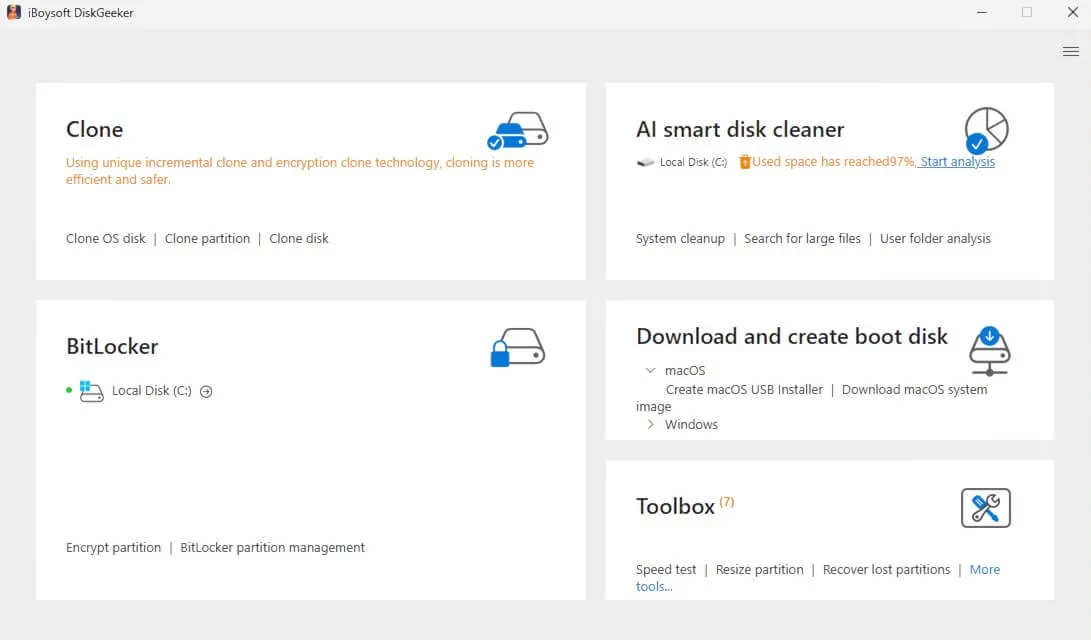
3. Click on "Windows 7," wait a second to let the other options be automatically filled, and select "Pro" in the system version section. Then, click "Get." 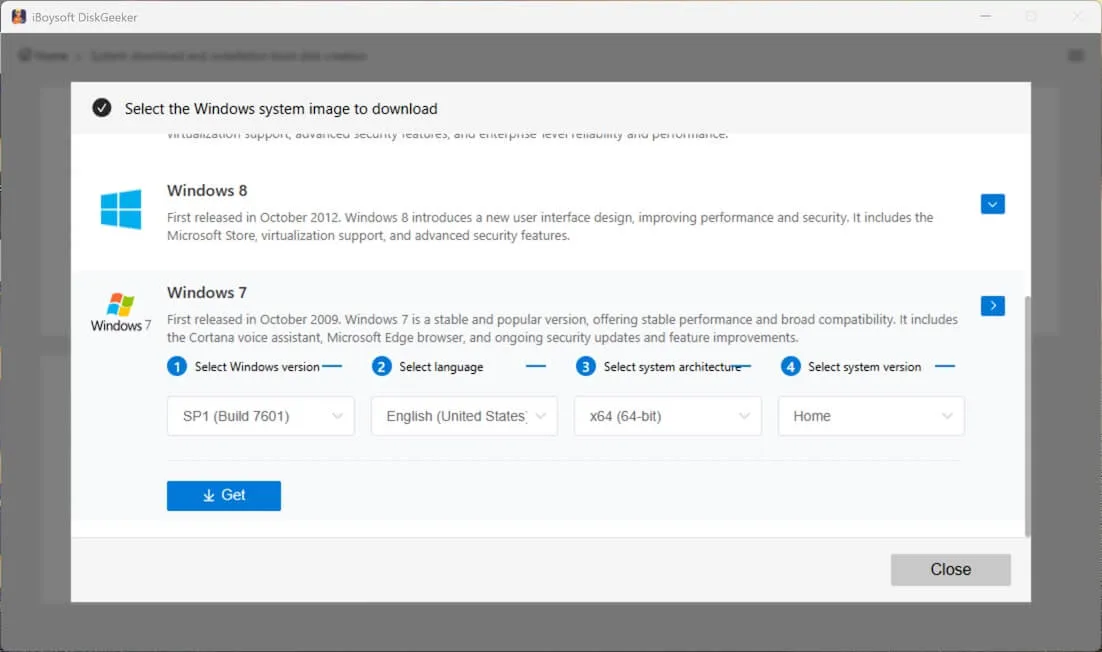
Wait a moment, you'll get a Windows 7 Pro ISO file.
If you download Windows 7 Pro for creating a bootable USB installer, just click "Windows" > "Create Windows USB Installer" on the app's main interface.
Windows 7 Pro system requirements
Before downloading Windows 7 Professional, I suggest you check its system requirements first.
This job can help you choose the correct edition (32-bit or 64-bit) and avoid the later installation failures.
Minimum system requirements for Windows 7 Professional:
| Component | Windows 7 Professional 64-bit (x64) | Windows 7 Professional 32-bit (x86) |
| Processor | 1 GHz (64-bit) | 1 GHz (32-bit) |
| RAM | 2 GB | 1 GB |
| Installation Storage | 20 GB | 16 GB |
| App Compatibility | 32-bit & 64-bit apps | 32-bit apps |
| Graphics | Base: DirectX 9-capable GPU with WDDM 1.0 driver Aero Glass: 128 MB graphics memory, Pixel Shader 2.0, Windows Experience Index ≥ 3.0 | Base: DirectX 9-capable GPU with WDDM 1.0 driver Aero Glass: 128 MB graphics memory, Pixel Shader 2.0, Windows Experience Index ≥ 3.0 |
| Display | 800 × 600 resolution | 800 × 600 resolution |
| Firmware | BIOS or UEFI (Secure Boot supported but not required) | BIOS or UEFI (Secure Boot supported but not required) |
If Windows 7 Professional is not supported by your computer, go to the Windows ISO download center to find the right version.
Want to switch to Windows Home? Follow: Windows 7 Home Edition Download
Need other editions of Windows 7? Access the Windows 7 ISO Download Center
Windows 7 Pro ISO download (64-bit)
Here are all the direct links for downloading the Windows 7 Professional 64-bit (x64) ISO file.
⬇️ Windows 7 Professional 64-bit ISO file download (SP1)
MD5: 3c394e66c208cfd641b976de10fe90b5
SHA-1: 708e0338d4e2f094dfeb860347c84a6ed9e91d0c
Size: 3.0 GB
Language: English
Note: The MD5 and SHA-1 are used to verify the integrity of this Windows 7 Pro 64-bit ISO file. Just use the Windows built-in certutil (a verification tool) to show the MD5 and SHA-1 of the downloaded ISO. Then, compare them with those offered above.
⬇️ Windows 7 Professional 64-bit ISO file download (All-in-One)
Size: 5.5 GB
Language: English
Product Keys:
Key 1: FJH38-9YYTR-3RHFDJ-KSFDH-PPTR5
Key 2: DSLJK-HFZZY-5VVMN-5RR4D-KFHJD
Key 3: HAADR-MMBN2-3GHHD-JSHER-UITY3
Key 4: 4EETX-KKPS5-9AASD-KSMZ2-HHT26
Key 5: SSD78-49RPO-IREIU-T8967-KKTT7
Note: To unlock all features in Windows 7 Pro, you'll need a valid product key. You can try the product keys listed above, though some of them might already be in use. Alternatively, you can skip entering a key during setup.
⬇️ Windows 7 Professional 64-bit ISO file download (Dell OEM)
Size: 5.2 GB
Language: English
⬇️ Windows 7 Professional 64-bit ISO file download
Size: 3.1 GB
Language: English
⬇️ Windows 7 Professional 64-bit ISO file download
Size: 3.1 GB
Language: English
Windows 7 Pro ISO file download (32-bit)
If you have an old computer that only supports Windows 7 Pro 32-bit (x86), check the free download links below.
Here is the Windows 7 Pro ISO download 32-bit checklist:
⬇️ Windows 7 Professional 32-bit ISO file download
MD5: f55d3916622dd4125be6336876559690
SHA-1: d5bd65e1b326d728f4fd146878ee0d9a3da85075
Size: 2.3 GB
⬇️ Windows 7 Professional 32-bit ISO file download
Size: 2.4 GB
Language: English
⬇️ Windows 7 Professional 32-bit ISO file download
Size: 2.4 GB
Language: English
⬇️ Windows 7 Professional 32-bit ISO file download (All-in-One)
Size: 3.8 GB
Language: English
Create a Windows 7 Professional bootable USB installer
Rufus is the tool for creating a Windows bootable USB installer for the mainstream. However, Windows 7 USB installers created by Rufus probably fail to boot in pure UEFI mode, as Windows 7 was designed before modern UEFI systems became standard.
Thus, to create a Windows 7 Pro bootable USB installer that works, use iBoysoft DiskGeeker for Windows. This tool lets you get a Windows 7 Pro bootable USB installer with only a few clicks, making the creation task time-saving and effortless for everyone.
Here's how:
- Connect an empty USB drive to your PC.
- Free download, install, and open iBoysoft DiskGeeker for Windows on your PC.
- Move to the Download and create boot disk module, and click "Windows" > "Create Windows OS USB Installer."
- Select your USB drive as the target disk.
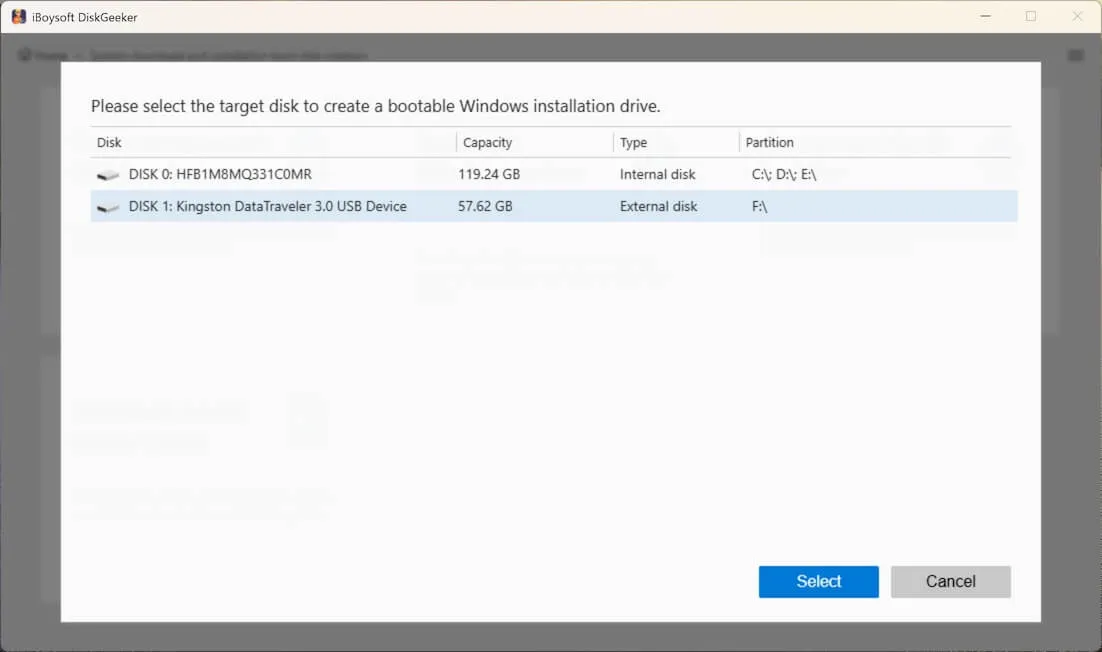
- Click on "Windows 7," select "Pro" in the system version field, and click "Start creating boot disk."
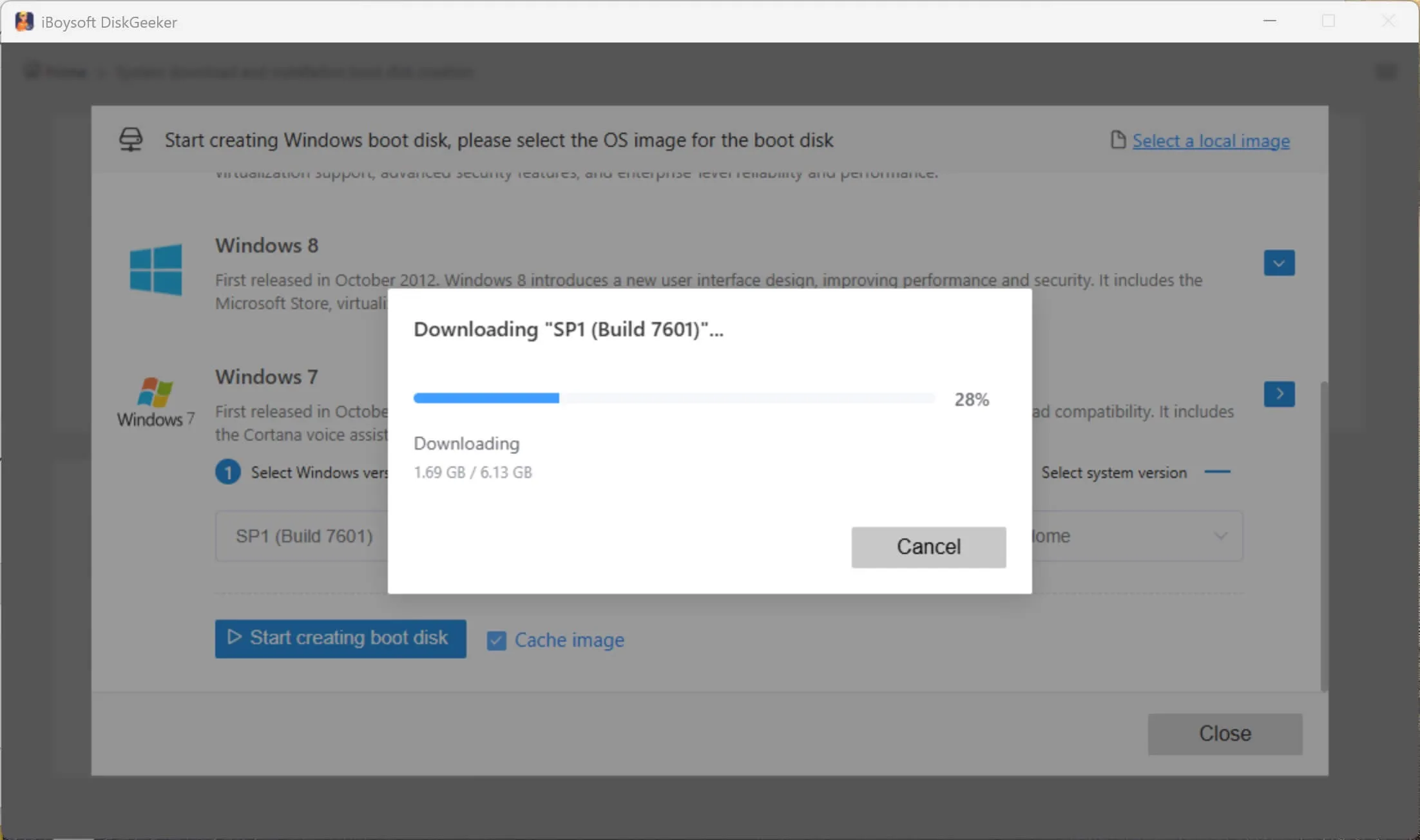
Now, wait for the Windows 7 bootable USB installer to be automatically created. During the process, keep the USB drive connected to your PC well, the internet is stable and powerful, and your computer is connected to the power source.
Install Windows 7 Pro on a PC (using a bootable USB installer)
What you need:
- A Windows 7 bootable USB installer
- A PC compatible with Windows 7 Professional
- A valid product key (optional during install)
When installing Windows 7 Professional, you'll be asked for a product key. But you can skip it and use the system fully for a 30-day grace period with all features available. It is sufficient to install Windows 7 for testing purposes.
When the period expires, you can still run Windows 7 Pro without activation, but some functions are restricted.
Since Microsoft no longer sells Windows 7 product keys, you can either keep using the inactivated system or obtain a valid retail key, OEM COA, or another legitimate license.
Steps to install Windows 7 Pro:
- Insert the USB drive into your PC.
- Boot from the USB.
Restart your PC and press the boot menu key (commonly F12, ESC, DEL, or F2), then select the USB drive. - Start Windows Setup.
Choose your language, time & currency format, and keyboard layout, then click Install Now. - Enter your product key.
Enter your Windows 7 Pro key, or skip and activate later. - Choose installation type.
Select:
- Custom (advanced): recommended for a clean install.
- Upgrade: only works if upgrading from an existing Windows system. - Select and prepare the disk.
- Choose the target partition.
- Click Drive options > Format/Delete for a clean install (Optional).
- Select Unallocated Space > Next if starting fresh.
⚠️ This will erase data on the selected partition. - Wait for the installation to complete.
The system will copy files and restart several times. - Complete initial setup.
- Create a user account.
- Set time zone.
- Choose network settings. - Install drivers (critical)
Install chipset, graphics, and network drivers from your PC or motherboard manufacturer.
Need older versions? Download Windows Vista ISO | Download Windows XP ISO
FAQs about Windows 7 Pro ISO download
- QCan you still download Windows 7 ISO from Microsoft?
-
A
No, you can't. Microsoft stopped extended support for Windows 7 on January 14, 2020. They also removed the ISO download options for Windows 7 after the support ended.
- QHow to download Windows 7 ISO for free?
-
A
You can search for Windows 7 ISO on the Internet archives for free download. However, Windows 7 is only free for a 30-day free trial. You need to enter a valid product key when it expires to explore all the features. Otherwise, you are only allowed to use limited features in Windows 7.
- QHow to download Windows 7 ISO file in 2025?
-
A
Currently, you can use iBoysoft DiskGeeker for Windows to securely download the full Windows 7 ISO file.