Windows 11 Pro is a professional edition of Windows 11 designed for professionals, developers, and business users who need advanced features such as BitLocker encryption, Remote Desktop, Hyper-V virtualization, and Group Policy management.
If you need to download Windows 11 Pro ISO offline installer for a clean installation, system upgrade, multiple PC installation, or bootable USB creation, follow this guide.
Here, we offer safe options for direct Windows 11 Pro ISO download and show how to create a Windows 11 bootable USB installer.
Need other editions of Windows 11? Follow: Windows 11 ISO Download
Want the Pro edition of Windows 10? Access: Windows 10 Pro ISO Download
Windows 11 Pro ISO download from Microsoft
Downloading Windows 11 Pro ISO 64-bit from Microsoft is the safest and most reliable option.
However, Microsoft does not offer a separate Pro-only ISO; instead, the official ISO includes multiple editions, including Pro, Home, Education, and other editions.
You should enter a Windows 11 Pro product key during the installation to run Windows 11 Pro. If you don't have one, simply skip this step and select the Pro edition when prompted. Windows 11 will then run for free indefinitely, but personalization settings will be disabled, and occasional activation reminders will appear.
Steps:
- Visit Microsoft's official Windows 11 download page.
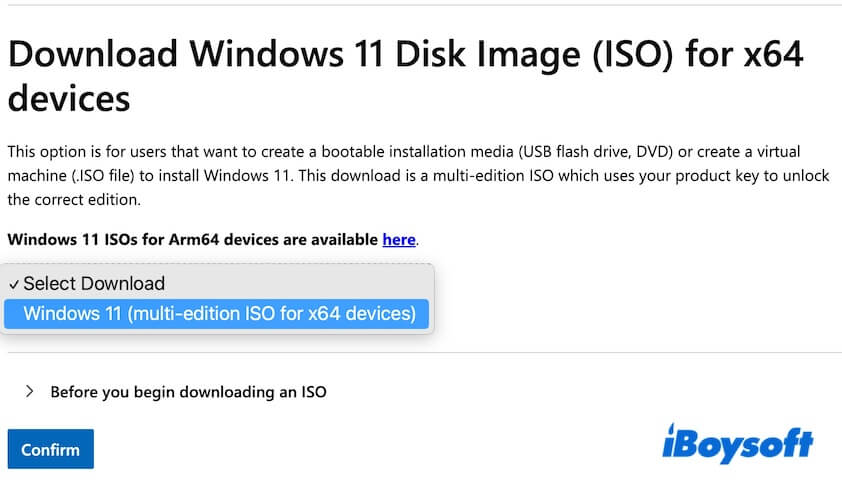
- Scroll to the Download Windows 11 Disk Image (ISO) for x64 devices section.
- Click the Select Download drop-down menu and select "Windows 11 (multi-edition ISO for x64 devices)."
- Click "Before you begin downloading an ISO" and read the notifications.
- Click "Confirm."
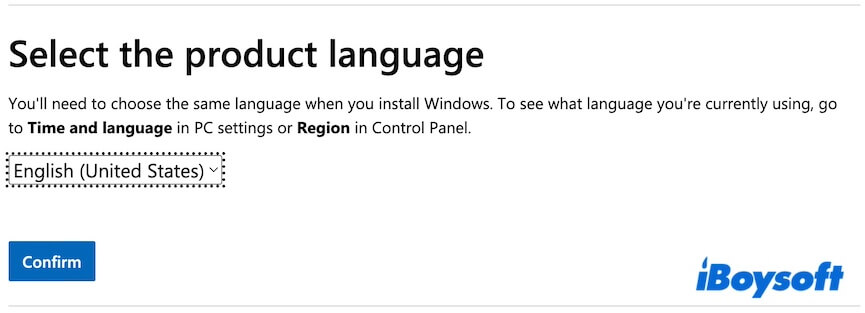
- Choose a language and click "Confirm."
- Click the 64-bit Download button to get the Windows 11 English 64-bit ISO file.
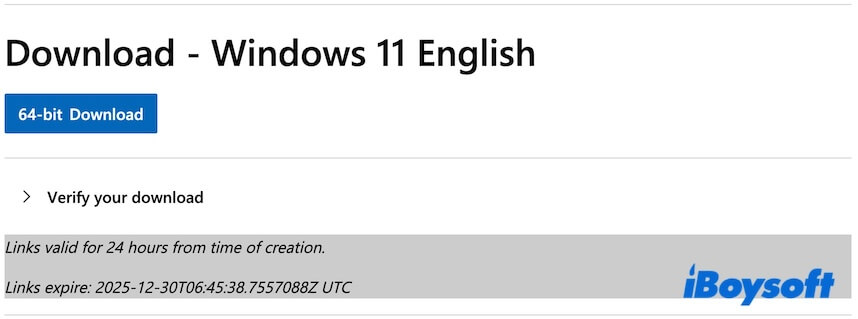
The ISO file is 7.2 GB and may take several minutes to hours to download, depending on your internet speed.
Windows 11 Pro ISO download options
A Windows 11 Pro ISO file is also called the Windows 11 Pro offline installer. It contains all the required files for installing Windows 11 Pro. Once you download it, you can install Windows 11 Pro on any compatible PC at any time, no additional setup files or an internet connection required.
You can follow these direct links to download Windows 11 Pro ISO 64-bit offline installers for free.
Tips: If you worry about the security of downloading a Windows 11 Pro ISO file from free sources, or are sick of verifying the integrity of ISO files downloaded from open-source, you can switch to using a professional Windows ISO downloader - iBoysoft DiskGeeker for Windows.
This tool enables you to download any edition of Windows 11, including Pro and Home, directly and securely from Microsoft's servers. (By the way, it can also help you create a Windows 11 Pro bootable USB installer in a few clicks)
Here's how:
1. Install and open iBoysoft DiskGeeker for Windows.
2. Focus on the Download and create boot disk section, click "Windows" > "Download Windows system image."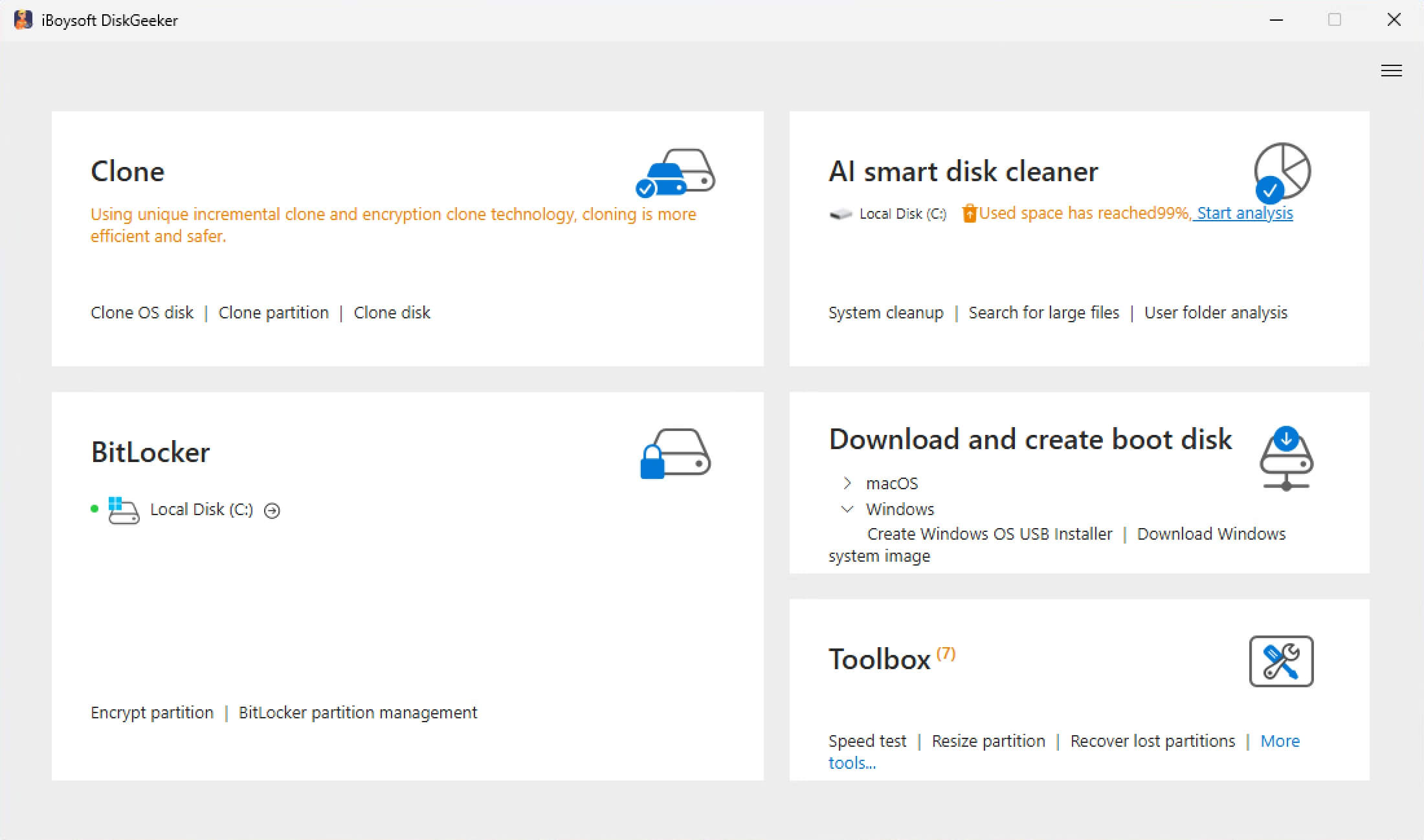
3. Click on "Windows 11," select an update edition, language, 64-bit, and "Pro", and then click "Get" to quickly download the ISO file.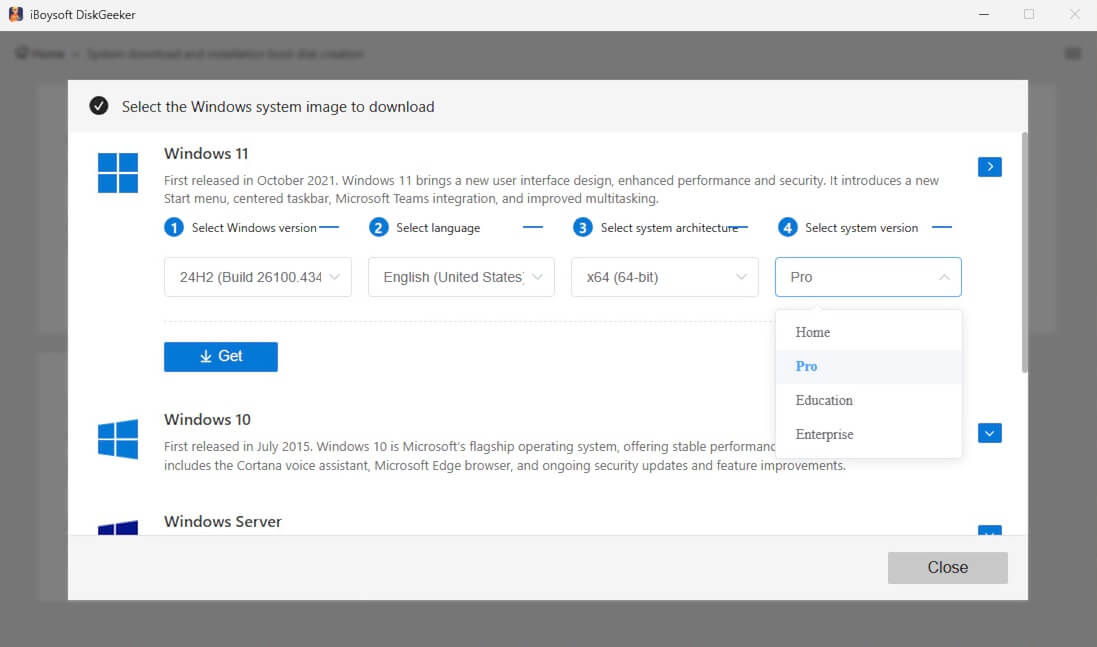
Option 1: Download Windows 11 Pro ISO 64-bit
Size: 4.5 GB
Language: English
Source: archive.org
MD5: 179bfe07f7050093ee595ddd85a30201
SHA1: 3b6da9194ba303ac7dbbf2e521716c809500919c
Option 2: Download Windows 11 Pro ISO 64-bit
Size: 5.4 GB
Language: English
Source: archive.org
MD5: bb2acb101d4a360c71530e4be00ec43c
SHA1: a81079ba4b9a9ce29a7a2a20cd34266ac21becce
#Windows 11 24H2
Option 3: Download Windows 11 Pro ISO 64-bit
Size: 4.6 GB
Language: English
Source: archive.org
MD5: 9c71d4e142f23d1f53260ffd524ed28e
SHA1: 82dd93d656408f517a1592756febc03ba9b593a2
#Windows 11 24H2
Option 4: Download Windows 11 Pro ISO 64-bit
Size: 5.2 GB
Language: English
Source: archive.org
MD5: 1add79027cf395498bada342b86675a4
SHA1: c5341ba26e420684468fa4d4ab434823c9d1b61f
#Windows 11 22H2
Option 5: Download Windows 11 Pro ISO 64-bit
Size: 4.3 GB
Language: English
Source: archive.org
MD5: bc895b4cc47e097b81c330e12924645f
SHA1: ab8d17efddd83be6c24f88e82d2a21b47a0f56bb
Notably, using these offline installers doesn't mean no activation is required during the installation. You still need a valid Windows 11 Pro license key. If you don't have one, you can still install and use Windows 11 Pro for free. In detail, just skip the activation screen and manually select the Pro edition to explore the inactivated Windows 11 Pro.
For installation:
Before installing Windows 11 or creating a Windows 11 bootable USB installer for certain computers, don't forget to check the system requirements for Windows 11 Pro 64-bit.
| Component | Minimum Requirement |
| Processor (CPU) | 64-bit processor, 1 GHz or faster, with 2 or more cores |
| RAM | 4 GB |
| Storage | 64 GB |
| System Firmware | UEFI, Secure Boot capable |
| TPM | Trusted Platform Module (TPM) version 2.0 |
| Graphics Card | DirectX 12 compatible GPU with WDDM 2.0 driver |
| Display | >9″ display, 720p (1280×720) resolution or higher |
| Architecture | 64-bit only |
Windows 11 Pro ISO download for USB
Whether you plan to clean install Windows 11 Pro, reinstall Windows 11 Pro after a system failure, install Windows 11 Pro on multiple computers, etc., a bootable Windows 11 Pro USB installer is essential.
While tools like Microsoft Media Creation Tool and Rufus work, iBoysoft DiskGeeker for Windows makes the process even easier. It can download the official Windows 11 Pro ISO directly and automatically create a bootable USB. All you need is a USB drive and a few clicks, no complicated steps required.
Here's how:
- Install and open iBoysoft DiskGeeker for Windows.
- Connect a USB drive with at least 32 GB of space.
(Back up data on the drive first if you need it, as the drive will be erased later.) - Find the "Download and create boot disk" section, and click "Windows" > "Create Windows OS USB Installer."
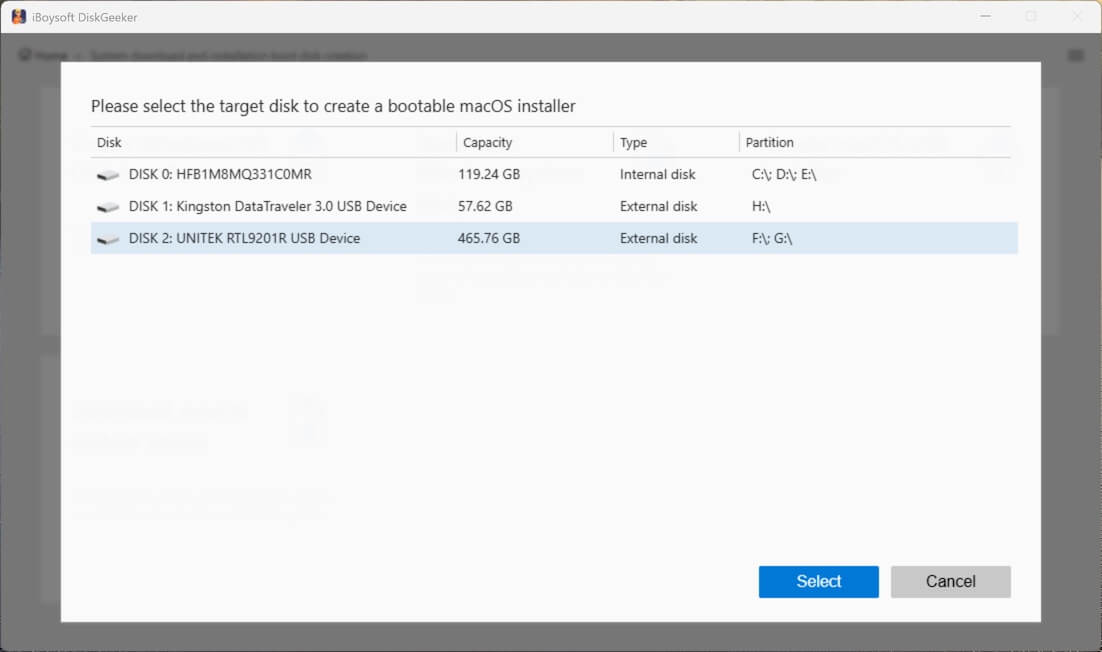
- Select your USB drive.
- Click on "Windows 11," select an update edition, language, 64-bit, and "Pro", and then click "Start creating boot disk."
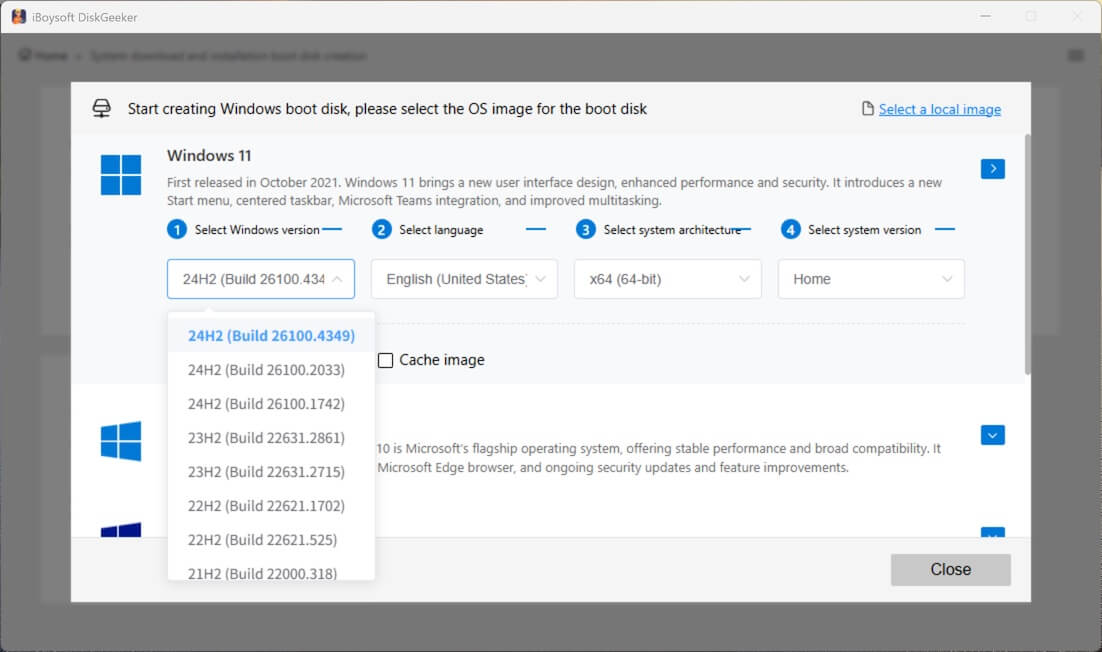
After that, wait for a moment to let this tool download the ISO file and automatically create a Windows 11 Pro bootable USB installer.
If this Windows 11 Pro ISO download guide covers everything you want, just share it.
FAQs about Windows 11 Pro ISO download
- QCan I download Windows 11 Pro ISO 64-bit activated for free?
-
A
No. Microsoft does not provide pre-activated Windows 11 Pro ISO files.
You can download the official ISO for free, install Windows 11 Pro without a product key, and activate it later using a valid license or digital entitlement. Any website offering a 'pre-activated' ISO is unsafe and should be avoided.
- QHow to download and install Windows 11 Pro 64 bit?
-
A
You can visit Microsoft's official Windows 11 download page and download the Windows 11 64-bit file first. Then, use the Microsoft Media Creation Tool to create a bootable USB installer.
Alternatively, you can use iBoysoft DiskGeeker for Windows to directly create a bootable USB installer without preparing a Windows 11 ISO file in advance, as this tool can help you automatically create a bootable USB installer for Windows 11 with a few clicks.
Insert the USB into your target PC, boot from it, and follow the setup instructions. During installation, you can enter a valid Windows 11 Pro product key or skip this step and select the Pro edition manually.
Once the setup is complete, your PC will be running Windows 11 Pro 64-bit.