Windows 10 Pro is the business-focused edition of Windows 10, designed for power users, small businesses, and enterprise environments. It offers all Home features plus advanced tools for security, productivity, and device management.
The common source to get Windows 10 Pro is from Microsoft's download webpage. Looking for other free Windows 10 Professional download resources? Check out our Windows 10 Pro ISO download database. It provides direct links to 64-bit and 32-bit ISO files for versions 22H2, 21H2, 21H1, and 20H2.
Need other editions of Windows 10? Follow: Windows 10 ISO Download Center.
Want to get Windows 10 Home ISO? Get it from: Windows 10 Home Edition Download.
Windows 10 Professional download 64-bit
Windows 10 Professional 64-bit (x64) is designed for computers with a 64-bit (x64) processor. In other words, computers made in 2008 or later can typically run Windows 10 Pro 64-bit while those made in 2012 or later run it very smoothly.
You can follow the direct links below to download the Windows 10 Professional 64-bit ISO for free in different feature updates. (If you need Windows 11 Pro, get it here: Windows 11 Pro ISO Download)
Tips: Always verify the integrity of any open-source Windows 10 Pro ISO you download online. Tired of this? Switch to using iBoysoft DiskGeeker for Windows to get the Windows 10 Pro ISO.
This professional Windows 10 ISO downloader enables you to download the official Windows 10 Pro ISO directly from Microsoft's server, safely, cleanly, and hassle-free.
1. Free download iBoysoft DiskGeeker for Windows, and install and open it on your PC.
2. In the Download and create boot disk field, click "Windows" > "Download Windows system image."
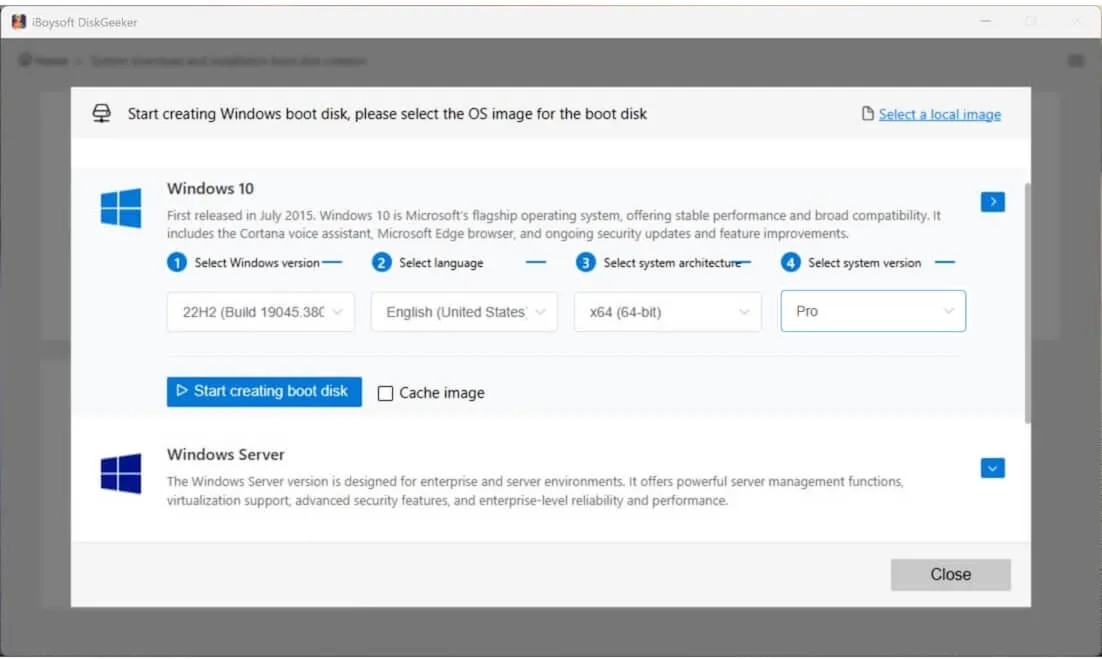
3. Click "Windows 10," choose an update like 22H2, language, architecture, and select "Pro."
4. Click "Get" to start downloading Windows 10 Pro directly from Microsoft's server.
⇩Windows 10 Professional download 64-bit (22H2)
File Size: 5.7 GB
Language: English
⇩Windows 10 Professional download 64-bit (21H2)
File Size:
Language: 5.5 GB
MD5: 823c3cb59ff0fd43272f12bb2e3a089d
SHA1: 30ff3cc3cdc05abf47489742e2e1b810d0003968
#Windows 10 Pro 22H2 ISO download 64-bit
Note: The MD5 and SHA1 are used to check the integrity of the ISO after it is downloaded. You can run the specific commands - certutil -hashfile "C:\path\to\file.iso" SHA1 and certutil -hashfile "C:\path\to\file.iso" MD5 in CMD and get the SHA1 and MD5 values of the downloaded ISO. Then compare them with the values above.
⇩Windows 10 Professional download 64-bit (21H1)
File Size: 5.4 GB
Language: English
#Windows 10 Pro 21H1 64-bit
⇩Windows 10 Professional download 64-bit (20H2)
File Size: 4.8 GB
Language: English
#Build: 20H2 (19042)
🔔 Notably, some ISO files include multiple Windows 10 editions, not just Windows 10 Professional. During installation, you can enter your Windows 10 Pro product key to install the Pro edition directly. If you don't have a key, you can also select Professional from the edition list and use it indefinitely without activation. The only limitation is that personalization features, like changing the wallpaper, will be disabled.
System requirements for Windows 10 Professional 64-bit
Notably, we suggest you check the system requirements for Windows 10 Pro 64-bit before installing it on your target PC or creating a bootable USB installer for a specific machine. This prevents subsequent work from being in vain.
| Component | Requirements |
| Processor (CPU) | 1 GHz or faster 64-bit CPU with PAE, NX, SSE2, and CMPXCHG16b support |
| RAM (Memory) | 2 GB or more |
| Hard Disk Storage | 20 GB or more |
| Graphics (GPU) | DirectX 9 or later with WDDM 1.0 driver |
| Display | Minimum 800×600 resolution |
| Firmware (optional) | UEFI/Secure Boot supported but not required |
| Network (optional) | Internet connection required for activation and updates |
Share these free archives for Windows 10 Pro download with more people.
Windows 10 Professional download 32-bit
Windows 10 Professional 32-bit (x86) is compatible with 32-bit CPUs and can also run on 64-bit CPUs. Most computers released from 2004 onward can install it, provided the CPU supports PAE, NX, and SSE2.
If you want to download Windows 10 Pro 32-bit for a fresh installation or to create a bootable USB, we've organized the download links by feature update version.
⇩Windows 10 Professional download 32-bit (22H2)
File Size: 4.0 GB
Language: English
⇩Windows 10 Professional download 32-bit (21H2)
File Size: 3.9 GB
Language: English
MD5: 989e53052a44e162d7c00b6d6e6dc743
SHA1: 3731950540c1136d16014fc999365da2c3a41758
Note: The offered MD5 or SHA1 checksums are used to verify the integrity of the downloaded ISO. Open Command Prompt and run the following commands:
certutil -hashfile "C:\path\to\file.iso" MD5
certutil -hashfile "C:\path\to\file.iso" SHA1
These commands will display the ISO's SHA1 and MD5 values. Simply compare them with the values listed above to ensure the file hasn't been corrupted or altered.
⇩Windows 10 Professional download 32-bit (21H1)
File Size: 3.9 GB
Language: English
⇩Windows 10 Professional download 32-bit (20H2)
File Size: 4.2 GB
Language: English
🔔 During the installation, if you don't have a valid product key, you'll be asked to select the Pro edition. Just select it to enjoy the unactivated Windows 10 Pro with minor restrictions.
System requirements for Windows 10 Professional 32-bit
To avoid installation failure, you should check the system requirements for Windows 10 Pro 32-bit in priority.
| Component | Requirements |
| Processor (CPU) | 1 GHz or faster CPU with PAE, NX, SSE2 support |
| RAM (Memory) | 1 GB or larger |
| Hard Disk Storage | 16 GB or larger free space |
| Graphics (GPU) | DirectX 9 or later with WDDM 1.0 driver |
| Display | Minimum 800×600 resolution |
| Firmware (optional) | UEFI/Secure Boot supported but not required |
| Network (optional) | Internet connection required for activation and updates |
Windows 10 Pro download for USB
If you download Windows 10 Pro to create a bootable USB installer, don't miss iBoysoft DiskGeeker for Windows.
This professional Windows ISO downloader helps you download the official Windows 10 Pro and then automatically create a Windows 10 Pro bootable USB installer, making the task effortless in one step.
Here's how:
- Free download, install, and open iBoysoft DiskGeeker for Windows on your PC.
- Connect an empty USB drive with at least 32 GB of free space to the PC.
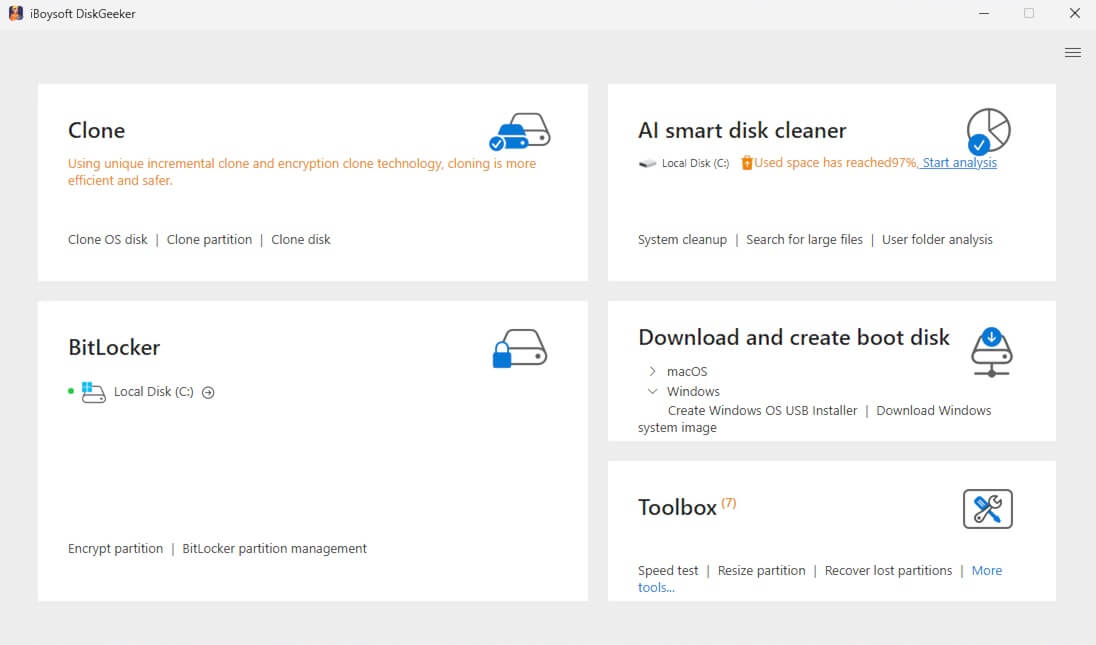
- Move to the Download and create boot disk module, click "Windows" > "Create Windows OS USB Installer."
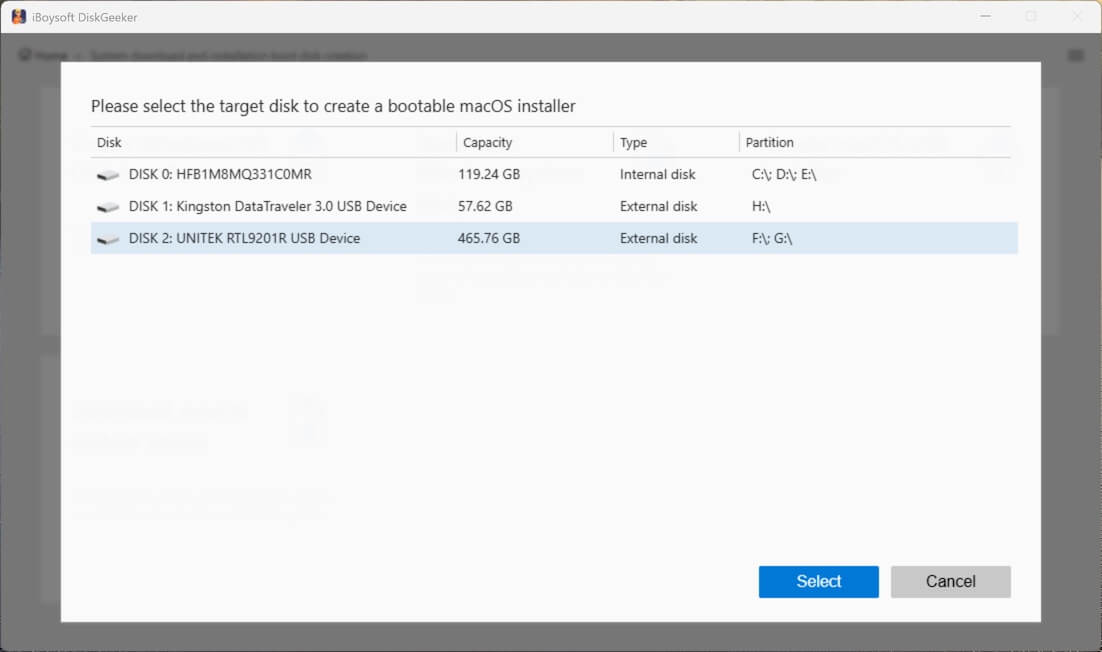
- Select your USB drive.
- Click on Windows 10, select an update edition, language, architecture, and "Pro", then click "Start creating boot disk."
Now, wait for a moment to let Windows 10 Pro ISO be downloaded, and then this tool will immediately and automatically create a Windows 10 Pro bootable USB installer. Easy and fast, right?
Want to download Windows 11 to a USB? Access: Windows 11 bootable USB download.
Share this Windows 10 Pro ISO file download center with others to help them get the free resources to get the Windows 10 Pro 64-bit and 32-bit ISO full version.
FAQs about Windows 10 Professional download
- QHow do I install Windows 10 Pro on my computer?
-
A
If your computer is running Windows 7, 8, or 8.1, you can upgrade directly to Windows 10 Pro by launching the Windows 10 setup program.
If your computer is running Windows 11 or if you prefer a clean installation, you'll need to create a Windows 10 Pro bootable USB installer and use it to install Windows 10 Pro.
- QHow to download Windows 10 Pro for free?
-
A
You can download Windows 10 Pro for free from Microsoft's official download page or the Internet Archive. When installing Windows 10 Pro, you are required to enter a Windows 10 Pro product key. Otherwise, you need to manually select Pro during the installation to explore the unactivated Windows Pro.
- QCan I still download Windows 10 for free without a product key?
-
A
Yes, you can still download Windows 10 for free from Microsoft's official website. During installation, you can skip entering a product key, and Windows 10 will install normally. Microsoft allows you to use Windows 10 indefinitely without activation, although certain features, mainly personalization options, will be restricted, and an unactivation watermark will appear.