Windows 10 Home is the standard consumer edition of Windows 10, designed for home users, students, gamers, and general everyday computing. Although Microsoft officially ended support for Windows 10 (including Home) on October 14, 2025, you can still download and use it.
If you are looking for the free Windows 10 Home ISO download sources, just focus on this post.
I've pulled together the archived and official sources for downloading a Windows 10 Home ISO, along with the easiest method I've tested to create a Windows 10 Home bootable installer.
Tips: Need to download other editions of Windows 10? Get them from:
Windows 10 ISO Download
Windows 10 Professional ISO Download
Explore other versions of Windows? Follow: Windows ISO Download
Before you download Windows 10 Home (Important)
Downloading a Windows 10 Home ISO is easy—but finding one that's clean, safe, intact, and truly official isn't.
Before choosing a source, understand:
- Microsoft ISO = 100% safe, slower process
- Archive ISO = faster, but not 100% secure; must verify integrity
- Third-party tools = convenient and safe, support bootable USB installer creation, but are trust-dependent
You should verify the integrity of the downloaded Windows 10 Home ISO. If you skip it, you risk:
- ⚠️ Corrupted ISO
- ⚠️ Modified system image
- ⚠️ Installation failure
Official Windows 10 Home download (from Microsoft)
If you just need a reliable, clean original image, the official method is usually sufficient.
Steps:
- Access the Microsoft Windows 10 download page.
- Focus on the Select edition field, choose "Windows 10 (multi-edition ISO)."
Microsoft offers version 22H2 of multiple editions, including Home, Pro, and Education. - Click "Confirm."
- Select a language and click "Confirm."
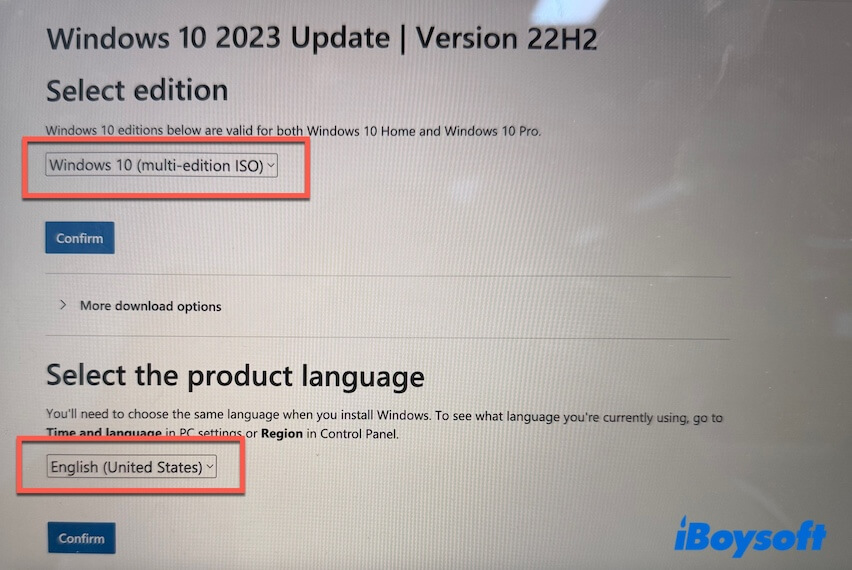
- Click "32-bit Download" or " 64-bit Download" to get the 32-bit or 64-bit version.
To run Windows 10 Home, you should enter your Windows 10 Home product key or manually select the Home edition during the installation.
If you need the 21H2, 21H1, or 20H2 edition of Windows 10 Home, get the archived mirrors.
Note: The official Windows 10 ISO from Microsoft does not have a publicly available SHA-256 checksum. This is because the ISO is dynamically generated during download. As a result, integrity can only be verified by combining the official download source, a locally generated hash, file structure, and file size.
My hands-on download & verification details:
| Device: | Lenovo IdeaPad Slim 3 15.6" Laptop Ryzen |
| Operating system: | Windows 11 |
| Browser: | Microsoft Edge |
| Download page: | Microsoft Download Windows 10 Disc Image (ISO File) |
| Actual download option shown: | 64-bit Download |
| Downloaded file name: | Win10_22H2_English_x64v1.iso |
| File size: | 5.7 GB |
| Architecture & language: | 64-bit, English (United States) |
| Safe to use? | Yes |
Direct Windows 10 Home ISO download (archived mirrors)
Usually, you can download Windows 10 Home ISO 64-bit and 32-bit from the Microsoft software download center. However, extra setup steps are required. You should select the edition (only the latest 22H2 available), wait for it to be loaded, choose the region, select 64-bit or 32-bit, etc.
To make it easier, you can click the direct links below for a free Windows 10 Home ISO download, including 22H2, 21H2, 21H1, and 20H2.
Download Windows 10 Home ISO 64-bit
✅ Download Windows 10 Home ISO 64-bit (22H2)
Size: 5.7 GB
Language: English
#Final update of Windows 10
✅ Download Windows 10 Home ISO 64-bit (21H2)
Size: 5.5 GB
Language: English
✅ Download Windows 10 Home ISO 64-bit (21H1)
Size: 5.4 GB
Language: English
✅ Download Windows 10 Home ISO 64-bit (20H2)
Size: 5.8 GB
Language: English
Windows 10 Home ISO download 32-bit
✅ Download Windows 10 Home ISO 32-bit (22H2)
Size: 4.0 GB
Language: English
✅ Download Windows 10 Home ISO 32-bit (21H2)
Size: 3.9 GB
Language: English
✅ Download Windows Home ISO 32-bit (22H1)
Size: 3.9 GB
Language: English
✅ Download Windows Home ISO 32-bit (20H2)
Size: 4.2 GB
Language: English
Verify the SHA256 (the integrity) of the downloaded Windows 10 Home ISO
Warning: For security and integrity, you must verify the checksum (SHA256) of the downloaded Windows 10 Home ISO before using it.
Steps:
- Open Command Prompt as an administrator.
- Run the following command.
After entering certutil -hashfile and pressing a space, drag and drop your Windows 10 ISO to the window to replace "C:\path\to\your\Windows10.iso", and then type a space and SHA256.
Example of the command: certutil -hashfile "C:\path\to\your\Windows10.iso" SHA256 - Check the output and compare it with the SHA256 of the ISO file.
Note: During installation, the system will prompt you for a product key. If you have a Windows Home product key, enter it; otherwise, skip this step.
If the ISO includes multiple editions, you'll then see the edition selection screen. Simply choose Windows 10 Home to install it.
Windows 10 Home download for USB
If you want not only to download the image but also to turn it into bootable media in a single workflow, iBoysoft DiskGeeker for Windows is the streamlined option.
This tool:
- ✅ Is better for users who need both quick Windows ISO downloads and easy bootable installer creation
- ❌ Not for users who only want an image file, since the official route is sufficient.
iBoysoft DiskGeeker for Windows offers direct entrances for downloading Windows 10 Home, Pro, Education, and Enterprise for both 64-bit and 32-bit from Microsoft's server.
Moreover, it helps you create a Windows 10 Home bootable USB installer with just a few clicks, eliminating the need for complicated setups.
How to create a Windows 10 Home bootable USB installer:
- Free download, install, and open iBoysoft DiskGeeker for Windows.
- Connect an empty USB drive (better with 32 GB or more storage space to ensure success) to your PC.
- In the Download and create boot disk module, click "Windows" > "Create Windows OS USB Installer."
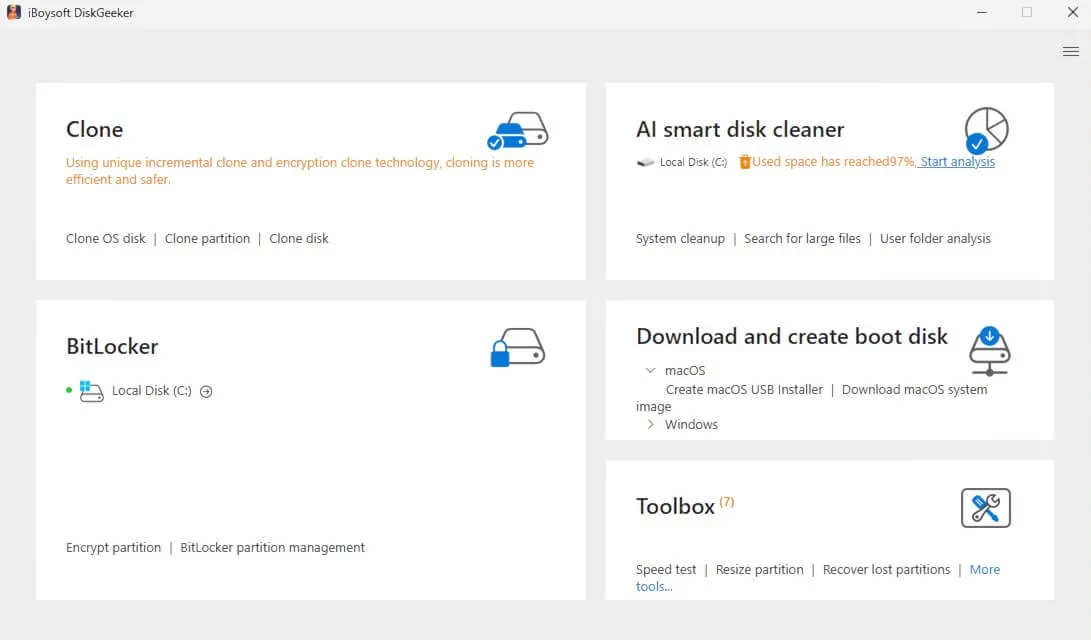
- Select your USB drive as the target disk.
- Click on "Windows 10" to expand the detailed info, and then select the version number, language, system architecture, and the Home edition.
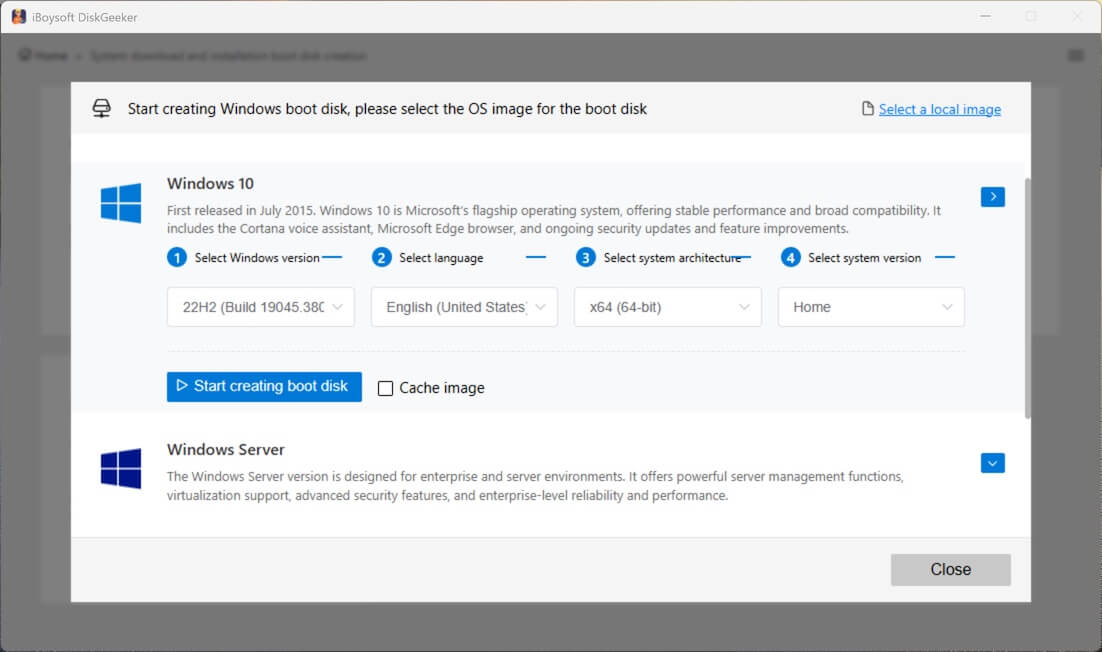
- Click "Start creating boot disk."
Wait for a moment to let the tool download the Windows 10 Home ISO and automatically create a Windows 10 Home bootable USB installer.
Windows 10 Home minimum system requirements
Check the minimum system requirements for Windows 10 Home ISO 64-bit and 32-bit before installing it. This is to reduce your chance of failure.
| Components | Windows 10 Home ISO 64-bit | Windows 10 Home ISO 32-bit |
| Processor (CPU) | 1 GHz or faster processor / SoC (compatible with x64, 64-bit capable) | 1 GHz or faster processor / SoC (compatible with x86) |
| RAM (Memory) | 2 GB | 1 GB |
| Installation Storage | 20 GB free space | 16 GB free space |
| Graphics | DirectX 9-capable GPU with WDDM 1.0 driver | DirectX 9-capable GPU with WDDM 1.0 driver |
| Display | 800 × 600 resolution | 800 × 600 resolution |
| Firmware | BIOS or UEFI (Secure Boot supported but not required) | BIOS or UEFI (Secure Boot supported but not required) |
Install Windows 10 Home (Step-by-step)
Once you've created the Windows 10 Home bootable USB and confirmed your PC meets the system requirements, follow these steps to perform a clean install, system upgrade or downgrade, or boot an unbootable computer…
- Plug in the Windows 10 Home bootable USB installer.
- Restart your PC and press the boot key (usually F12, Esc, F2, or Del, depending on your motherboard) to open the Boot Menu (BIOS).
- In BIOS, set USB as the first boot device.
- Once Windows Setup loads:
Choose Language, Time, and Keyboard.
Click Next → Install Now. - Enter your product key, or click I don't have a product key.
Then select Windows 10 Home when prompted.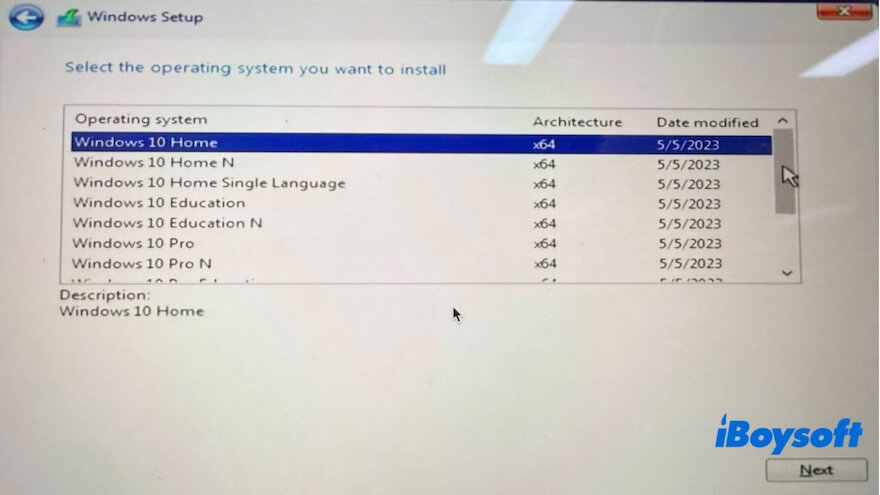
- Choose Custom: Install Windows only (Advanced).
- Select the target drive/partition:
(Optional) Delete existing partitions for a clean install.
Click Next. - Wait while Windows copies files and installs (your PC will restart several times).
- Complete the setup:
Create a user account
Choose privacy settings
Connect to Wi-Fi
FAQs about Windows 10 Home ISO download
- QWhere can I get free Windows 10 ISO?
-
A
You can download Windows 10 ISO for free from Microsoft's official website, as well as sources like Internet Archive or other third-party sites. However, a valid product key is required to activate Windows and unlock full personalization features. Without activation, Windows will still run normally but will display a watermark and restrict some customization options.
- QIs it legal to download Windows 10 ISO for free?
-
A
Yes, downloading Windows 10 ISO from the official Microsoft website is free and legal. However, downloading Windows 10 ISO from other sources that claim no activation is required is illegal and unsafe.
By default, installing Windows 10 requires a paid product key to unlock all features; however, even without one, you can still install the Windows 10 ISO for free. The defect is that you can only use a limited number of features in Windows 10.