Numerous Mac cleaners are filled with Mac cleaners market with different features and strengths, and it's easy to pick up a solid CCleaner alternative to speed up your Mac's performance. This post also compares 4 top-recommended alternatives to CCleaner for you to choose from.
Top 4 Alternatives to CCleaner Comparison Table
| Overall Score (out of ten) | Supported macOS | Price | Operability | Other Highlights | |
| iBoysoft DiskGeeker | 9 | macOS 10.13 -macOS 26 | $39.95 for year-subscription | Easy | Disk repairing, BitLocker encrypted drive unlocking, malware guard, disk clone, etc. |
| iBoysoft Cleaner | 9 | macOS 11 -macOS 26 | $9.99 for year-subscription | Easy | N/A |
| BleachBit | 7 | macOS 10.12-macOS 10.15 | Free and open-source | Difficult (terminal install and operation) | N/A |
| CleanMyMac | 8 | macOS 11-macOS 15 | $39.95 for year-subscription | Easy | Disk maintanence |
Note: All Mac optimizers are based on our real test. We selected 4 best disk cleaners and thoroughly evaluated them on price, performance, cleaning ability, security, and stability.
| 🔢 Number of tested tools | 4 |
| ⌛ Overall test time | 1 weeks |
| 💻 Device we tested on | MacBook Air (13-inch, 2020), MacBook Pro (14-inch, 2024, M4) |
| 💻 macOS version we tested on | 15.0 Sequoia |
| 💰 Average cost | $20 |
iBoysoft DiskGeeker
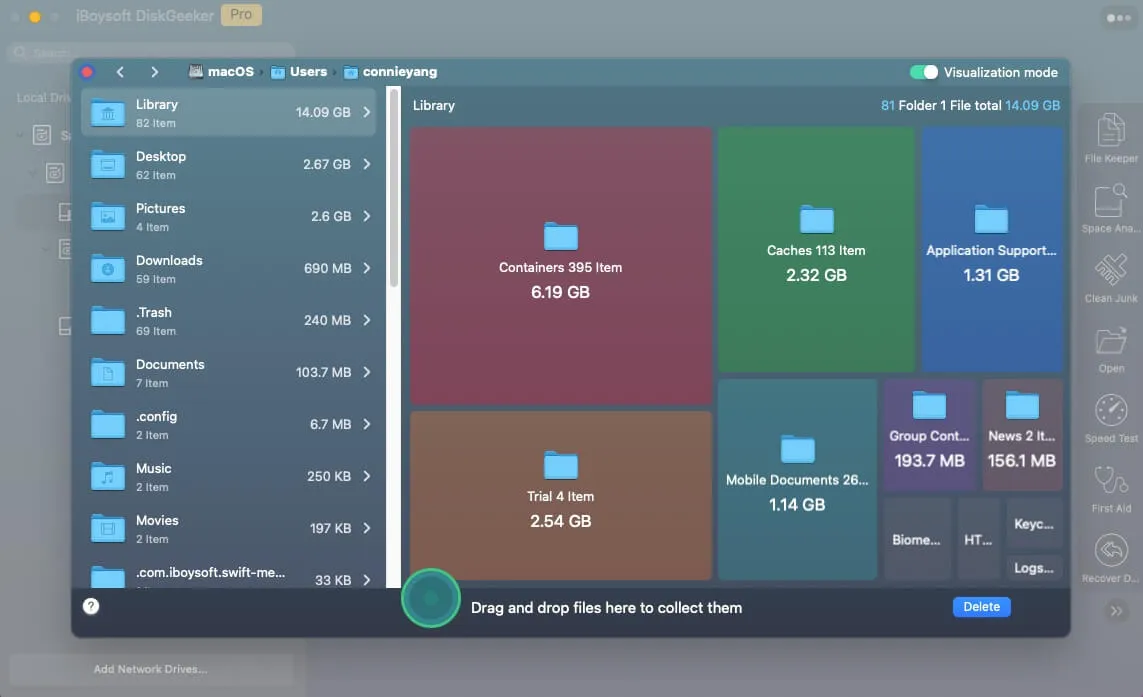
iBoysoft DiskGeeker is a powerful Mac disk space analyzer that helps you quickly identify what's taking up space on your Mac. It scans your hard drive and displays files and folders in a visual map, with larger items shown more prominently. This makes it easy to find and remove space-hogging files and free up Macintosh HD storage.
It detects system caches, user logs, app caches, downloads, app packages, extensions, third-party drivers, launch helpers, support files, and more.
Files are listed with their names, modification dates, and sizes, helping you decide what to remove to reclaim disk space, improve Mac performance, and reduce the risk of system crashes.
- Pros:
- Scan for every file and folder on Mac thoroughly
- Remove unwanted files from your Mac with a few clicks
- Support macOS from Tahoe to High Sierra
- Fully compatible with Apple Silicon Macs
- Manage USB drives, flash drives, external hard drives
- Back up files on APFS volumes (Macintosh HD) to avoid data loss
- Support disk clone
- Do not sell user data
- Cons:
- No support by phone
How to use iBoysoft DiskGeeker to clean junk on Mac:
Step 1: Free download and install iBoysoft DiskGeeker on your Mac.
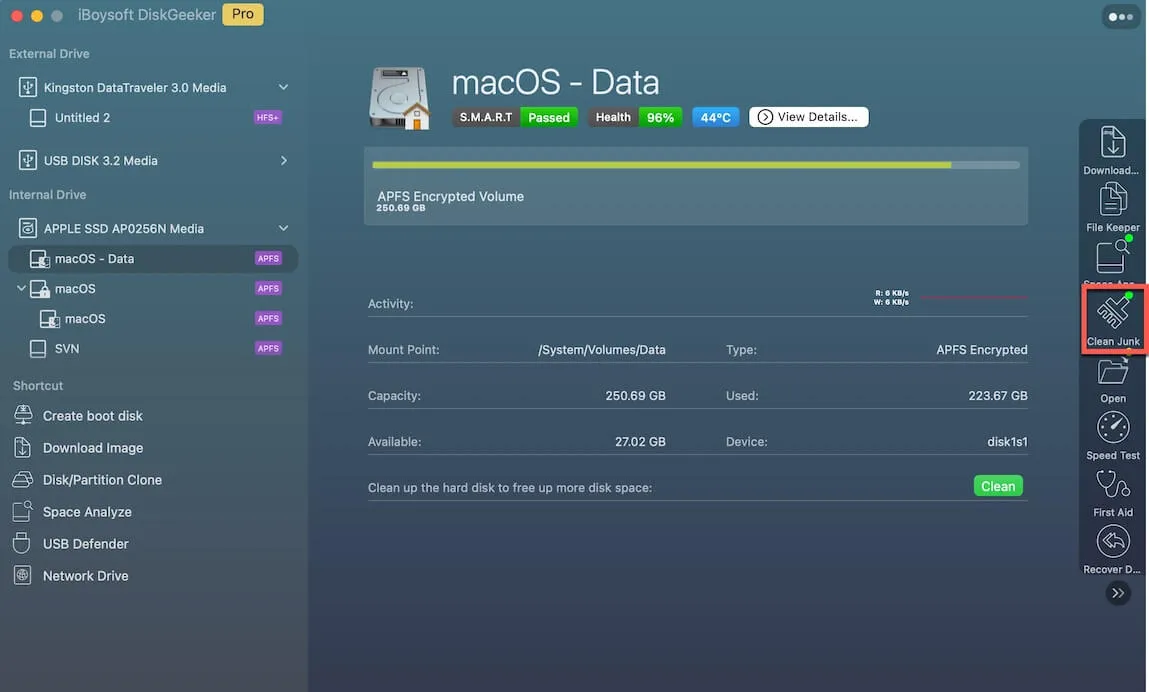
Step 2: Select a volume from the startup disk usually labeled as macOS - Data, macOS, or Macintosh HD, or Macintosh HD - Data.
Step 3: Click "Clean Junk" from the toolbar.
Step 3: Select a folder from the left panel and select the files/folders you want to delete.
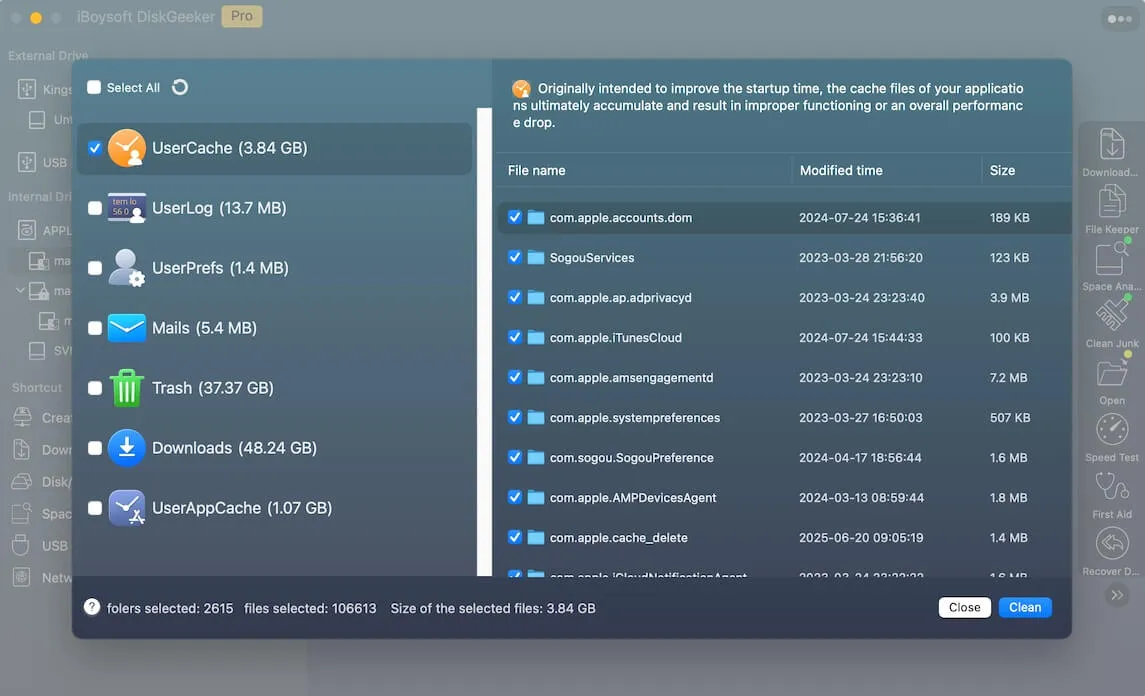
Step 4: Click "Clean" and then click "Ok". You will fail to clean certain files if you don't have permission to do so.

Our Overall User Experience
Once you download and install iBoysoft DiskGeeker on Mac, we can let it scan the whole hard drive directly. It scans the hard drive bit by bit and sector by sector for every single file, including the hidden files on Mac, in a fast and stable manner.
Then we access the folder it gives, including UserCache, UserLog, Trash, Downloads, and UserAppCache with the memory it takes up in the bracket, to clean the useless files. It will ask you to confirm before the clean since the files can't be recovered.
What amazes me the most is that it not only includes the disk cleaning feature, but also the functions to read/write BitLocker drive and NTFS drive on Mac, encrypt and unlock disks by using FileVault or BitLocker, prevent virus attacks via setting USB Defender, and more.
Full Review
With this software, you can clean junk files on a Mac hard drive with ease. Just click the Junk Clean button, and then it gathers all files and presents you the scanning result, you can click each folder to select the files you don't desire, and then click the Clean button to confirm your action.
After that, iBoysoft DiskGeeker returns to a super-fast machine with incomparable performance and running speed.
Editor's Review: iBoysoft DiskGeeker is an all-in-one disk management tool with rich features. It works as a one-stop BitLocker solution to manage and use BitLocker drives on Mac. It's able to encrypt and unlock drives with BitLocker/FileVault encryption method, read and write NTFS drives, manage external disks and network drives, check and diagnose disk errors, clone disks, clean drives, and so on. - MacUpdate.com
Surprised by the junk clean feature of iBoysoft DiskGeeker? Then share it with more people!
iBoysoft Cleaner
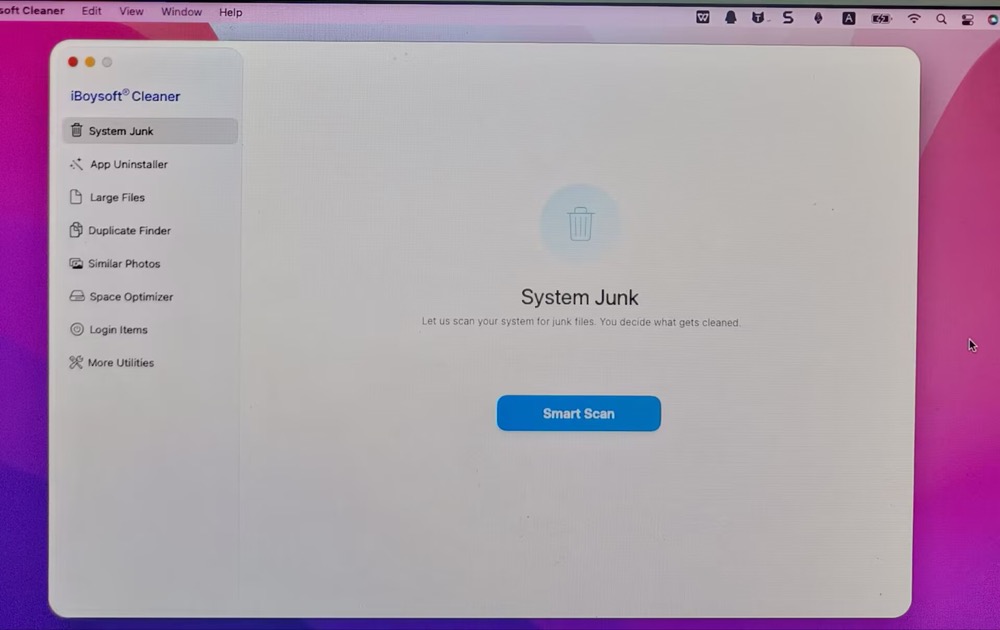
iBoysoft Cleaner is a cover-all Mac disk space optimizer and cleaner. It can scan your whole Mac hard disk, user folder, or specific folder to analyze your space usage, and meanwhile provide you with a variety of cleanup tools, including clearing system junk, uninstalling apps, removing large/duplicate files, deleting similar photos, managing login items.
This CCleaner alternative is also a strong performer to optimize your Mac performance via RAM memory boost, Spotlight index, DNS reset/refresh, and file shredder.
- Pros:
- AI smart analyze Mac disk space
- Scan the whole disk to find cleanable data
- Support clearing system junks, uninstalling apps, deleting large/duplicate files, etc.
- Support macOS from Tahoe to Big Sur
- Fully compatible with Apple Silicon Macs
- Do not collect your data
- Cons:
- No support by phone
How to use iBoysoft Cleaner on Mac?
Step 1: Download and open iBoysoft Cleaner on your Mac machine.
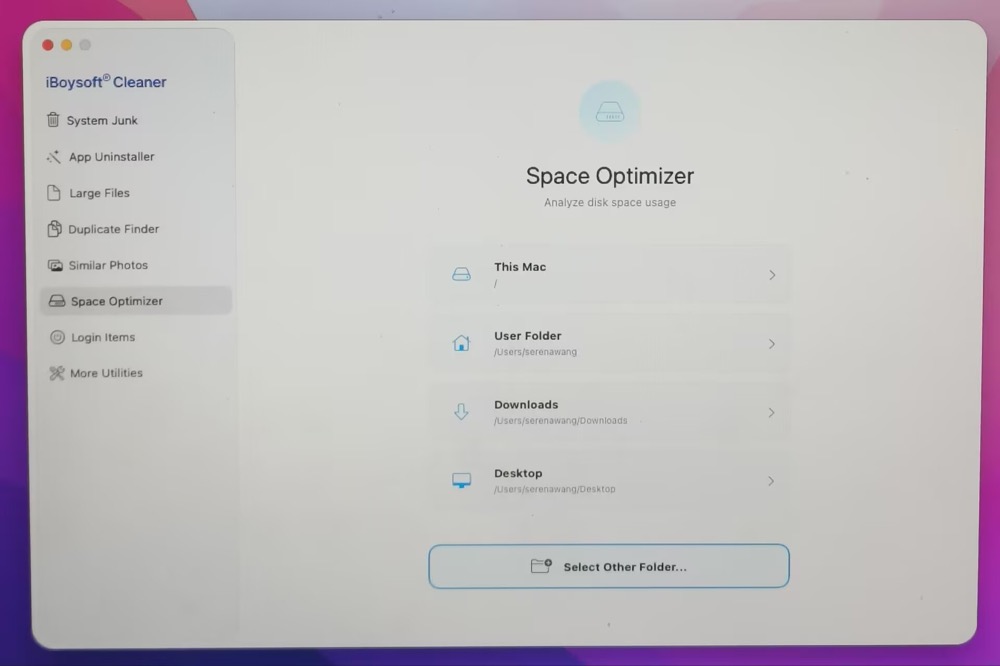
Step 2: Click Space Optimizer > choose the target drive or folder. Here I choose "This Mac".
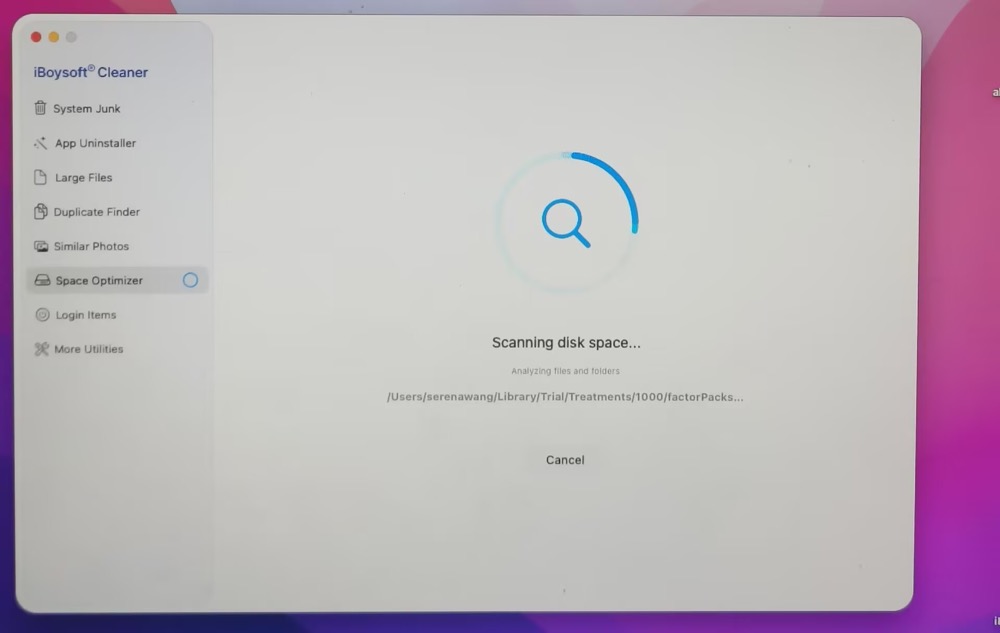
Step 3: Wait for this tool to finish the scanning.
Step 4: I can visualize the disk analysis via a directory tree, which helps me see what is using my disk space at a glance. Applications consume 26.84 GB, system folder takes up 17.6 GB and Users occupy 10.57 GB.
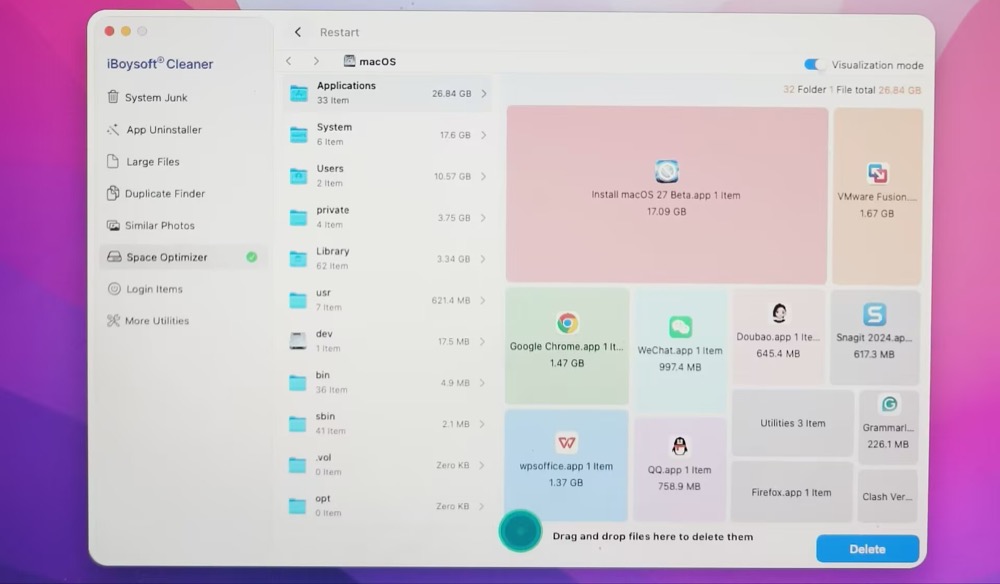
I open my Applications folder and have no idea which one is safe to delete. Unluckily, this CCleaner alternative features AI analysis function. Just click the colorful button (shown as below) to analyze the specific file.
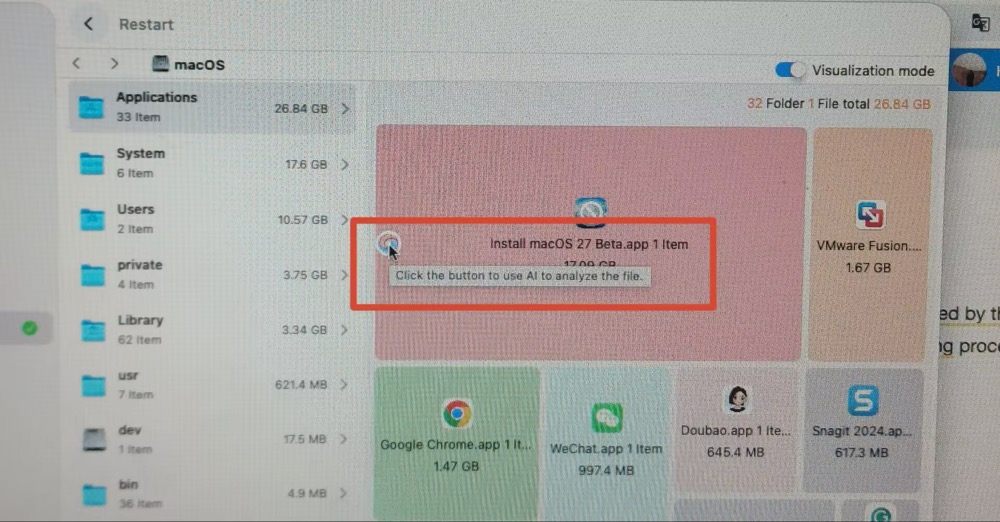
Step 5. Choose the folder or files and drag them to the green button in the middle of the interface to delete them.
Our Overall Use Experience
This handy Mac junk cleaner works fast in scanning for useless files hiding on the partition, volume, or hard drives, and then toggle on the files it regards as junk for cleaning. If you want to remove the files from the will-be-removed list, you need to uncheck them manually, which takes a few seconds.
It never makes itself burdensome for the hard drive space with its small package size (2.7 MB), occupying a little bit of space. Although small, it exerts a powerful cleaning function on any Mac machine.
Full Review
iBoysoft Cleaner is smaller than CCleaner, which takes up a little space on the Mac hard drive and never worsens its performance. With a strong official team, it is safe and secure to use on the basis that it never ever collects and steals users' data.
It is suitable to place on any Mac lineup for launching to deal with the accumulation of files at any time you need.
BleachBit
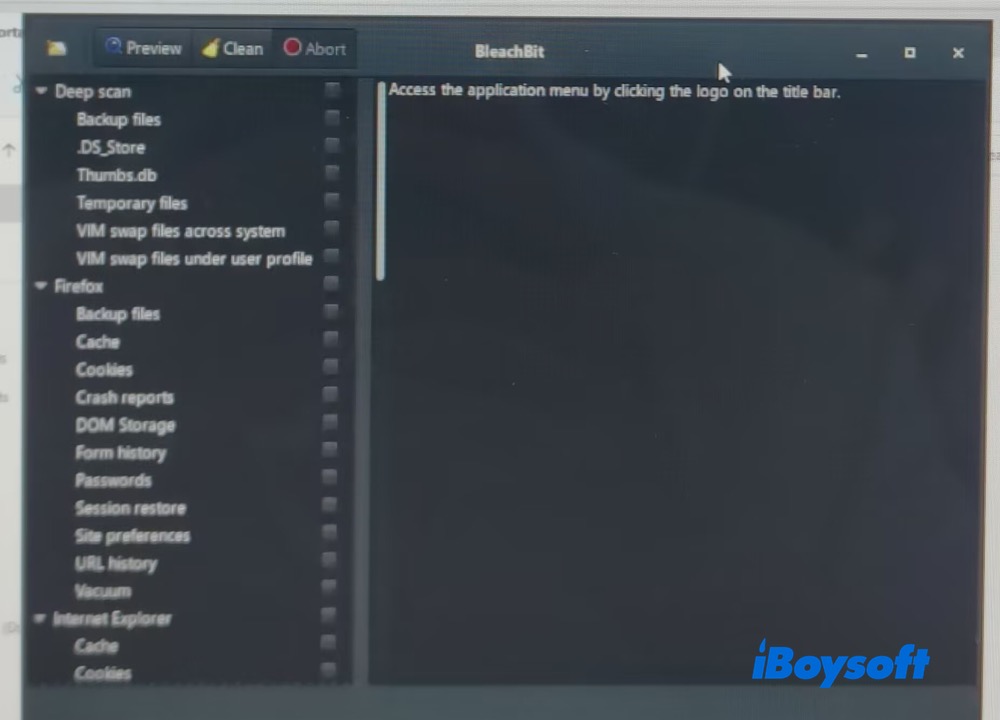
BleachBit deletes unnecessary files such as cache and cookies to enhance privacy and disk space efficiency on Mac, Linux, and Windows. It supports numerous applications including web browsers, office suites, and multimedia tools.
It's free and open-source software with very robust cleaning functionality, helping you clean system files and duplicate files in Finder, free caches, delete cookies, clear internet histories, shred temporary files, delete logs, discard junk, clean thousands of applications including Firefox, Adobe Flash, Google Chrome, Opera, and more.
- Pros:
- Free and open-source
- Clean duplicate files and applications
- Portable and ad-free
- Multiple languages
- No tracking and no selling of user data
- Cons:
- Support for limited Mac OS X
- Command-line operation
- Non-visual webpage
- No intuitive user interface
- Stop updating to support for macOS after 2020
- No install package
- Necessary large of development tools installation before installing it
How to use BleachBit to clean Mac junk:
Step 1: Install HomeBrew on your Mac. Skip this step if you have HomeBrew installed already.
Step 2: Install BleacnBit in HomeBrew by executing this command line:
brew install bleachbit
Step 3: Open Terminal on your Mac and launch BleachBit by typing and hitting Enter:
bleachbit
Step 4: Select cleaning options. The command line will present a list of cleaning options for different applications and system areas.
Step 5: Use the appropriate flags or keywords to choose which items you want to clean.
Our Overall User Experience
BleachBit is a portable archive so it's unnecessary to install it, on top of that, you can even run it from a USB hard drive. It comes with a relatively simple interface and a handy clean function.
However, it stopped supporting macOS released after 2020, including macOS Big Sur, macOS Monterey, macOS Ventura, macOS Sonoma, and macOS Sequoial. Moreover, it has no install package so it's kind of a hard and tricky mission to use it on your Mac, let alone have to use it by terminal command lines.
Full Review
BleachBit is a wonderful free Mac disk cleaner that takes all junk and caches from Mac away with ease. While it's more suitable for advanced users who have some knowledge of terminal command lines. And if you're running macOS released after 2020, it's a pity that it offers no support.
But if you're running a Mac with Mac OS X installed and have some understanding of commands, you can give this simple and handy software a try!
Editor's Review: BleachBit emerges as a strong alternative to CCleaner, appreciated for its open-source nature, robust cleaning capabilities, and absence of ads. Users highlight its multiplatform support and privacy focus. While BleachBit lacks some features of CCleaner and has limitations such as not cleaning multiple user profiles or system registries, it stands out for its efficiency, CLI scripting options, and suitability for Linux. Concerns regarding CCleaner focus on bloat, ads, and reduced functionality after its acquisition. - AlternativeTo
CleanMyMac
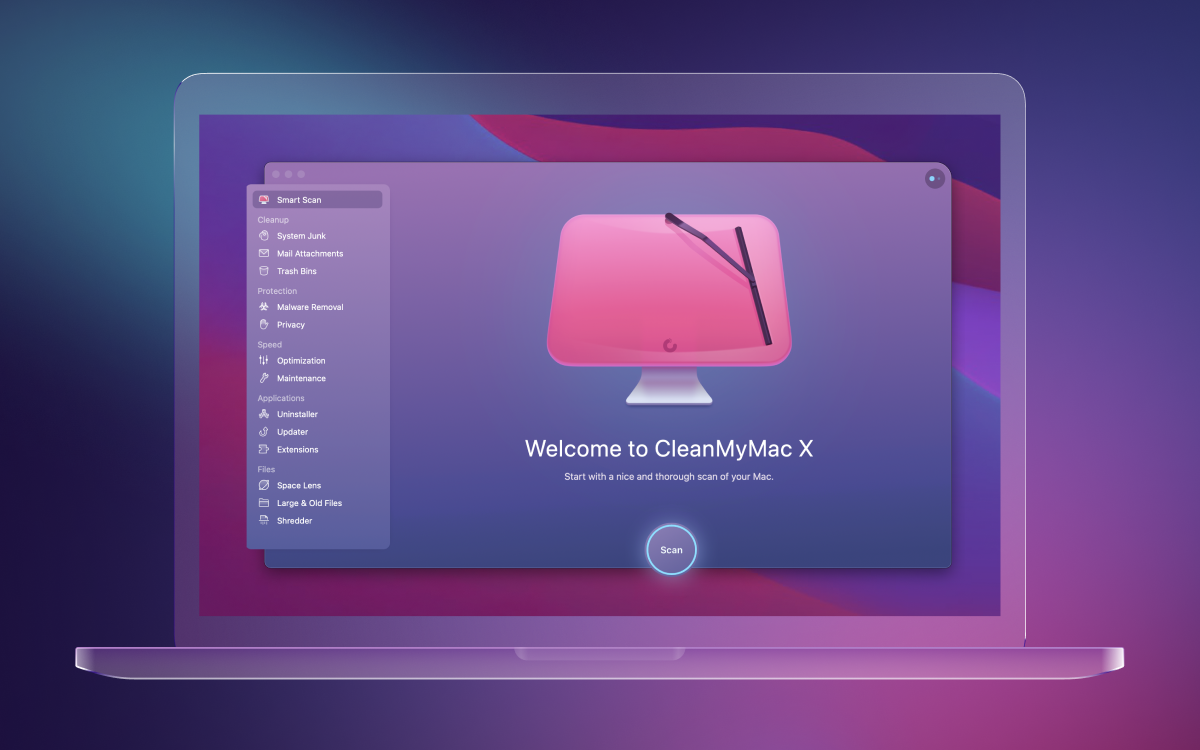
CleanMyMac is a macOS maintenance and optimization utility developed by MacPaw, first released in 2008. The software is designed to optimize system performance by removing unnecessary files and managing disk space on Mac products.
CleanMyMac offers features aimed at maintaining and optimizing macOS systems. It combines antivirus protection with tools for cleaning disk space, protecting user privacy, optimizing performance, updating applications, uninstalling software, and preventing malware and adware. The software's malware removal functionality is powered by MacPaw's proprietary Moonlock Engine.
It can clear unused system files, log files, and temporary files. On top of that, the software provides optimization tools such as maintenance scripts, disk repair functions, and options for resetting system indexes and databases.
- Pros:
- Intuitive GUI interface
- Clean system database and system logs
- Prevent malware and adware
- Optimize Mac performance
- Disk maintenance
- Cons:
- Limited free trial
- Potential for data loss
- Pretty expensive when compared with others
- No support for macOS before 11 Big Sur
- Takes up 320 MB of memory space of the hard drive
How to use CleanMyMac to remove junk:
Step 1: Download CleanMyMac and purchase the preferred CleanMyMac subscription.
Step 2: Open the app on your Mac.
Step 3: Go to My Clutter and click Scan > Review All Files > Large & Old Files.
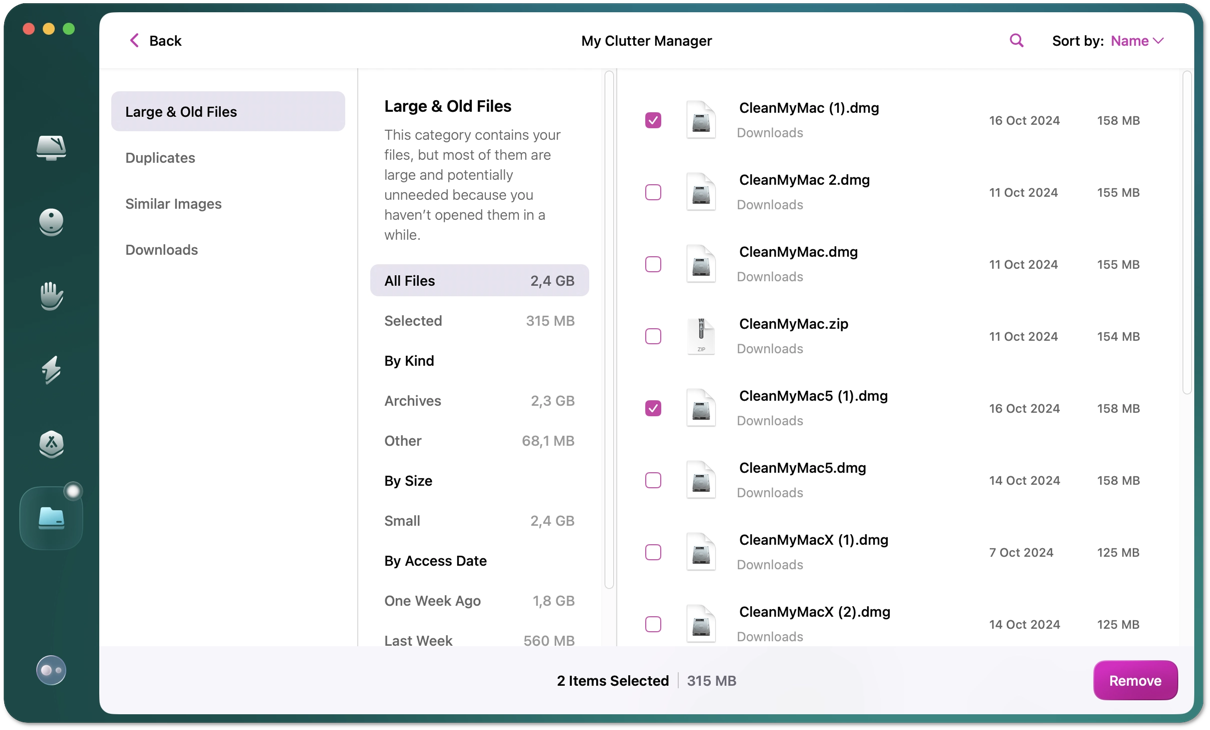
Step 4: Select what to clean, and then click Remove.
Our Overall Use Experience:
CleanMyMac is quite wonderful in scanning for old and large files hiding on a Mac hard drive, and then it removes them all in one quickly after receiving your removal intention. However, it takes up larger hard drive space than it states (320MB), so If you have less space available, consider twice before downloading it since it generates user logs and caches for sure.
Moreover, its advanced features are available only through a subscription, which costs $39.95 for one year for one Mac.
Full Review:
CleanMyMac is a Mac-only software designed to help clean up your Mac in various ways, including uninstalling software, fixing permissions, removing files, and much more. With too many old and large files on the Mac hard drive, you can rely on it to restore a clean and good-performance machine. Want another tool? Check: CleanMyMac free alternatives.
Editor's Review: CleanMyMac X is regarded as a malware removal tool, Mac optimization tool, file shredder, and mail attachment remover and has serviced users worldwide. You can rest assured of using it to help you tidy up your Mac and speed up the performance. - iBoysoft.com
Final words
No matter what reason urges you to stop using CCleaner, it's never the end of the Mac disk cleaning mission. So, we select the 4 widely used alternatives to CCleaner and test them comprehensively, then users can pick one software that fits the most for further drive cleaning missions on the Mac machines.
FAQs
- Q1. What is the equivalent or better app for CCleaner in Mac?
-
A
The best overall and more advanced equivalent to CCleaner on macOS is iBoysoft Cleaner. It offers a polished interface, disk space scanning, system junk removal, app uninstaller, large/duplicate files clear, RAM memory release and DNS refresh.
- Q2. Any free open-source alternatives to CCleaner for Mac?
-
A
BleachBit and OnyX are both free open-source CCleaner alternatives to scan your Mac and clear system junk, caches, logs, etc.