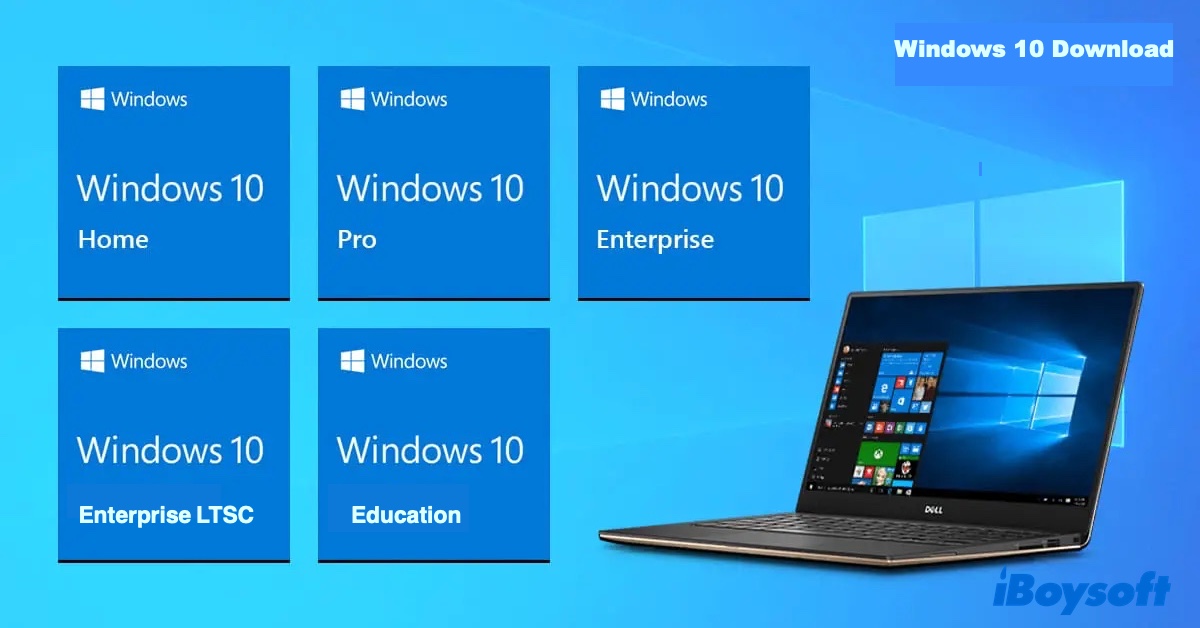
Windows 10 is a popular Windows operating system available for download for free. But Microsoft only provides a multi-edition Windows 10 ISO file for 64-bit or 32-bit PCs. If you're downloading it on a Windows PC, it forces you to download the Media Creation Tool first instead of a direct download. (Want to download Windows 10 ISO without Media Creation Tool?)
This article helps you download all editions of Windows 10 for free, including Windows 10 Enterprise, Windows 10 Enterprise LTSC, Windows 10 Pro, Windows 10 Enterprise LTSC, Windows 10 Home, and Windows 10 Education. Whether you want to download Windows 10 Pro for USB or get Windows 10 Home for PC, it has you covered.
Windows 10 download: Enterprise/Pro/Home/Education ISO
If you need a Windows 10 ISO downloader that lets you download the original Windows 10 installer of any editions and versions, iBoysoft DiskGeeker for Windows is the one.
It has a library of Windows ISO files, including Windows 10 Pro, Windows 10 Enterprise, Windows 10 Home, and Windows 10 Education ISO files available in every Windows 10 update (22H2, 21H2, 21H1, 20H2, 2004, 1909, 1903, 1809, 1803, 1709, and 1703).
Whether you want the 64-bit Windows 10 Pro 22H2 ISO file or the 64-bit Windows 10 Enterprise 22H2 ISO file, it has what you need. In addition, it allows you to create a Windows 10 bootable USB installer in a few clicks. If your goal is to make Windows 10 installation media, it can save you a lot of time.
To download Windows 10 ISO 32/64-bit full version for PC or USB:
Step 1: Download and install iBoysoft DiskGeeker for Windows.
Step 2: Open Download and create boot disk > Download Windows system image.

Step 3: Tap on Windows 10.

Step 4: Select the latest Windows 10 version 22H2, or an earlier one.
Step 5: Choose a language.
Step 6: Pick the system architecture (64-bit or 32-bit) of the Windows PC where Windows 10 will be installed.
Step 7: Choose a Windows 10 edition, such as Home, Pro, Education, or Enterprise.
Step 8: Click the Get button and save the Windows 10 image file.
Step 9: Choose the location where you want to save the Windows 10 ISO file. If you're trying to get the Windows 10 download for USB, select your USB drive.
Tips: If you want to download the Windows 10 ISO image to create a bootable USB installer, connect an external drive with more than 10 GB of free space to your PC and then choose "Create Windows USB Boot Disk" in Step 2.
This tool is convenient, right? Share the tool to help others download Windows 10 ISO for PC!
Windows 10 Enterprise download (64-bit & 32-bit)
Windows 10 Enterprise is designed for medium- to large-sized organizations and builds on the Pro version with even more advanced management and security features, including AppLocker, Device Guard, and granular controls over Windows Updates.
It's often used by IT departments in large corporations that need centralized control over many installations and enhanced enterprise-level security.
Here are the direct links to download Windows 10 Enterprise ISO for USB/PC:
Windows 10 Enterprise ISO Download 64-bit (4.2 GB)
Windows 10 Enterprise Download ISO 64-bit RTM (3.7 GB, the base version without any updates)
Windows 10 Enterprise Download ISO 32-bit RTM (2.7 GB, the base version without any updates)
Windows 10 Enterprise LTSC download (64-bit & 32-bit)
Windows 10 Enterprise LTSC (Long-Term Servicing Channel) is a specialized version of Windows 10 designed to provide a static, secure, and predictable operating system over a long period.
Unlike standard Windows 10 editions that receive semi-annual feature updates, LTSC only receives security updates for 5 to 10 years. Notable LTSC releases include 2015 (originally LTSB), 2016 (LTSB), 2019 (LTSC), and 2021 (LTSC).
It's a tool for a specific job and not intended for general-purpose use across most or all PCs in an organization. It's recommended for PCs that handle a single critical task, such as computers used with medical equipment, Air traffic control devices, POS terminals, or ATMs.
Here are the links to download Windows 10 Enterprise LTSC ISO for USB/PC: (source: archive.org)
Windows 10 Enterprise LTSC 2021:
Windows 10 Enterprise LTSC 2021 Download (64-bit) - 4.6 GB
Windows 10 Enterprise LTSC 2021 Download (32-bit) - 3.2 GB
Windows 10 IoT Enterprise LTSC 2021:
Windows 10 IoT Enterprise LTSC 2021 download (64-bit) - 4.5 GB
Windows 10 IoT Enterprise LTSC 2021 download (ARM64) - 4.1 GB
Windows 10 Enterprise LTSC 2019:
Windows 10 Enterprise LTSC 2019 Download (64-bit) - 4 GB
Windows 10 Enterprise LTSC 2019 Download (32-bit) - 2.8 GB
Windows 10 Enterprise LTSC 2016:
Windows 10 Enterprise LTSC 2016 Download (64-bit) - 3.3 GB
Windows 10 Enterprise LTSC 2016 Download (32-bit) - 2.5 GB
Windows 10 Enterprise LTSC 2015:
Windows 10 Enterprise LTSC 2015 Download (64-bit) - 3.4 GB
Windows 10 Enterprise LTSC 2015 Download (32-bit) - 2.5 GB
Share the links to download Windows 10 Enterprise LTSC!
Windows 10 Pro ISO download (64-bit & 32-bit)
Windows 10 Pro (Professional) includes all the features of the Home edition, plus additional capabilities oriented towards professionals and small business environments, such as BitLocker encryption, Remote Desktop access, etc.
It's recommended for professionals, IT administrators, small business owners, or whoever needs robust security, management, and connectivity features for their work environment.
Here are the links to download Windows 10 Pro ISO files for USB/PC 100% free:
Original Microsoft Windows 10 Pro ISO files (x86/x64):
Windows 10 Pro 64-bit Free Download Full Version (4.6 GB)
Windows 10 Pro 32-bit Free Download Full Version (3.3 GB)
Preactivated Windows 10 Pro free download:
Windows 10 Pro 64-bit preactivated ISO download (3.3 GB)
Windows 10 Pro 64-bit preactivated ISO download (3.4 GB)
Windows 10 Pro (Lite Edition):
Windows 10 Pro 64 bits 1909 Build 18363.476 (Lite Edition) (1.1 GB)
Windows 10 Pro for Workstations:
Windows 10 Pro for Workstations x64 Lite (3.1 GB)
Windows 10 Pro for Workstations x64 Download RAR (4 GB)
Windows 10 Pro N:
Windows 10 Pro N ISO Download 64-bit (3.5 GB)
Windows 10 Pro N ISO Download 32-bit (2.7 GB)
If you need the manufacturer's version (OEM) of Windows 10 Pro ISO files:
Windows 10 Pro ISO Download 64 bits Sony VAIO OEM (3.9 GB)
Windows 10 Pro ISO Download 32 bits Sony VAIO OEM (3.1 GB)
This is a specific version tailored for Sony to install Windows 10 version 1803 on their VAIO line of laptops and desktops. If you own a Sony VAIO computer, you can download this version.
Windows 10 Pro Free Download 64-bit Dell OEM (5.9 GB)
This Win 10 Pro ISO file is used to install the operating system on a Dell computer.
Share this article to benefit others who need to download Windows 10 Professional!
Windows 10 Home ISO download (64-bit & 32-bit)
Windows 10 Home is the standard, consumer-focused edition. It's recommended for average home users, students, and casual gamers who don't require advanced business management or security tools.
Here are the links to download Windows 10 Home ISO images for USB/PC 100% free:
Original Windows 10 Home ISO:
Windows 10 Home Download 64-bit (5.1 GB)
Windows 10 Home product key: YTMG3-N6DKC-DKB77-7M9GH-8HVX7
Windows 10 Home Download 32-bit (4.2 GB)
Original Windows 10 Home RTM ISO:
Windows 10 Home Single Language RTM 64-bit (3.3 GB)
Windows 10 Home Single Language RTM 32-bit (2.5 GB)
Share the links for Windows 10 Home free download!
Windows 10 Education Download for PC/USB (64-bit & 32-bit)
Windows 10 Education is a variant of the Enterprise edition tailored for academic environments. It's commonly used by students, teachers, and school IT admins in schools, colleges, and universities.
Here are the links to download Windows 10 Education ISO files for USB/PC:
Windows 10 bootable USB download (64-bit & 32-bit)
If you're downloading the Windows 10 Pro, Enterprise, LTSC, Home, or Education ISO file to create Windows 10 installation media, you can simply use iBoysoft DiskGeeker for Windows. In addition to letting you download the Windows 10 ISO file, it also allows you to create a bootable USB installer from the Windows 10 ISO file quickly.
Follow the steps below to create the Windows 10 USB installer:
- Open iBoysoft DiskGeeker for Windows.
- Click Download and create boot disk > Create Windows USB Boot Disk.
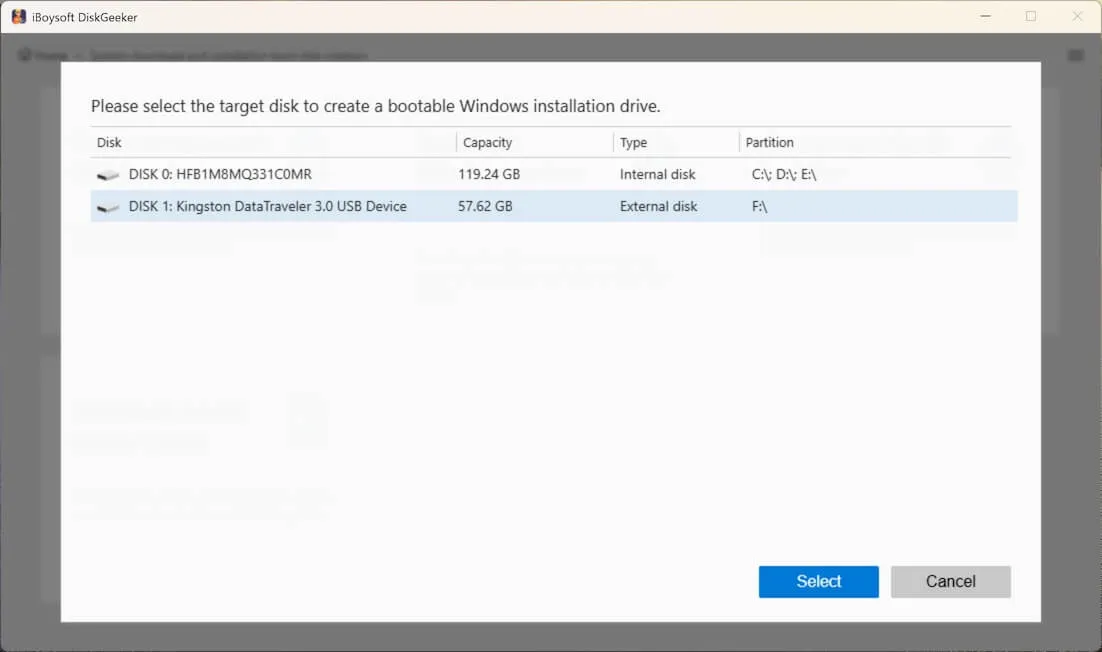
- Insert a USB flash drive or any external storage device with at least 10 GB of free storage into your PC. (Make sure this disk is backed up before proceeding.)
- Choose the USB drive and click Select.
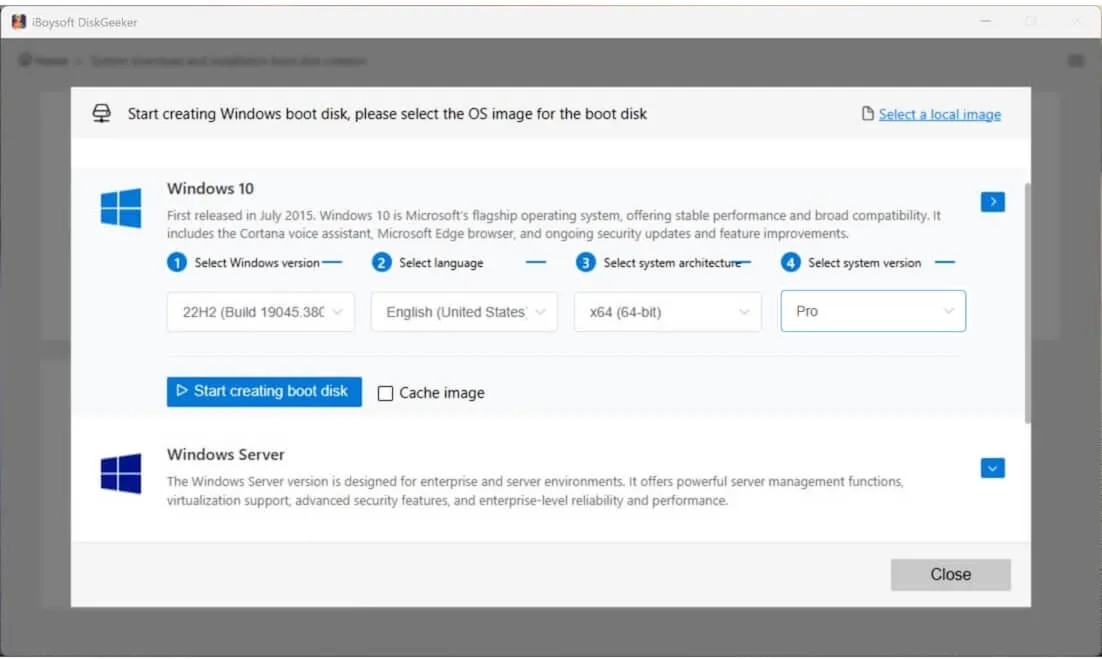
- Click on Windows 10, then choose the needed version, language, 32-bit or 64-bit, and the edition. For example, Windows 10 22H2 64-bit Pro.
- Click Start creating boot disk.
Wait a while, and then you'll get the Windows 10 download to USB!
Need Windows 11? Download Microsoft Windows 11 or the lightweight version: Ghost Spectre Windows 11 or Windows 11 LTSC.
FAQs about Windows 10 download ISO (all versions)
- QHow to download Windows 10 to USB?
-
A
If you're trying to download Windows 10 to a USB drive so that you can run the installer from the current OS, simply download the Windows 10 ISO file and choose the external USB drive as the destination.
If you're trying to create a Windows 10 bootable USB installer, use iBoysoft DiskGeeker for Windows, which will download the Windows 10 Pro, Home, Enterprise, or Education ISO file and automatically make a bootable USB installer.
- QCan I download Windows 10 for free?
-
A
Yes, you can download Windows 10 for free from Microsoft if you need the multi-edition ISO file or download a specific version from a free archive like archive.org.
- QCan I still download Windows 10 for free without a product key?
-
A
Yes, you can download Windows 10 for free without a product key because downloading Windows 10 is free whether you have a product key or not. Besides, the product key is only necessary for activating Windows 10.
- QCan you still upgrade to Windows 10 from Windows 7 for free?
-
A
Yes, you can totally upgrade to Windows 10 from Windows 7 for free. Simply go to Windows Update and install the available upates, provided that your PC is compatible with Windows 11.