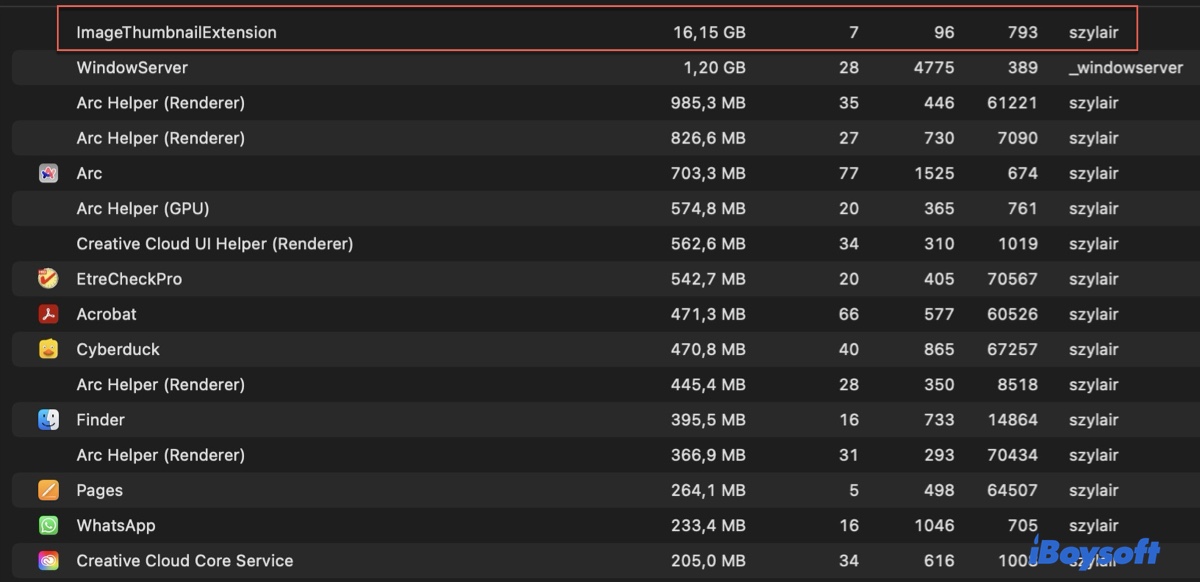
Sometimes, when you check Activity Monitor, you'll notice a process called ImageThumbnailExtension consuming a lot of CPU or memory usage. This may happen when the thumbnail of a downloaded picture doesn't show up in Finder or when copying or moving files hangs halfway.
If you're wondering what this ImageThumbnailExtension process is, this article has the answer.
What is ImageThumbnailExtension on Mac?
ImageThumbnailExtension is a system process, part of Apple's "Quick Look" technology. Its job is to generate the small preview images (thumbnails) you see for files in the Finder.
When you look at a folder of photos, documents, or videos in Icon View or Cover Flow View, you don't see the actual file—you see a small, cached preview image. ImageThumbnailExtension is the background worker that creates and manages these previews.
Share the information about ImageThumbnailExtension on Mac!
How to Fix ImageThumbnailExtension High CPU/memory usage?
If ImageThumbnailExtension is acting up in Activity Monitor, try the following fixes:
Fix 1: Force quit the ImageThumbnailExtension process
When ImageThumbnailExtension uses abnormally high CPU, you can force quit it in Activity Monitor by selecting it and clicking the x icon. Then choose "Force Quit" when a window pops up. Suppose the process continues to tax the CPU or memory heavily; try the next solution.
Fix 2: Delete the Thumbnail Cache
The system stores all thumbnails in a cache folder. If this cache becomes corrupted, it can cause ImageThumbnailExtension to utilize excessive CPU resources. Deleting it forces the system to rebuild all thumbnails from scratch.
- Open Finder.
- Press Cmd + Shift + G and enter this path: ~/Library/Caches/
- Locate the folder named com.apple.ImageThumbnailExtension and move it to the Trash.
- Press Cmd + Shift + G and enter this path: ~/Library/Caches/com. apple.finder/
- Move the QuickLook folder to the Trash.
- Empty the Trash.
- Reboot your Mac.
Fix 3: Update macOS
The final solution is to update your Mac operating system. Simply go to System Settings, then open General > Software Update and check for available updates. If there's an update available, install it.
Share the solutions to fix ImageThumbnailExtension High CPU/memory usage with others!
FAQs about ImageThumbnailExtension
- QWhat to do if thumbnails won't show up in Finder?
-
A
If thumbnails won't show up in Finder, you can relaunch Finder. Hold the Option key, then right-click on the Finder icon on the Dock and choose Relaunch.
- QHow do I open a thumbnail view in Preview?
-
A
Go to the View menu and select Thumbnails. Then a sidebar will appear on the left showing a small thumbnail for every page in the document.