MacCleaner Pro is a popular tool for cleaning and optimizing Mac systems, but it isn't the only option available.
Whether you're looking for a free alternative or a more feature-rich alternative to MacCleaner, there are plenty of excellent options to consider. We've tested and reviewed six of the top MacCleaner Pro alternatives, comparing their performance, features, ease of use, and potential drawbacks to help you find the right tool for your needs.
Top MacCleaner Alternatives Overview Summary
| Overall score | Full junk removal | Key features | Take much space | |
| Finder | ❌ | Manual file and cache management | ❌ | |
| iBoysoft Cleaner | ✅ | Clear junk, caches, logs, large files, duplicates, uninstall apps… | ✅ | |
| DaisyDisk | Sometimes | Visual disk space analysis | ✅ | |
| CCleaner | ❌ | Basic cleaning and privacy protection | ✅ | |
| iBoysoft DiskGeeker for Mac | ✅ | Disk space analysis, management and optimization | ❌ | |
| OnyX | ✅ | Advanced system maintenance and tweaks | ✅ |
Please share this useful table on social media for more Mac users to find the most suitable alternatives to MacCleaner Pro.
Note: To ensure an accurate and fair assessment of each MacCleaner Pro alternative, we selected six popular options, including Finder, a built-in macOS tool.
We thoroughly tested each one based on key criteria such as cleaning performance, user interface, ease of use, storage footprint, pricing and overall value, among other factors.
As a result, we tested all six MacCleaner Pro alternatives under real-world conditions, simulating everyday usage scenarios to objectively evaluate their performance and effectiveness.
| 🔢Number of Tools Tested | 15 tested, 6 selected |
| 💻Device We Tested | Mac mini, MacBook Pro, MacBook Air |
| 📖Tested macOS versions | macOS Sequoia, Sonoma, Ventura, Monterey |
| ⏰Average testing time | One day |
Finder
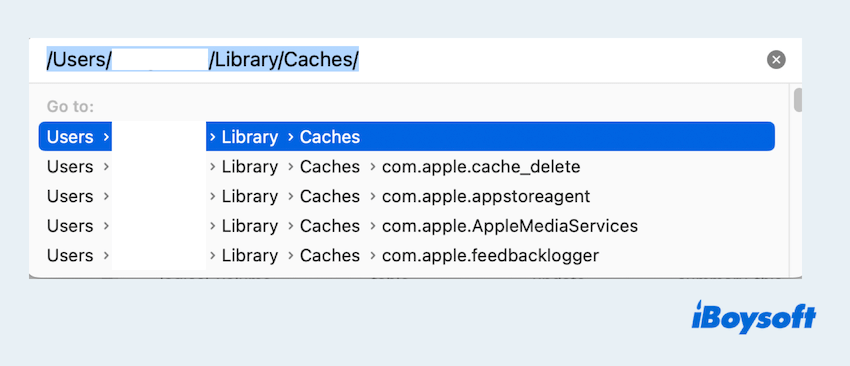
Mac Finder, macOS's default file manager, provides basic file organization and manual cleanup features. While it does not have a dedicated junk file cleaning function, users can leverage Finder to locate and delete unnecessary files, such as old downloads, duplicate files, and large unused documents.
- Pros:
- Free
- Per-installed on every Mac
- Cons:
- The manual process can be time-consuming
- Too many related data in the Library
- Lacks advanced cleaning features like cache and system junk removal
Overall reviews
You can easily find files and folders on your Mac with Finder, then move the known data to realize junk file cleanup. The Smart Folder can also filter and locate large or old files for deletion.
However, Finder's search function is slow and often inaccurate, making it difficult to locate files quickly. And the users can't find all junk data at once. And you can learn more about cleaning junk files on Mac.
Editor's Review: macOS Finder doesn't offer robust tools for organizing or cleaning up files, leading to cluttered storage. -medium.com
iBoysoft Cleaner
iBoysoft Cleaner is designed to help Mac users clean up junk files and optimize Mac's storage. This lightweight app is a comprehensive Mac cleaner to scan and clear system junk, caches, system components, logs, app cache, large files, duplicates, and uninstall apps to free up your Mac space to the utmost.
- Pros:
- Easy-to-use interface
- Cover-all cleanup options and visual disk analysis
- Auto-select system junks, app cache to clear
- Full-disk scanning to identify all cleanable files
- Resource-efficient disk scanning with minimal impact on RAM and CPU usage.
- Cons:
- Not support for phones
Overall reviews
iBoysoft Cleaner is a well-rounded Mac cleaning app designed to find large and duplicate files, remove system junk, uninstall unwanted apps, and visualize and optimize disk space. It also offers useful system maintenance tools, allowing you to manage login items, free up RAM, securely shred files, flush the DNS cache, and rebuild the Spotlight index to help keep your Mac running smoothly.
Additionally, it's an Apple-trusted app available for safe download from the App Store. Uninstalling it is also quick and straightforward, making it accessible to users of all experience levels.
How to clean junk files with iBoysoft Cleaner
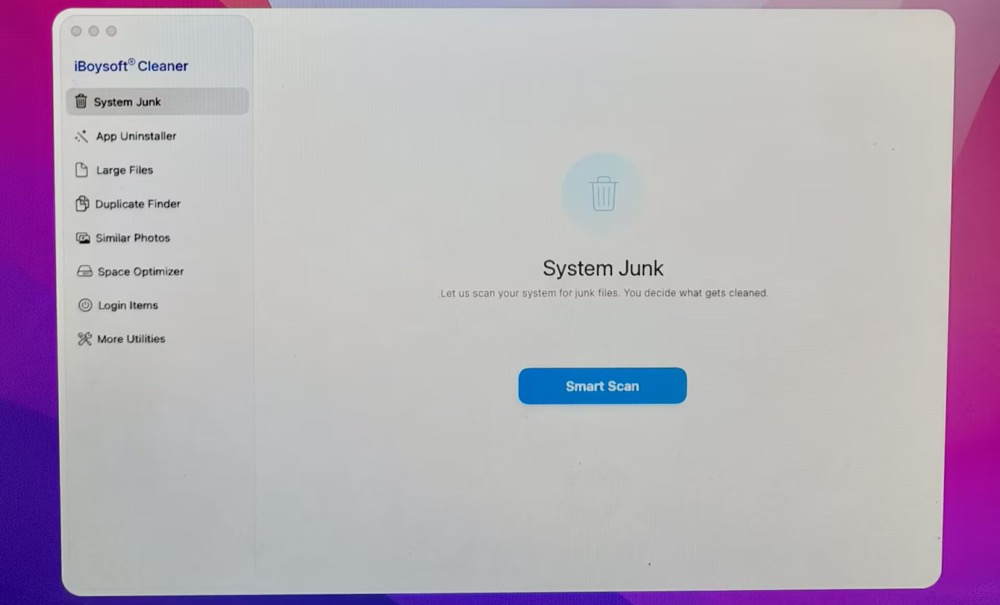
- Free download, install, and open iBoysoft Cleaner
- Click Grant Access to give it permission.
- Click Smart Scan in the System Junk section and wait for the completion of scanning.
- All the cleanable folders are classified on the scanning result window, including Downloads, Browser cache, System Junk, Trash, App Cache, etc. You can open the specific folder to check the scanned junk files.
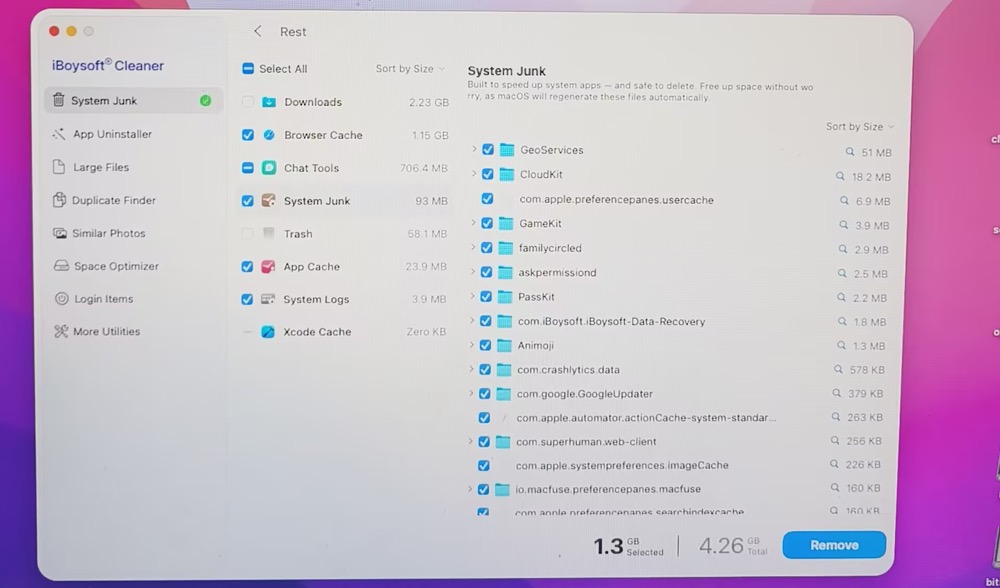
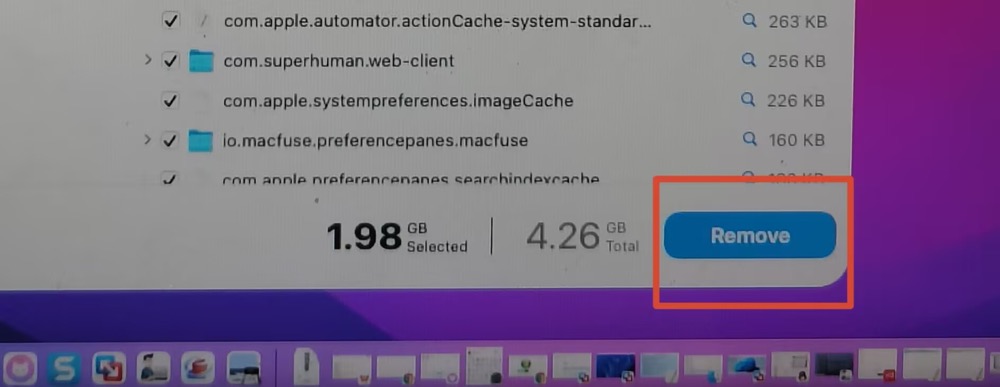
Safe-to-remove files are automatically selected, so you can simply click the Delete button to remove them all at once. If you're concerned about accidentally deleting important files, you can check the cleaner's on-screen description of each folder, as shown below, before proceeding.

5. Click the Remove button to delete the selected folders and files. Files in the Downloads folder are not selected automatically, so you can review them and decide which ones to keep and which to remove.
In addition to cleaning up system junk, you can use features such as the app uninstaller, large file finder, similar photo cleaner, and space optimizer to free up even more storage space when needed.
Editor's Review: The app is marketed as a solution for maintaining a clean and efficient Mac. Users should exercise caution when deleting system files to avoid unintended consequences. -appagg.com
DaisyDisk
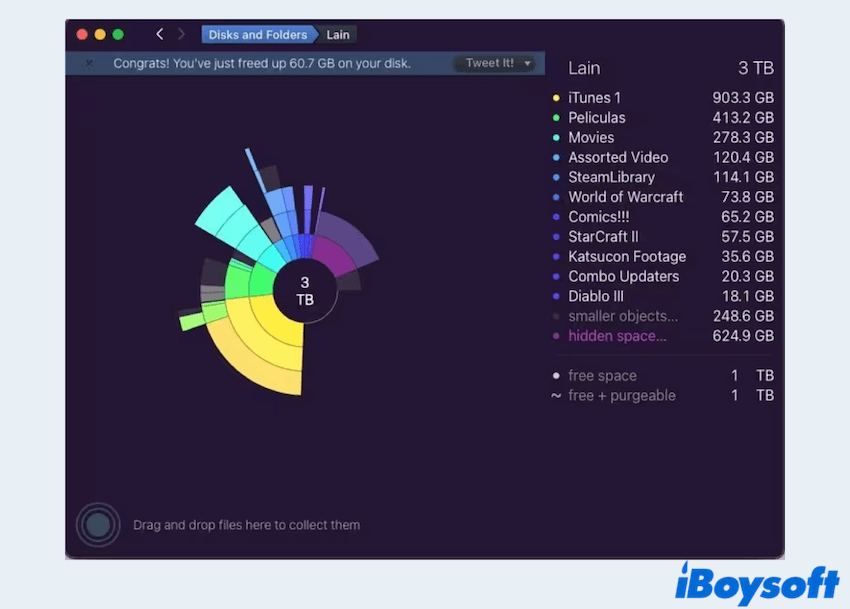
DaisyDisk is a popular disk space analyzer and cleanup tool designed for macOS, which is the powerful MacCleaner Pro alternative. It provides a visual representation of disk usage, helping users identify and manage large files, unused data, and junk files.
- Pros:
- Helps quickly identify storage-heavy files
- Cons:
- Sometimes accidentally delete important files
- No automatic cleaning options
- Limited free version
- Lack of advanced features
- Users need a learning process
Overall reviews
DaisyDisk is widely considered as a user-friendly and efficient tool for managing disk space on Mac, particularly for users looking to free up storage by removing redundant or unused files.
But it is available as a paid app, with a free trial offering limited functionality. Some users note that the lack of advanced features, such as automated cleanup or duplicate file detection, limits its functionality for more advanced needs.
Editor's Review: DaisyDisk is an excellent option for those new to disk analysis tools. Its sleek and user-friendly interface simplifies what can otherwise be a complicated task. While it may not have an extensive range of features, it remains a reliable and well-rounded choice for most users. -mapaw.com
CCleaner
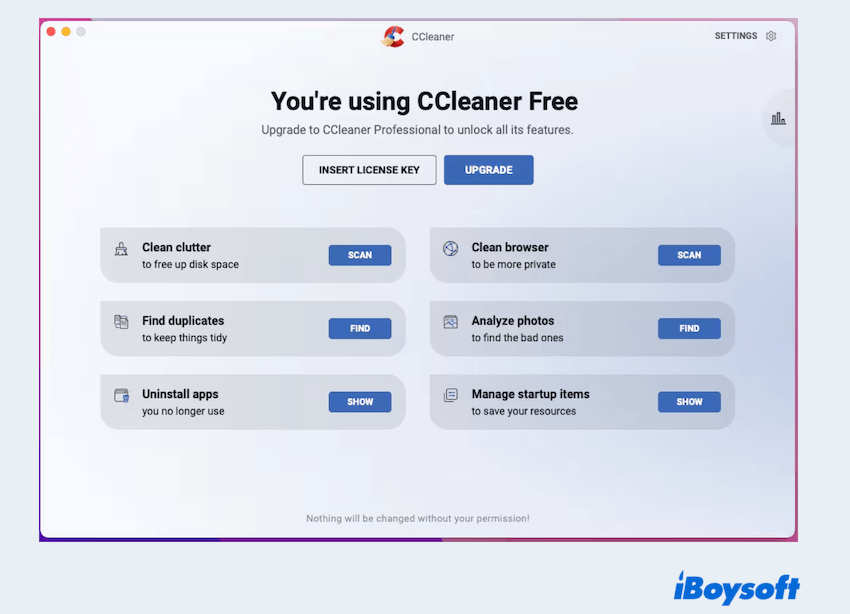
CCleaner is a popular utility software designed to help users clean and optimize their Mac systems by removing unnecessary files and freeing up storage space. CCleaner is widely recognized for its ability to clean junk files, such as system cache, browser cookies, temporary files, and other clutter that accumulates over time.
- Pros:
- Includes additional tools like app uninstaller and startup management
- Effective at reclaiming disk space
- Cons:
- It is overly aggressive if not configured properly, potentially deleting important files
- The free version has limited features
- Raised concerns about data privacy
- Many ads on the free version
- Medium control of file removal
Overall reviews
CCleaner for Mac offers basic junk file cleaning and privacy protection features. This tool can help improve the performance of your hardware and devices. It also allows you to identify which applications are using the most system resources.
Additionally, it provides privacy protection by effectively removing tracking files and browsing history though users should exercise caution and customize settings to avoid unintended deletions.
Editor's Review: While the interface may not be the most intuitive, CCleaner offers a robust set of tools once you take the time to familiarize yourself with its layout. Hope it will have more control over which files are deleted during the cleaning process. -cybernews.com
iBoysoft DiskGeeker
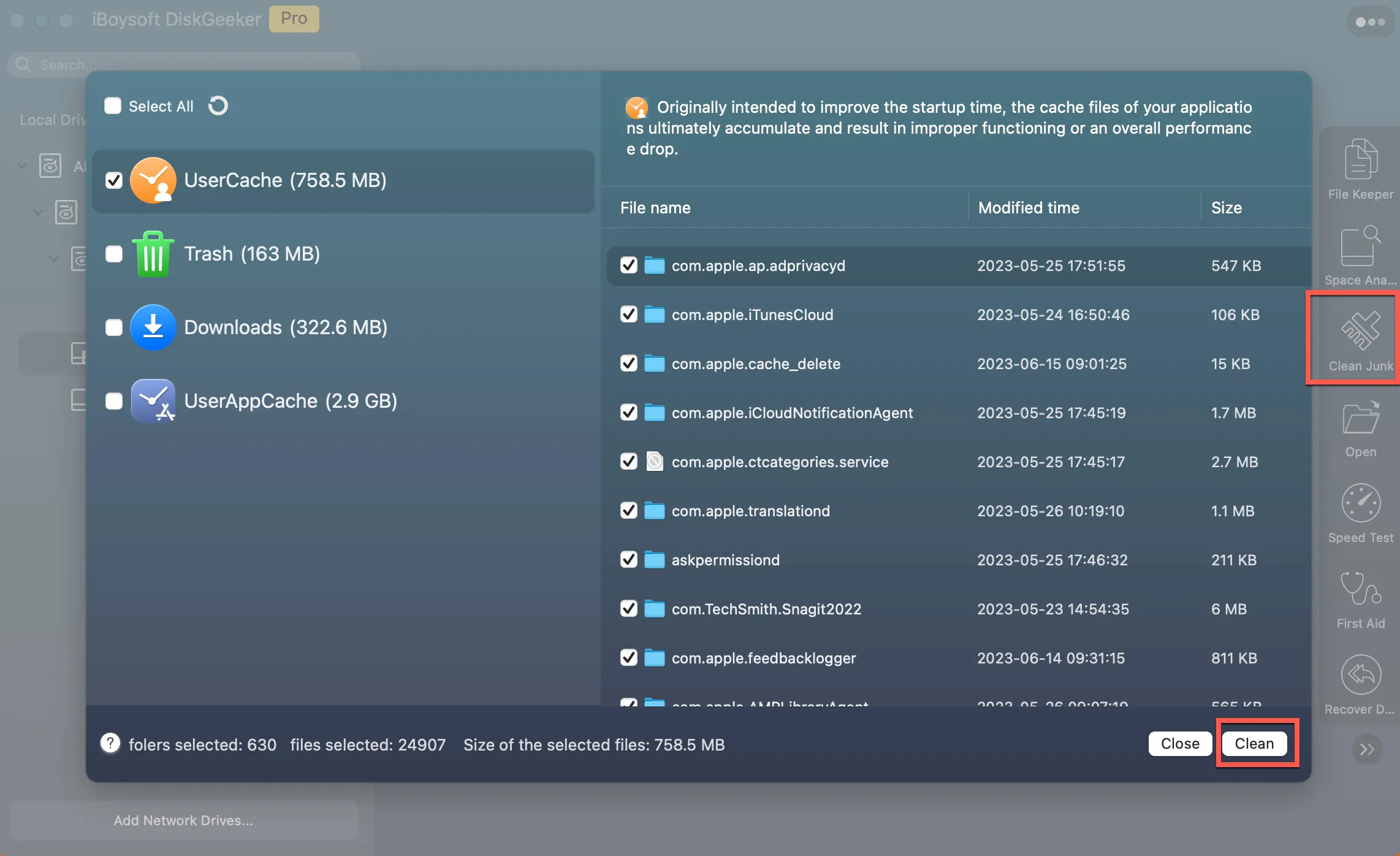
iBoysoft DiskGeeker for Mac provides disk management and optimization features, including junk cleanup and partition management. Its excellent space analysis is in a visual mode with ranging files from big to small, and the complete removal of junk data makes it stand out.
- Pros:
- Effective at cleaning junk files
- Includes tools like disk analysis and duplicate file removal
- Easy-to-use interface with customizable cleaning options
- Total removal and permanent deletion
- Cons:
- Some advanced features may be paid
- Not support for phones
Overall reviews
iBoysoft DiskGeeker for Mac is a reliable tool for cleaning junk files, analyzing disk usage, and improving storage management. It is particularly useful for users looking to free up space and maintain their Mac's performance.
Moreover, it can read or write BitLocker encrypted drive and NTFS drive on Mac, prevent virus attacks via setting USB defender, and check and diagnose disk errors.
Editor's Review: With iBoysoft DiskGeeker, Mac users can benefit from cross-platform disk management, improved data security, enhanced system performance, and increased work productivity. -sourceforge.net
OnyX
OnyX is a versatile maintenance and optimization utility designed specifically for macOS. It is a free tool that offers a wide range of features to help users clean, manage, and optimize their Mac systems. OnyX is particularly known for its ability to clean junk files and perform deep system maintenance.
- Pros:
- Comprehensive cleaning and maintenance capabilities
- Includes diagnostic tools for system monitoring
- Cons:
- The interface is not as intuitive as other tools
- Best suited for advanced users
- Lacks a modern, user-friendly design
- Cannot use the latest version on old macOS versions
Overall reviews
OnyX is a powerful and reliable tool for cleaning junk files and performing system maintenance on macOS. It is best suited for advanced users or those willing to invest time in understanding its features to avoid potential mishaps.
However, if you need more advanced tools in it, it can't.
Editor's Review: OnyX is a robust Mac optimization tool. When used correctly, it offers both power and flexibility, delivering impressive results. It is lightweight, takes up minimal space, and remains highly stable. -macpaw.com
Please share our post if you find an alternative to MacCleaner Pro.
Conclusion
From the listed 6 MacCleaner Pro alternatives, hope you can consider your preferences and needs to choose the most suitable one. Importantly, iBoysoft Cleaner is very simple and quick to clean junk data on Mac, download, and have a try.
No matter which tool you choose, keeping your Mac clean and optimized will ensure better performance and longevity.
FAQs
- Q1. MacCleaner Pro vs CleanMyMac, which one is better?
-
A
CleanMyMac is a polished, all-in-one suite that automates Mac cleanup and optimization, while MacCleaner Pro takes a more modular approach, offering a collection of dedicated utilities with greater manual control at a lower one-time cost.
In short, CleanMyMac is more beginner-friendly and easier to get started with, while MacCleaner Pro is better suited to users who want more granular control over specific cleanup tasks.
- Q2. Is MacCleaner Pro approved by Apple?
-
A
MacCleaner Pro is notarized by Apple to ensure it is free of malware, but it is not officially endorsed or "approved" by Apple as a necessary or recommended tool.
- Q3. How do I uninstall MacCleaner Pro?
-
A
Use it's built-in uninstall option inside its setting menu:
Step 1. Open MacCleaner Pro on your Mac.
Step 2. Go to the app’s Settings.
Step 3. Select the Advanced tab.
Step 4. Scroll to the bottom and click Remove.
Step 5. Click Uninstall to confirm.
Step 6. Empty the Trash to complete the uninstallation.