My Mac keeps opening right-click menus and stops responding to clicks

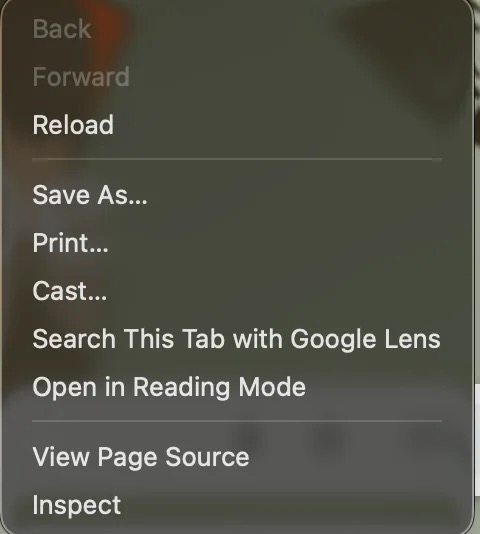
I’m experiencing a strange issue with my Mac. While using the mouse, a context menu randomly appears, similar to the menu normally displayed when I right-click. After this happens, I can still move the cursor, but clicking no longer works.

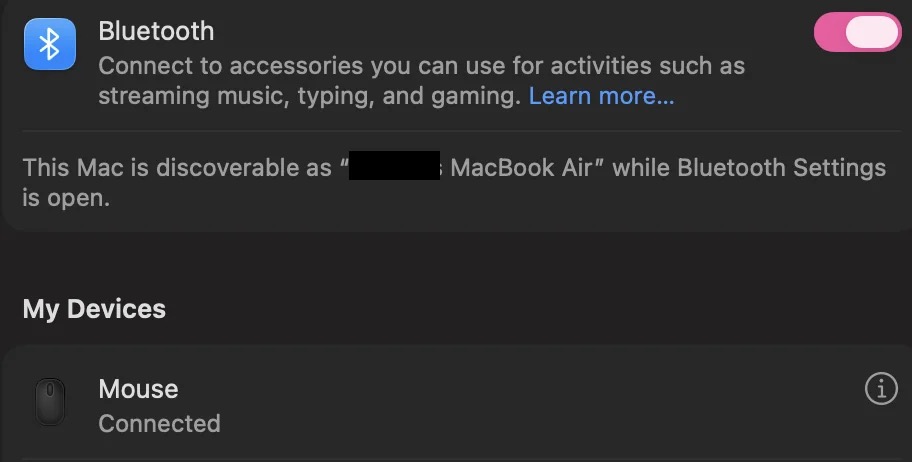
I checked my Bluetooth settings and noticed an unfamiliar mouse connected to my Mac. Could this unknown device be causing the problem by sending unintended clicks? Is this related to something called a “ghost mouse”?

Here are the screenshots in case anyone confused:


An unknown Bluetooth mouse may be sending unintended right-clicks, which could explain the unexpected context menus and the inability to click normally. Removing the device is a practical first troubleshooting step.
The specific steps are:

  • Open System Settings → Bluetooth.
  • Locate the unknown mouse.
  • Click the information button (ⓘ) next to it.
  • Select “Forget This Device” to remove it.

Turn off Bluetooth temporarily to see whether the unexpected behavior stops.

If the unfamiliar mouse reappears, check your Bluetooth device list and investigate why it is reconnecting before using Bluetooth normally again.

More workarounds like resetting SMC, updating macOS, etc. You can get details from this mac right-click not working troubleshooting guide: